
As modernas lojas de fast-food priorizam velocidade e precisão no atendimento diário. As linhas de contador manuais muitas vezes se acumulam rapidamente durante os horários de pico. Eles também criam pequenos erros em pedidos devido à falta de comunicação verbal.
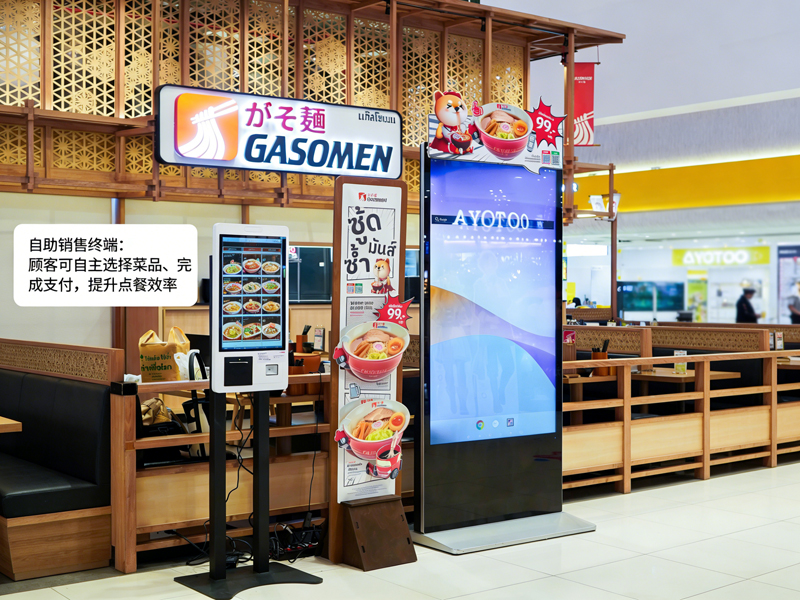
Por esta razão, Máquinas de auto-encomenda tornam-se equipamentos padrão na loja. Esses tela sensível ao toque terminais permitem que os hóspedes façam pedidos de forma independente. Além disso, eles reduzem o tempo de espera e padronizam todos os detalhes do pedido. Este guia prático mostra aos novos usuários todo o processo de operação, habilidades úteis e soluções comuns para máquinas de auto-pedido.
Verificações pré-operação para máquinas de auto-encomenda
Algumas verificações rápidas ajudam você a operar a máquina sem problemas e evitar pequenos erros.
1. Ative a tela de espera
Primeiro, toque suavemente na tela escura para ativar o dispositivo. A máquina sai do modo de espera e carrega a página oficial de pedidos imediatamente.
2. Confirme as configurações básicas da loja
Próximo, verifique a opção de tipo de pedido na barra superior. Alterne entre jantar no local ou para viagem com base em suas necessidades reais. Esta etapa evita erros de classificação de pedidos.
3. Prepare sua forma de pagamento
Prepare seu pagamento móvel ou cartão com antecedência. A preparação rápida do pagamento reduz muito o tempo de operação.
Guia passo a passo para usar máquinas de auto-pedido
Siga estas etapas claras para finalizar um pedido completo em máquinas de auto-pedido.
1. Navegue pelos menus e selecione itens alimentares
Procure alimentos categorizados, listas de bebidas e combinações na tela. Toque em cada item para adicioná-lo ao seu carrinho virtual. O sistema atualiza sua lista de pedidos em tempo real.
2. Personalize detalhes individuais da refeição
A maioria das refeições suporta ajustes personalizados. Você pode remover ingredientes, alterar porções ou adicionar itens secundários. Além disso, todas as alterações de preço são exibidas instantaneamente na interface.
3. Aplique promoções e combos válidos
Verifique as ofertas atuais da loja na página da promoção. Selecione combos ou cupons qualificados para deduzir seu custo total. O sistema calcula preços finais precisos automaticamente.
4. Revise a lista completa de pedidos com atenção
Verifique novamente todos os itens, configurações personalizadas e taxas totais. Remova seleções erradas ou adicione itens ausentes antes de prosseguir com o pagamento. Esta etapa evita ajustes pós-pagamento.
5. Selecione o modo de pagamento e conclua as transações
Escolha seu canal de pagamento preferido na lista pop-up. Siga as instruções na tela para concluir a digitalização ou a passagem do cartão. A máquina confirma o pagamento bem-sucedido em segundos.
6. Colete os recibos e aguarde a retirada
Finalmente, leve o recibo do pedido impresso com seu número de pedido exclusivo. Guarde o recibo e aguarde os alertas de refeição no balcão de retirada da loja.
Dicas Práticas para Melhor Operação da Máquina
Estas dicas simples ajudam você a usar máquinas de auto-pedido com mais rapidez e precisão.
1. Selecione itens em lote para economizar tempo
Escolha todas as refeições do seu grupo em uma única operação. Você evita toques repetidos na tela e agiliza todo o processo.
2. Conclua todas as edições antes do pagamento
O sistema bloqueia os detalhes do pedido após o pagamento bem-sucedido. Por isso, você deve concluir todas as personalizações e edições com antecedência.
3. Siga as instruções na tela para erros
Se a tela exibir lembretes, leia as dicas primeiro. Corrija imediatamente pequenos problemas, como seleções vazias ou cupons expirados.
4. Use modos multilíngues para fácil compreensão
A máquina suporta várias opções de idioma. Mude seu idioma familiar para evitar mal-entendidos no conteúdo do menu.
Problemas menores comuns & Correções rápidas
Você pode resolver a maioria dos problemas de máquinas pequenas sem a ajuda da equipe.
1. Resposta lenta da tela
Toque no botão suavemente e espere 1 para 2 segundos. Toques fortes ou repetidos não acelerarão a resposta do sistema.
2. Falha no envio de pagamento
Verifique primeiro o status da sua rede e o saldo da conta. Então, tente novamente o processo de pagamento ou mude para outro método de pagamento.
3. Exibições de promoção ausentes
Atualize a página inicial para sincronizar as atividades mais recentes da loja. O conteúdo desatualizado geralmente desaparece após uma atualização rápida.
Perguntas frequentes sobre máquinas de auto-encomenda KFC
Q1: As máquinas de auto-encomenda são difíceis para usuários iniciantes?
A1: Não. A interface usa ícones simples e dicas de etapas. Qualquer usuário pode finalizar o pedido em um minuto sem nenhum treinamento.
Q2: Posso modificar meu pedido depois de pagar na máquina?
A2: Raramente. O sistema bloqueia pedidos após o pagamento. Você precisa confirmar todos os detalhes antes de enviar sua transação.
Q3: As máquinas de auto-encomenda suportam todos os descontos da loja?
A3: Sim. O terminal sincroniza promoções da loja em tempo real, combos e cupons. Aplica descontos válidos automaticamente.
4º trimestre: O que devo fazer se a máquina congelar repentinamente?
A4: Interrompa sua operação atual primeiro. Notifique a equipe no local para reiniciar e depurar o dispositivo para uso normal.
Q5: Tenho que usar máquinas de auto-encomenda para fazer pedidos?
A5: Não. O pedido de autoatendimento é opcional. Você ainda pode escolher o pedido tradicional no balcão, se preferir.
Conclusão
Resumindo, As máquinas de auto-encomenda no KFC oferecem um serviço rápido, experiência de pedido precisa e fácil de usar. Cada etapa da operação apresenta orientação clara, personalização flexível e faturamento transparente. Esses terminais inteligentes reduzem a pressão nas filas e os erros de pedido tanto para clientes quanto para operadores de loja. Eles se tornaram um padrão, ferramenta de serviço eficiente para cenários modernos de fast-food.
Se pretende equipar a sua loja de fast-food ou catering com instalações estáveis, Máquinas de auto-encomenda fáceis de operar, por favor preencha o formulário de consulta em nosso site oficial. Compartilhe a escala da sua loja, espaço de layout e demandas funcionais, e nossa equipe fornecerá soluções profissionais de terminais personalizados.
