
Kedai makanan segera moden mengutamakan kelajuan dan ketepatan untuk perkhidmatan harian. Talian kaunter manual sering terbina dengan cepat semasa waktu sibuk. Mereka juga mencipta ralat pesanan kecil daripada miskomunikasi lisan.
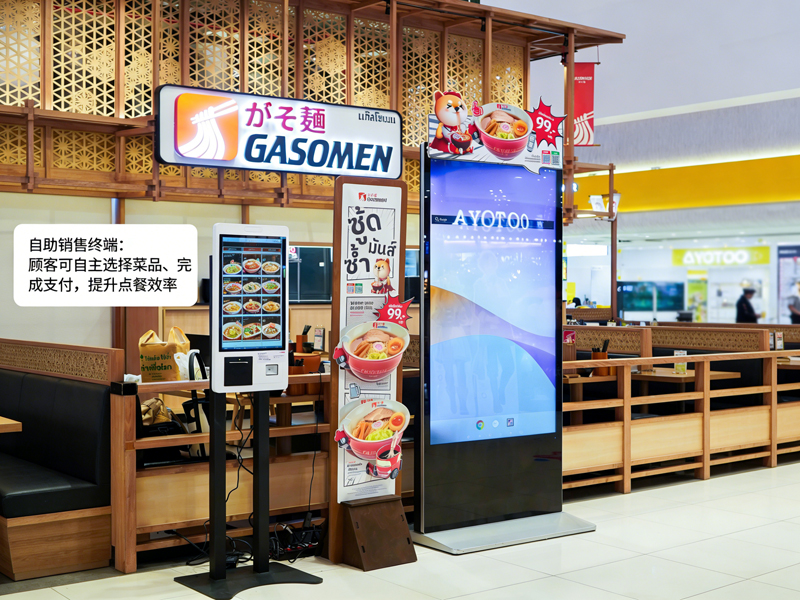
Atas sebab ini, Mesin Tempahan Sendiri menjadi peralatan standard dalam kedai. Ini skrin sentuh terminal membenarkan tetamu membuat pesanan secara bebas. Selain itu, mereka mengurangkan masa menunggu dan menyeragamkan setiap butiran pesanan. Panduan praktikal ini menunjukkan kepada pengguna baharu proses operasi penuh, kemahiran berguna dan pembaikan biasa untuk Mesin Pesanan Sendiri.
Pemeriksaan Pra-Operasi untuk Mesin Tempahan Sendiri
Beberapa pemeriksaan pantas membantu anda mengendalikan mesin dengan lancar dan mengelakkan ralat kecil.
1. Bangunkan skrin siap sedia
Pertama, ketik skrin gelap perlahan-lahan untuk mengaktifkan peranti. Mesin keluar dari mod siap sedia dan memuatkan halaman utama pesanan rasmi dengan segera.
2. Sahkan tetapan kedai asas
Seterusnya, semak pilihan jenis pesanan pada bar atas. Beralih antara makan-makan atau bawa pulang berdasarkan keperluan sebenar anda. Langkah ini menghalang kesilapan pengelasan pesanan.
3. Sediakan kaedah pembayaran anda
Sediakan pembayaran mudah alih atau kad anda terlebih dahulu. Penyediaan pembayaran yang pantas memendekkan keseluruhan masa operasi anda.
Panduan Langkah demi Langkah untuk Menggunakan Mesin Pesanan Sendiri
Ikuti langkah-langkah yang jelas ini untuk menyelesaikan pesanan lengkap pada Mesin Pemesanan Sendiri.
1. Semak imbas menu dan pilih item makanan
Semak imbas makanan yang dikategorikan, senarai minuman dan kombo pada skrin. Ketik setiap item untuk menambahkannya pada troli maya anda. Sistem mengemas kini senarai pesanan anda dalam masa nyata.
2. Sesuaikan butiran makanan individu
Kebanyakan makanan menyokong pelarasan diperibadikan. Anda boleh mengeluarkan bahan, tukar bahagian atau tambah item sampingan. Lebih-lebih lagi, semua perubahan harga dipaparkan serta-merta pada antara muka.
3. Gunakan promosi dan kombo yang sah
Semak tawaran kedai yang sedang berjalan di halaman promosi. Pilih kombo atau kupon yang layak untuk menolak jumlah kos anda. Sistem mengira harga akhir yang tepat secara automatik.
4. Semak senarai pesanan penuh dengan teliti
Semak semula semua item, tetapan tersuai dan jumlah bayaran. Alih keluar pilihan yang salah atau tambah item yang hilang sebelum anda meneruskan pembayaran. Langkah ini mengelakkan pelarasan selepas pembayaran.
5. Pilih mod pembayaran dan selesaikan transaksi
Pilih saluran pembayaran pilihan anda daripada senarai pop timbul. Ikut gesaan skrin untuk menyelesaikan pengimbasan atau leretan kad. Mesin mengesahkan pembayaran yang berjaya dalam beberapa saat.
6. Kumpul resit dan tunggu untuk diambil
Akhirnya, ambil resit pesanan bercetak dengan nombor pesanan unik anda. Simpan resit dengan selamat dan tunggu makluman makanan di kaunter pengambilan kedai.
Petua Praktikal untuk Pengendalian Mesin yang Lebih Baik
Petua mudah ini membantu anda menggunakan Mesin Pesanan Sendiri dengan lebih pantas dan lebih tepat.
1. Batch pilih item untuk menjimatkan masa
Pilih semua hidangan untuk kumpulan anda dalam satu operasi. Anda mengelak daripada mengetik skrin berulang dan menyelaraskan keseluruhan proses.
2. Selesaikan semua suntingan sebelum pembayaran
Sistem mengunci butiran pesanan selepas pembayaran berjaya. Justeru, anda mesti melengkapkan semua penyesuaian dan pengeditan terlebih dahulu.
3. Ikut gesaan pada skrin untuk ralat
Jika skrin muncul peringatan, baca petunjuk dahulu. Selesaikan isu kecil seperti pilihan kosong atau kupon tamat tempoh serta-merta.
4. Gunakan mod berbilang bahasa untuk memudahkan pemahaman
Mesin ini menyokong pelbagai pilihan bahasa. Tukar bahasa biasa anda untuk mengelakkan salah faham kandungan menu.
Isu Kecil Biasa & Pembetulan Pantas
Anda boleh menyelesaikan kebanyakan masalah mesin kecil tanpa bantuan kakitangan.
1. Respons skrin perlahan
Ketik butang perlahan-lahan dan tunggu 1 ke 2 saat. Ketik berat atau berulang kali tidak akan mempercepatkan tindak balas sistem.
2. Penyerahan pembayaran gagal
Semak status rangkaian dan baki akaun anda terlebih dahulu. Kemudian, cuba semula proses pembayaran atau tukar kepada kaedah pembayaran lain.
3. Tiada paparan promosi
Muat semula halaman utama untuk menyegerakkan aktiviti kedai terkini. Kandungan lapuk selalunya hilang selepas muat semula pantas.
Soalan Lazim Mengenai Mesin Tempahan Sendiri KFC
Q1: Adakah Mesin Tempahan Sendiri sukar untuk pengguna kali pertama?
A1: Tidak. Antara muka menggunakan ikon mudah dan petunjuk langkah. Mana-mana pengguna boleh menyelesaikan pesanan dalam satu minit tanpa latihan.
S2: Bolehkah saya mengubah suai pesanan saya selepas membayar pada mesin?
A2: Jarang-jarang. Sistem mengunci pesanan selepas pembayaran. Anda perlu mengesahkan semua butiran sebelum menyerahkan transaksi anda.
Q3: Adakah Mesin Tempahan Sendiri menyokong semua diskaun kedai?
A3: Ya. Terminal menyegerakkan promosi kedai masa nyata, kombo dan kupon. Ia menggunakan diskaun yang sah secara automatik.
Q4: Apa yang perlu saya lakukan jika mesin membeku secara tiba-tiba?
A4: Hentikan operasi semasa anda dahulu. Maklumkan kakitangan di tapak untuk memulakan semula dan nyahpepijat peranti untuk kegunaan biasa.
S5: Adakah saya perlu menggunakan Mesin Pesanan Sendiri untuk membuat pesanan?
A5: Tidak. Pesanan layan diri adalah pilihan. Anda masih boleh memilih pesanan kaunter tradisional jika anda mahu.
Kesimpulan
Kesimpulannya, Mesin Tempahan Sendiri di KFC menyampaikan dengan pantas, pengalaman pesanan yang tepat dan mesra pengguna. Setiap langkah operasi mempunyai panduan yang jelas, penyesuaian fleksibel dan pengebilan telus. Terminal pintar ini mengurangkan tekanan beratur dan ralat pesanan untuk pelanggan dan pengendali kedai. Mereka telah menjadi standard, alat perkhidmatan yang cekap untuk senario makanan segera moden.
Jika anda ingin melengkapkan kedai makanan segera atau katering anda dengan kandang, Mesin Tempahan Sendiri yang mudah dikendalikan, sila isi borang pertanyaan di laman web rasmi kami. Kongsi skala kedai anda, ruang susun atur dan permintaan fungsi, dan pasukan kami akan memberikan anda penyelesaian terminal tersuai profesional.
