消息

随时了解最新的触摸显示器新闻

科技趋势, 新产品发布, 行业洞察

以及满足您需求的实际应用技巧.

如何使用肯德基自助点餐机

Modern fast-food stores prioritize speed and accuracy for daily service. Manual counter lines often build up quickly during rush hours. They also create small order errors from verbal miscommunication.

Self-Ordering Machines

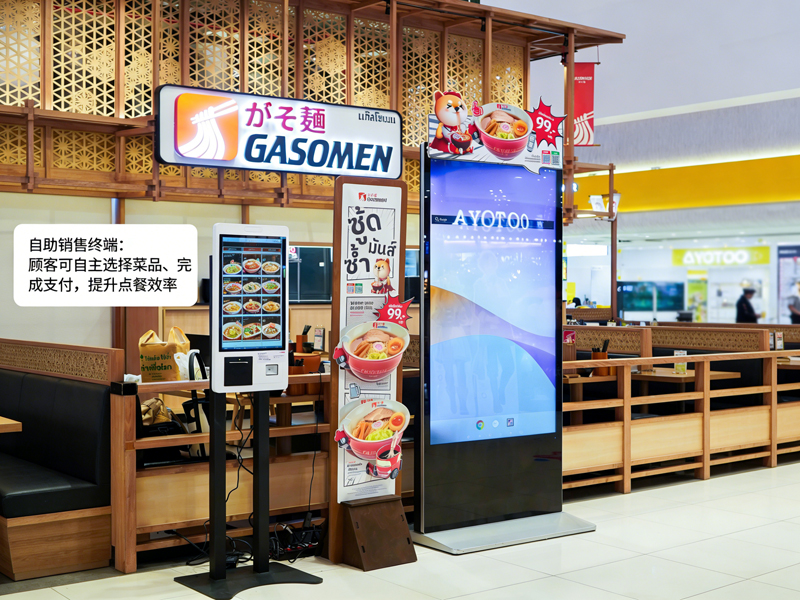
为此原因, Self-Ordering Machines become standard in-store equipment. 这些 触摸屏 terminals let guests place orders independently. 此外, they cut waiting time and standardize every order detail. This practical guide shows new users the full operation process, useful skills and common fixes for Self-Ordering Machines.

Pre-Operation Checks for Self-Ordering Machines

A few quick checks help you operate the machine smoothly and avoid minor errors.

1. Wake up the standby screen

第一的, tap the dark screen gently to activate the device. The machine exits standby mode and loads the official ordering homepage right away.

2. Confirm basic store settings

下一个, check the order type option on the top bar. Switch between dine-in or takeaway based on your actual needs. This step prevents order classification mistakes.

3. Prepare your payment method

Get your mobile payment or card ready in advance. Fast payment preparation shortens your whole operation time greatly.

Step-by-Step Guide to Use Self-Ordering Machines

Follow these clear steps to finish a complete order on Self-Ordering Machines.

1. 浏览菜单并选择食品

Browse categorized food, drink and combo lists on the screen. Tap each item to add it to your virtual cart. The system updates your order list in real time.

2. Customize individual meal details

Most meals support personalized adjustments. You can remove ingredients, change portions or add side items. 而且, all price changes display instantly on the interface.

3. Apply valid promotions and combos

Check ongoing store offers on the promotion page. Select eligible combos or coupons to deduct your total cost. The system calculates accurate final prices automatically.

4. 仔细查看完整的订单清单

Double-check all items, custom settings and total fees. Remove wrong selections or add missing items before you proceed to pay. This step avoids post-payment adjustments.

5. Select payment mode and complete transactions

Choose your preferred payment channel from the pop-up list. Follow screen prompts to finish scanning or card swiping. The machine confirms successful payment within seconds.

6. Collect receipts and wait for pickup

最后, take the printed order receipt with your unique order number. Keep the receipt safe and wait for meal alerts at the store pickup counter.

Practical Tips for Better Machine Operation

These simple tips help you use Self-Ordering Machines faster and more accurately.

1. Batch select items to save time

Choose all meals for your group in one operation. You avoid repeated screen tapping and streamline the whole process.

2. Finish all edits before payment

The system locks order details after successful payment. 因此, you must complete all customization and edits in advance.

3. Follow on-screen prompts for errors

If the screen pops up reminders, read the hints first. Fix small issues such as empty selections or expired coupons immediately.

4. Use multi-language modes for easy understanding

The machine supports multiple language options. Switch your familiar language to avoid misunderstanding menu content.

Common Minor Issues & 快速修复

You can solve most small machine problems without staff help.

1. Slow screen response

Tap the button gently and wait 1 到 2 秒. Heavy or repeated taps will not speed up the system response.

2. Failed payment submission

Check your network status and account balance first. 然后, retry the payment process or switch to another payment method.

3. Missing promotion displays

Refresh the homepage to sync the latest store activities. Outdated content often disappears after a quick refresh.

FAQs About KFC Self-Ordering Machines

Q1: Are Self-Ordering Machines hard for first-time users?

A1: 不. The interface uses simple icons and step hints. Any user can finish ordering in one minute with no training.

Q2: Can I modify my order after paying on the machine?

A2: Rarely. The system locks orders after payment. You need to confirm all details before submitting your transaction.

第三季度: Do Self-Ordering Machines support all store discounts?

A3: 是的. The terminal syncs real-time store promotions, 组合和优惠券. It applies valid discounts automatically.

第四季度: What should I do if the machine freezes suddenly?

A4: Stop your current operation first. Notify on-site staff to restart and debug the device for normal use.

Q5: Do I have to use Self-Ordering Machines to place orders?

A5: 不. Self-service ordering is optional. You can still choose traditional counter ordering if you prefer.

结论

总结, Self-Ordering Machines at KFC deliver a fast, accurate and user-friendly ordering experience. Every operation step features clear guidance, flexible customization and transparent billing. These smart terminals reduce queuing pressure and order errors for both customers and store operators. They have become a standard, efficient service tool for modern fast-food scenarios.

If you want to equip your fast-food or catering store with stable, easy-to-operate Self-Ordering Machines, 请在我们的官方网站上填写咨询表. 分享一下你的店铺规模, layout space and functional demands, and our team will provide you with professional customized terminal solutions.

提交下面的表格以获取更多信息

或获得个性化优惠.


    *我们尊重您的机密性,所有信息均受到保护