
Moderne fastfood-butikker prioriterer hastighed og nøjagtighed til daglig service. Manuelle tællerlinjer opbygges ofte hurtigt i myldretiden. De skaber også små ordrefejl fra verbal fejlkommunikation.
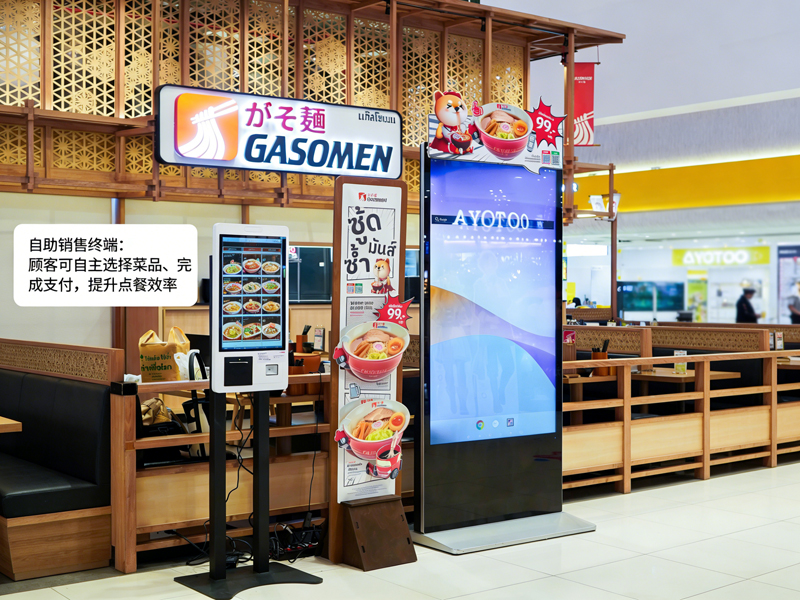
Af denne grund, Selvbestillingsmaskiner bliver standardudstyr i butikken. Disse berøringsskærm terminaler lader gæster afgive ordrer uafhængigt. Desuden, de reducerer ventetiden og standardiserer alle ordredetaljer. Denne praktiske vejledning viser nye brugere hele betjeningsprocessen, nyttige færdigheder og almindelige rettelser til selvbestillingsmaskiner.
Før-driftstjek for selvbestillingsmaskiner
Et par hurtige kontroller hjælper dig med at betjene maskinen problemfrit og undgå mindre fejl.
1. Væk standby-skærmen
Først, tryk forsigtigt på den mørke skærm for at aktivere enheden. Maskinen afslutter standbytilstand og indlæser den officielle bestillingshjemmeside med det samme.
2. Bekræft grundlæggende butiksindstillinger
Næste, tjek indstillingen for ordretype på den øverste bjælke. Skift mellem spise-in eller takeaway baseret på dine faktiske behov. Dette trin forhindrer ordreklassificeringsfejl.
3. Forbered din betalingsmetode
Gør din mobilbetaling eller kort klar på forhånd. Hurtig betalingsforberedelse forkorter hele din operationstid meget.
Trin-for-trin guide til brug af selvbestillingsmaskiner
Følg disse klare trin for at afslutte en komplet ordre på selvbestillingsmaskiner.
1. Gennemse menuer og vælg madvarer
Gennemse kategoriseret mad, drikke- og kombinationslister på skærmen. Tryk på hvert element for at tilføje det til din virtuelle indkøbskurv. Systemet opdaterer din ordreliste i realtid.
2. Tilpas individuelle måltidsdetaljer
De fleste måltider understøtter personlige justeringer. Du kan fjerne ingredienser, skifte portioner eller tilføje tilbehør. Desuden, alle prisændringer vises øjeblikkeligt på interfacet.
3. Anvend gyldige kampagner og kombinationer
Tjek løbende butikstilbud på kampagnesiden. Vælg kvalificerede kombinationer eller kuponer for at fratrække dine samlede omkostninger. Systemet beregner automatisk nøjagtige slutpriser.
4. Gennemgå den fulde ordreliste omhyggeligt
Dobbelttjek alle elementer, brugerdefinerede indstillinger og samlede gebyrer. Fjern forkerte valg, eller tilføj manglende varer, før du fortsætter med at betale. Dette trin undgår efterbetalingsjusteringer.
5. Vælg betalingsmetode og fuldfør transaktioner
Vælg din foretrukne betalingskanal fra pop op-listen. Følg skærmmeddelelserne for at afslutte scanningen eller stryge kort. Maskinen bekræfter vellykket betaling inden for få sekunder.
6. Saml kvitteringer og vent på afhentning
Endelig, tag den udskrevne ordrekvittering med dit unikke ordrenummer. Opbevar kvitteringen sikkert, og vent på måltidsadvarsler ved butikkens afhentningsskranke.
Praktiske tips til bedre betjening af maskinen
Disse enkle tips hjælper dig med at bruge selvbestillingsmaskiner hurtigere og mere præcist.
1. Batch vælg elementer for at spare tid
Vælg alle måltider til din gruppe i én operation. Du undgår gentagne skærmtryk og strømliner hele processen.
2. Afslut alle redigeringer før betaling
Systemet låser ordreoplysninger efter vellykket betaling. Således, du skal fuldføre alle tilpasninger og redigeringer på forhånd.
3. Følg anvisningerne på skærmen for fejl
Hvis skærmen dukker op påmindelser, læs rådene først. Løs små problemer såsom tomme markeringer eller udløbne kuponer med det samme.
4. Brug multi-sprog modes for nem forståelse
Maskinen understøtter flere sprogindstillinger. Skift dit velkendte sprog for at undgå misforståelse af menuindhold.
Almindelige mindre problemer & Hurtige rettelser
Du kan løse de fleste små maskinproblemer uden personalehjælp.
1. Langsom skærmrespons
Tryk forsigtigt på knappen og vent 1 til 2 sekunder. Kraftige eller gentagne tryk vil ikke fremskynde systemets reaktion.
2. Mislykket indsendelse af betaling
Tjek først din netværksstatus og kontosaldo. Så, prøv betalingsprocessen igen, eller skift til en anden betalingsmetode.
3. Manglende kampagnevisninger
Opdater hjemmesiden for at synkronisere de seneste butiksaktiviteter. Forældet indhold forsvinder ofte efter en hurtig opdatering.
Ofte stillede spørgsmål om KFC selvbestillingsmaskiner
Q1: Er selvbestillingsmaskiner svære for førstegangsbrugere?
A1: Ingen. Grænsefladen bruger enkle ikoner og trintip. Enhver bruger kan afslutte bestilling på et minut uden træning.
Q2: Kan jeg ændre min ordre efter at have betalt på maskinen?
A2: Sjældent. Systemet låser ordrer efter betaling. Du skal bekræfte alle detaljer, før du sender din transaktion.
Q3: Understøtter selvbestillingsmaskiner alle butiksrabatter?
A3: Ja. Terminalen synkroniserer butikskampagner i realtid, kombinationer og kuponer. Den anvender automatisk gyldige rabatter.
Q4: Hvad skal jeg gøre, hvis maskinen pludselig fryser?
A4: Stop din nuværende operation først. Giv personalet på stedet besked om at genstarte og fejlfinde enheden til normal brug.
Q5: Skal jeg bruge selvbestillingsmaskiner for at afgive bestillinger?
A5: Ingen. Selvbetjeningsbestilling er valgfri. Du kan stadig vælge traditionel kontrabestilling, hvis du foretrækker det.
Konklusion
For at opsummere, Selvbestillingsmaskiner hos KFC leverer en hurtig, præcis og brugervenlig bestillingsoplevelse. Hvert operationstrin har klar vejledning, fleksibel tilpasning og gennemsigtig fakturering. Disse smarte terminaler reducerer køtrykket og bestillingsfejl for både kunder og butiksoperatører. De er blevet en standard, effektivt serviceværktøj til moderne fastfood-scenarier.
Hvis du ønsker at udstyre din fastfood- eller cateringbutik med stald, lette at betjene selvbestillingsmaskiner, udfyld venligst forespørgselsformularen på vores officielle hjemmeside. Del din butiksvægt, layout plads og funktionelle krav, og vores team vil give dig professionelle tilpassede terminalløsninger.
