
تعطي متاجر الوجبات السريعة الحديثة الأولوية للسرعة والدقة في الخدمة اليومية. غالبًا ما تتراكم خطوط العدادات اليدوية بسرعة خلال ساعات الذروة. كما أنهم يرتكبون أخطاء ترتيبية صغيرة بسبب سوء الفهم اللفظي.
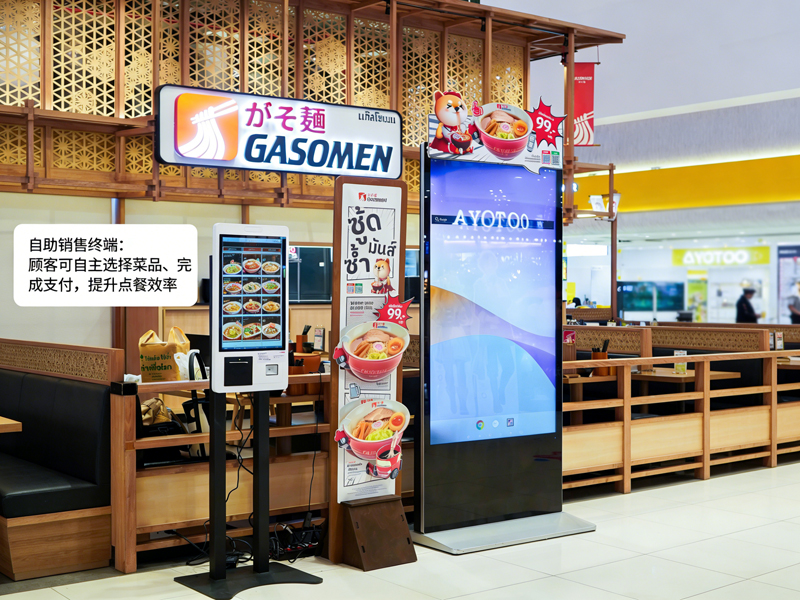
لهذا السبب, أصبحت آلات الطلب الذاتي من المعدات القياسية في المتجر. هؤلاء شاشة تعمل باللمس تتيح المحطات للضيوف تقديم الطلبات بشكل مستقل. فضلاً عن ذلك, لقد قاموا بتقليل وقت الانتظار وتوحيد كل تفاصيل الطلب. يوضح هذا الدليل العملي للمستخدمين الجدد عملية التشغيل الكاملة, مهارات مفيدة وإصلاحات شائعة لآلات الطلب الذاتي.
فحوصات ما قبل التشغيل لآلات الطلب الذاتي
تساعدك بعض عمليات الفحص السريعة على تشغيل الجهاز بسلاسة وتجنب الأخطاء البسيطة.
1. استيقظ على شاشة الاستعداد
أولاً, اضغط على الشاشة المظلمة بلطف لتنشيط الجهاز. يخرج الجهاز من وضع الاستعداد ويقوم بتحميل الصفحة الرئيسية الرسمية للطلب على الفور.
2. قم بتأكيد إعدادات المتجر الأساسية
التالي, تحقق من خيار نوع الطلب في الشريط العلوي. قم بالتبديل بين تناول الطعام في الداخل أو الوجبات الجاهزة بناءً على احتياجاتك الفعلية. تمنع هذه الخطوة أخطاء تصنيف الطلب.
3. قم بإعداد طريقة الدفع الخاصة بك
احصل على الدفع عبر الهاتف المحمول أو البطاقة جاهزة مسبقًا. يؤدي الإعداد السريع للدفع إلى تقصير وقت العملية بالكامل بشكل كبير.
دليل خطوة بخطوة لاستخدام آلات الطلب الذاتي
اتبع هذه الخطوات الواضحة لإنهاء الطلب الكامل على أجهزة الطلب الذاتي.
1. تصفح القوائم وحدد المواد الغذائية
تصفح المواد الغذائية المصنفة, قوائم المشروبات والسرد التي تظهر على الشاشة. اضغط على كل عنصر لإضافته إلى سلة التسوق الافتراضية الخاصة بك. يقوم النظام بتحديث قائمة الطلبات الخاصة بك في الوقت الحقيقي.
2. تخصيص تفاصيل الوجبة الفردية
تدعم معظم الوجبات التعديلات الشخصية. يمكنك إزالة المكونات, تغيير الأجزاء أو إضافة عناصر جانبية. علاوة على ذلك, يتم عرض جميع تغيرات الأسعار على الفور على الواجهة.
3. تطبيق العروض الترويجية والمجموعات الصالحة
تحقق من عروض المتجر المستمرة على صفحة الترويج. حدد المجموعات أو الكوبونات المؤهلة لخصم التكلفة الإجمالية. يقوم النظام باحتساب الأسعار النهائية الدقيقة تلقائيًا.
4. قم بمراجعة قائمة الطلبات الكاملة بعناية
تحقق مرة أخرى من كافة العناصر, الإعدادات المخصصة والرسوم الإجمالية. قم بإزالة التحديدات الخاطئة أو قم بإضافة العناصر المفقودة قبل متابعة الدفع. تتجنب هذه الخطوة تعديلات ما بعد الدفع.
5. اختر طريقة الدفع وأكمل المعاملات
اختر قناة الدفع المفضلة لديك من القائمة المنبثقة. اتبع المطالبات التي تظهر على الشاشة لإنهاء المسح الضوئي أو تمرير البطاقة. تؤكد الآلة الدفع الناجح خلال ثواني.
6. جمع الإيصالات وانتظر الاستلام
أخيراً, خذ إيصال الطلب المطبوع مع رقم الطلب الفريد الخاص بك. احتفظ بالإيصال آمنًا وانتظر تنبيهات الوجبات عند مكتب الاستلام من المتجر.
نصائح عملية لتشغيل الماكينة بشكل أفضل
تساعدك هذه النصائح البسيطة على استخدام أجهزة الطلب الذاتي بشكل أسرع وأكثر دقة.
1. دفعة حدد العناصر لتوفير الوقت
اختر جميع الوجبات لمجموعتك في عملية واحدة. يمكنك تجنب النقر المتكرر على الشاشة وتبسيط العملية برمتها.
2. قم بإنهاء جميع التعديلات قبل الدفع
يقوم النظام بتأمين تفاصيل الطلب بعد الدفع الناجح. هكذا, يجب عليك إكمال كافة التخصيصات والتعديلات مقدمًا.
3. اتبع المطالبات التي تظهر على الشاشة لمعرفة الأخطاء
إذا انبثقت الشاشة التذكيرات, اقرأ التلميحات أولاً. قم بإصلاح المشكلات الصغيرة مثل التحديدات الفارغة أو القسائم منتهية الصلاحية على الفور.
4. استخدم أوضاع متعددة اللغات لسهولة الفهم
يدعم الجهاز خيارات لغة متعددة. قم بتبديل لغتك المألوفة لتجنب سوء فهم محتوى القائمة.
القضايا البسيطة المشتركة & إصلاحات سريعة
يمكنك حل معظم مشاكل الماكينات الصغيرة دون مساعدة الموظفين.
1. استجابة الشاشة بطيئة
اضغط على الزر بلطف وانتظر 1 ل 2 ثواني. لن تؤدي النقرات الثقيلة أو المتكررة إلى تسريع استجابة النظام.
2. فشل إرسال الدفعة
تحقق من حالة شبكتك ورصيد حسابك أولاً. ثم, أعد محاولة عملية الدفع أو قم بالتبديل إلى طريقة دفع أخرى.
3. عروض ترويجية مفقودة
قم بتحديث الصفحة الرئيسية لمزامنة أحدث أنشطة المتجر. غالبًا ما يختفي المحتوى القديم بعد التحديث السريع.
الأسئلة الشائعة حول ماكينات الطلب الذاتي لـKFC
س 1: هل آلات الطلب الذاتي صعبة على المستخدمين لأول مرة؟?
A1: لا. تستخدم الواجهة أيقونات بسيطة وتلميحات للخطوات. يمكن لأي مستخدم إنهاء الطلب في دقيقة واحدة دون أي تدريب.
Q2: هل يمكنني تعديل طلبي بعد الدفع على الجهاز?
A2: نادرًا. يقوم النظام بتأمين الطلبات بعد الدفع. تحتاج إلى تأكيد جميع التفاصيل قبل تقديم معاملتك.
س 3: هل تدعم آلات الطلب الذاتي جميع خصومات المتجر?
A3: نعم. تقوم المحطة بمزامنة العروض الترويجية للمتجر في الوقت الفعلي, المجموعات والكوبونات. يتم تطبيق الخصومات الصحيحة تلقائيًا.
س 4: ماذا علي أن أفعل إذا تجمد الجهاز فجأة?
A4: قم بإيقاف العملية الحالية أولاً. قم بإبلاغ الموظفين في الموقع بإعادة تشغيل الجهاز وتصحيح الأخطاء للاستخدام العادي.
س5: هل يجب علي استخدام آلات الطلب الذاتي لتقديم الطلبات؟?
A5: لا. طلب الخدمة الذاتية اختياري. لا يزال بإمكانك اختيار الطلب التقليدي إذا كنت تفضل ذلك.
خاتمة
لتلخيص, تقدم آلات الطلب الذاتي في كنتاكي فرايد تشيكن خدمة سريعة, تجربة طلب دقيقة وسهلة الاستخدام. تتميز كل خطوة عملية بتوجيهات واضحة, التخصيص المرن والفواتير الشفافة. تعمل هذه المحطات الذكية على تقليل ضغط الانتظار وأخطاء الطلب لكل من العملاء ومشغلي المتجر. لقد أصبحوا معيارا, أداة خدمة فعالة لسيناريوهات الوجبات السريعة الحديثة.
إذا كنت ترغب في تجهيز متجر الوجبات السريعة أو متجر تقديم الطعام الخاص بك بإسطبل, آلات الطلب الذاتي سهلة التشغيل, يرجى ملء نموذج الاستفسار على موقعنا الرسمي. شارك بمقياس متجرك, مساحة التخطيط والمتطلبات الوظيفية, وسوف يزودك فريقنا بحلول طرفية احترافية مخصصة.
