
Сучасні магазини швидкого харчування надають пріоритет швидкості та точності щоденного обслуговування. У години пік черги на ручних лічильниках часто накопичуються швидко. Вони також створюють невеликі помилки порядку через словесне недомовлення.
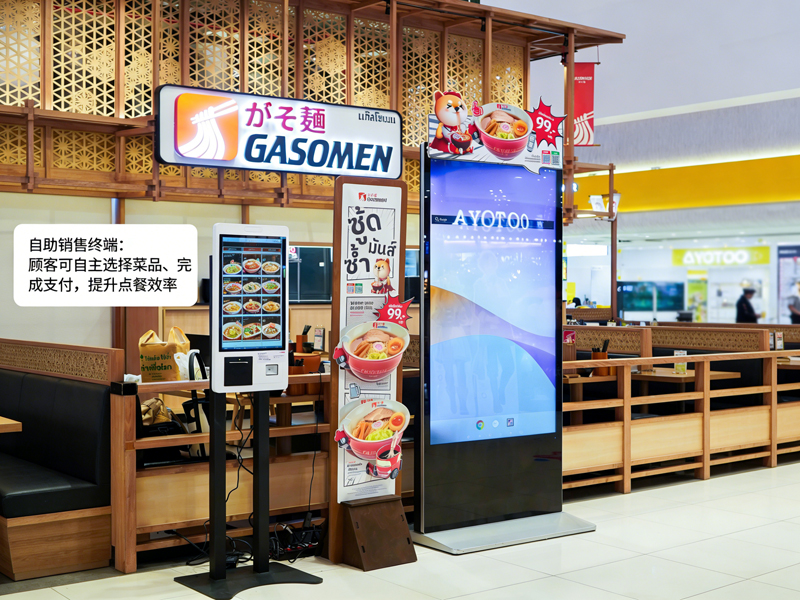
З цієї причини, Машини для самостійного замовлення стають стандартним обладнанням для магазинів. Ці сенсорний екран термінали дозволяють гостям самостійно робити замовлення. Крім того, вони скорочують час очікування та стандартизують кожну деталь замовлення. Цей практичний посібник показує новим користувачам повний процес роботи, корисні навички та загальні виправлення для машин із самозамовленням.
Перевірки машин, що замовляються самостійно, перед початком роботи
Кілька швидких перевірок допоможуть безперебійно працювати з машиною та уникнути дрібних помилок.
1. Розбудити екран очікування
перше, обережно торкніться темного екрана, щоб активувати пристрій. Машина вийде з режиму очікування та одразу завантажить офіційну домашню сторінку замовлення.
2. Підтвердьте основні налаштування магазину
Далі, перевірте опцію типу замовлення на верхній панелі. Перемикайтеся між їжею в закладі та їжею на винос залежно від ваших фактичних потреб. Цей крок запобігає помилкам класифікації замовлення.
3. Підготуйте спосіб оплати
Приготуйте свій мобільний платіж або картку заздалегідь. Швидка підготовка платежу значно скорочує весь час вашої операції.
Покроковий посібник із використання машин із самозамовленням
Виконайте ці чіткі кроки, щоб завершити повне замовлення на машинах із самозамовленням.
1. Переглядайте меню та вибирайте страви
Перегляньте їжу за категоріями, списки напоїв і комбо на екрані. Торкніться кожного товару, щоб додати його до віртуального кошика. Система оновлює ваш список замовлень у режимі реального часу.
2. Налаштуйте індивідуальні деталі їжі
Більшість страв підтримують персоналізовані налаштування. Ви можете видалити інгредієнти, змініть порції або додайте гарніри. Крім того, всі зміни цін миттєво відображаються в інтерфейсі.
3. Застосовуйте дійсні акції та комбо
Перевірте актуальні пропозиції магазину на сторінці акції. Виберіть прийнятні комбо або купони, щоб вирахувати загальну вартість. Система автоматично розраховує точні кінцеві ціни.
4. Уважно перегляньте повний список замовлень
Ще раз перевірте всі елементи, індивідуальні налаштування та загальні збори. Видаліть неправильно вибрані або додайте відсутні елементи, перш ніж продовжити платити. Цей крок дозволяє уникнути коригування післяплати.
5. Виберіть спосіб оплати та завершіть операції
Виберіть бажаний платіжний канал зі спливаючого списку. Дотримуйтесь підказок на екрані, щоб завершити сканування або перетягнути картку. Автомат підтверджує успішний платіж протягом декількох секунд.
6. Зберіть квитанції та дочекайтеся отримання
Нарешті, візьміть роздруковану квитанцію про замовлення з унікальним номером замовлення. Зберігайте квитанцію та чекайте сповіщень про їжу біля стійки самовивозу в магазині.
Практичні поради для кращої роботи машини
Ці прості поради допоможуть вам швидше й точніше використовувати автомати з самозамовленням.
1. Груповий вибір елементів, щоб заощадити час
Виберіть усі страви для вашої групи за одну операцію. Ви уникаєте повторних натискань на екран і спрощуєте весь процес.
2. Завершіть усі зміни до оплати
Після успішної оплати система блокує деталі замовлення. Таким чином, ви повинні виконати всі налаштування та редагування заздалегідь.
3. Дотримуйтеся вказівок на екрані щодо помилок
Якщо на екрані з'являються нагадування, спочатку прочитайте підказки. Негайно вирішуйте невеликі проблеми, такі як порожні вибрані або прострочені купони.
4. Використовуйте багатомовні режими для легкого розуміння
Машина підтримує кілька мовних варіантів. Змініть знайому мову, щоб уникнути неправильного розуміння вмісту меню.
Поширені незначні проблеми & Швидкі виправлення
Ви можете вирішити більшість дрібних проблем з машиною без допомоги персоналу.
1. Повільний відгук екрана
Обережно натисніть кнопку та зачекайте 1 до 2 секунд. Сильні або повторні натискання не прискорять реакцію системи.
2. Не вдалося подати платіж
Спочатку перевірте стан мережі та баланс рахунку. Потім, повторіть процес оплати або перейдіть на інший спосіб оплати.
3. Відсутні рекламні дисплеї
Оновіть домашню сторінку, щоб синхронізувати останні дії магазину. Застарілий вміст часто зникає після швидкого оновлення.
Поширені запитання про автомати KFC із самозамовленням
Q1: Чи складні машини для самостійного замовлення для тих, хто вперше користується?
A1: немає. В інтерфейсі використовуються прості піктограми та крокові підказки. Будь-який користувач може завершити замовлення за одну хвилину без навчання.
Q2: Чи можу я змінити своє замовлення після оплати в автоматі?
A2: Рідко. Система блокує замовлення після оплати. Вам потрібно підтвердити всі деталі, перш ніж відправити транзакцію.
Q3: Чи підтримують автомати для самостійного замовлення всі знижки в магазині?
A3: так. Термінал синхронізує акції магазину в реальному часі, комбо та купони. Він автоматично застосовує діючі знижки.
Q4: Що робити, якщо апарат раптово завис?
A4: Спочатку припиніть поточну операцію. Повідомте персонал на місці, щоб перезапустити та налагодити пристрій для нормального використання.
Q5: Чи потрібно використовувати машини для самостійного замовлення, щоб розміщувати замовлення?
A5: немає. Замовлення самообслуговування необов'язкове. Ви все ще можете вибрати традиційне зустрічне замовлення, якщо хочете.
Висновок
Підводячи підсумок, Машини для самостійного замовлення в KFC забезпечують швидку роботу, точний і зручний досвід замовлення. Кожен крок операції містить чіткі вказівки, гнучка настройка та прозорий білінг. Ці інтелектуальні термінали зменшують тиск у чергах і помилки в замовленні як для клієнтів, так і для операторів магазинів. Вони стали еталоном, ефективний інструмент обслуговування для сучасних сценаріїв швидкого харчування.
Якщо ви бажаєте обладнати свій фаст-фуд або заклад громадського харчування стайнею, прості в експлуатації машини з автоматичним замовленням, будь ласка, заповніть форму запиту на нашому офіційному сайті. Поділіться своїми масштабами магазину, планування простору та функціональні вимоги, і наша команда надасть вам професійні індивідуальні термінальні рішення.
