
Современные рабочие и коммерческие среды используют простые и эффективные режимы работы.. Традиционные мониторы полагаются на внешние мыши и клавиатуры для выполнения каждого управляющего действия.. Эти дополнительные аксессуары загромождают рабочее пространство и замедляют ежедневные рабочие процессы. сенсорный монитор прекрасно решает эти болевые точки.
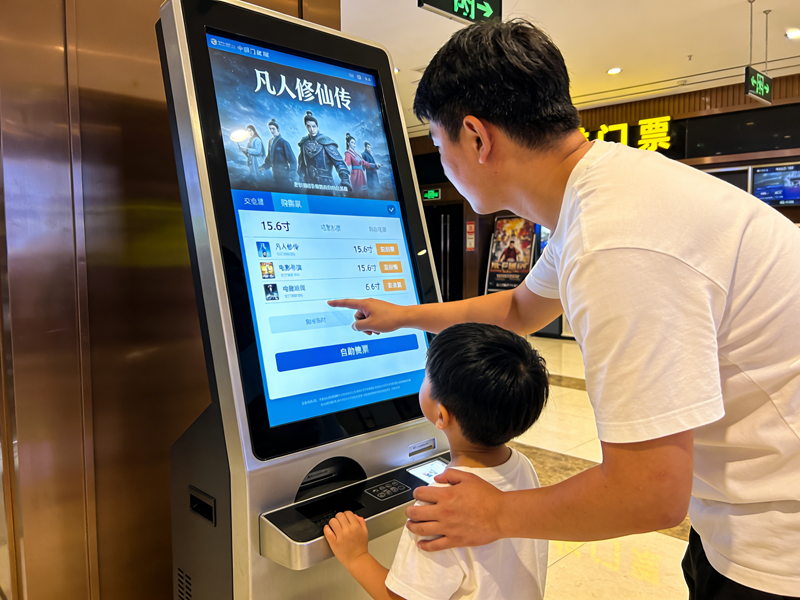
Он объединяет вывод дисплея и сенсорное управление в одно автономное устройство.. Кроме того, он поддерживает прямое нажатие на экран для завершения команд без дополнительных инструментов. В этой статье объясняется его основное определение., ключевые особенности, популярные типы, практические преимущества и применимые сценарии, которые помогут вам сделать правильный выбор оборудования.
Базовое определение сенсорного монитора
Монитор с сенсорным экраном — это универсальное интерактивное устройство отображения.. Он сочетает в себе стандартную панель дисплея и встроенное сенсорное оборудование..
1. Интегрированный двойной функциональный дизайн
В отличие от обычных дисплеев, это устройство одновременно обеспечивает визуальные эффекты и интерактивное управление.. Пользователи меняют настройки, выбирать опции и системы управления прямо на поверхности экрана. Устраняет зависимость от внешних входных аксессуаров..
2. Независимое аппаратное обеспечение Plug-and-Play
Сенсорный монитор — это законченное готовое устройство.. Имеет встроенную панель управления., сигнальные порты и приводные модули. Таким образом, он соединяется с хостами и начинает работать после простого подключения.
3. Функциональная дифференциация на основе сценариев
Более того, он имеет две основные категории для разных требований. Коммерческие модели ориентированы на плавное взаимодействие. Промышленные версии отдают приоритет стабильности, долговечность и адаптация к окружающей среде.
Основной рабочий механизм сенсорного монитора
Каждый монитор с сенсорным экраном следует простому и эффективному рабочему циклу для всех интерактивных действий..
1. Генерируйте сенсорные сигналы в реальном времени
Первый, контакт пальца или инструмента вызывает крошечные изменения на чувствительном слое. Различные типы экранов создают сдвиги емкости или сигналы индукции давления.. Эти изменения действуют как действующие инструкции по эксплуатации..
2. Сбор точных координатных данных
Следующий, внутренние датчики мгновенно фиксируют изменения сигнала. Они фиксируют точное положение касания и отслеживают скользящие движения.. Весь процесс завершается за миллисекунды.
3. Обработка и фильтрация недействительных сигналов
Затем, встроенный чип фильтрует случайные прикосновения и помехи окружающей среды. Он сохраняет только данные об эффективной эксплуатации.. Этот шаг гарантирует точное и стабильное управление..
4. Выполнение функций и визуальная обратная связь
Окончательно, система запускает соответствующую команду. Монитор обновляет содержимое экрана, чтобы подтвердить успешную работу.. Этот цикл поддерживает долгосрочное многократное использование..
Распространенные типы сенсорных мониторов
Различные типы сенсорных мониторов подходят для различных рабочих условий и привычек работы..
1. Емкостные сенсорные мониторы
Емкостные модели воспринимают сигналы микротоков человеческого тела. Они обеспечивают чувствительный отклик и плавное управление несколькими касаниями.. Тем временем, они обеспечивают четкие эффекты отображения для офисных и розничных сцен..
2. Резистивные сенсорные мониторы
Резистивные модели активируют сигналы за счет физического давления.. Они поддерживают работу в перчатках и работу стилуса.. По этой причине, они подходят пыльному, влажная среда промышленных цехов.
3. Инфракрасные сенсорные мониторы
Инфракрасные модели используют периферийную инфракрасную световую решетку для позиционирования.. Они обладают сильной защитой от столкновений и помех.. Кроме того, они хорошо адаптируются к крупномасштабным публичным интерактивным сценариям.
Ключевые практические особенности качественных мониторов с сенсорным экраном
Превосходные мониторы с сенсорным экраном обладают уникальными характеристиками, с которыми не могут сравниться обычные дисплеи..
1. Интуитивное и быстрое управление
Прямое постукивание по экрану исключает лишние рабочие операции.. Управление новым штатным мастер-устройством в короткие сроки. Это значительно повышает эффективность повседневной работы и обслуживания..
2. Компактная интегрированная конструкция
Конструкция «все в одном» исключает беспорядочную проводку клавиатуры и мыши.. Приводит в порядок пульты управления и площадки оборудования.. Создает аккуратное и стандартизированное рабочее пространство..
3. Сильная адаптация к окружающей среде
Сенсорные мониторы промышленного класса устойчивы к пыли, брызги воды и перепады температуры. Они поддерживают стабильную производительность в течение 24 часов непрерывной работы.. Они эффективно снижают частоту отказов оборудования.
4. Высокая совместимость с основными устройствами
Эти мониторы поддерживают подключение по универсальному интерфейсу.. Они плавно сочетаются с настольными компьютерами, ноутбуки и хосты промышленного управления. Для ежедневного использования им не требуется сложная отладка..
Основные сценарии применения сенсорных мониторов
Мониторы с сенсорным экраном демонстрируют большую практическую ценность во многих коммерческих и промышленных областях..
1. Управление промышленной автоматизацией
Рабочие используют эти мониторы для настройки параметров машины и проверки рабочих данных.. Стабильная работа сенсорного экрана адаптируется к условиям вибрации и пыли в мастерской.. Обеспечивает точный контроль производства..
2. Розничная торговля и общественное питание
Терминалы самообслуживания для заказа и оплаты оснащены сенсорными мониторами.. Они упрощают операции с клиентами и сокращают время ожидания в очереди.. Они повышают общее качество обслуживания магазина..
3. Умный офис и конференц-залы
Сенсорные мониторы для офисов и конференций поддерживают быстрое управление документами и переключение экранов.. Они делают офисное общение более эффективным и интеллектуальным..
4. Средства общественного запроса и демонстрации
В оборудовании коммунальных служб используются долговечные сенсорные мониторы. Они поддерживают частое посещение посетителей и сокращают объем ежедневных работ по техническому обслуживанию..
Часто задаваемые вопросы о сенсорных мониторах
1 квартал: В чем основное отличие сенсорного монитора от обычного монитора?
А1: Обычный монитор отображает только изображения. Монитор с сенсорным экраном добавляет встроенные сенсорные системы для поддержки прямого ручного управления без дополнительных аксессуаров..
2 квартал: Может ли сенсорный монитор работать с любым компьютерным устройством?
А2: Да. Большинство мониторов с сенсорным экраном используют универсальные интерфейсы Plug-and-Play.. Они работают практически со всеми распространенными настольными компьютерами., ноутбуки и промышленные хост-устройства.
Q3: Какой тип сенсорного монитора лучше всего подходит для промышленных цехов?
А3: Резистивные и инфракрасные сенсорные мониторы идеально подходят. Они поддерживают работу в перчатках и противостоят суровым воздействиям окружающей среды в мастерской..
Q4: Нужна ли сенсорным мониторам профессиональная установка??
А4: Нет. Они имеют простую проводку и конструкцию Plug-and-Play.. Обычный персонал может быстро завершить установку и базовую отладку..
Q5: Как сделать монитор с сенсорным экраном чувствительным и долговечным??
А5: Регулярная бережная чистка удаляет пыль и пятна.. Избегайте острых царапин и агрессивных жидкостей, чтобы обеспечить долгосрочную стабильную работу сенсорного экрана..
Заключение
Подводя итог, Сенсорный монитор – это многофункциональное интегрированное устройство отображения, сочетающее в себе визуальное отображение и сенсорное управление.. Он имеет несколько типов для соответствия офису., коммерческие и промышленные сценарии. Это упрощает рабочие процессы, экономит рабочее пространство и повышает общую эффективность работы. Более того, Прочные промышленные модели адаптируются к суровым условиям и сокращают долгосрочные затраты на техническое обслуживание..
Если вы хотите приобрести качественный, сенсорные мониторы, соответствующие сценарию, для модернизации вашего оборудования или развертывания нового проекта, пожалуйста, заполните форму консультации на нашем официальном сайте. Оставьте необходимый размер экрана, среда использования и функциональные требования. Наша профессиональная команда предоставит индивидуальные, экономичные решения для вас в кратчайшие сроки.
