
Moderne arbejds- og kommercielle miljøer forfølger enkle og effektive driftsformer. Traditionelle skærme er afhængige af eksterne mus og tastaturer til at fuldføre enhver kontrolhandling. Dette ekstra tilbehør roder arbejdsområder og sænker daglige arbejdsgange.A touchscreen skærm løser disse smertepunkter perfekt.
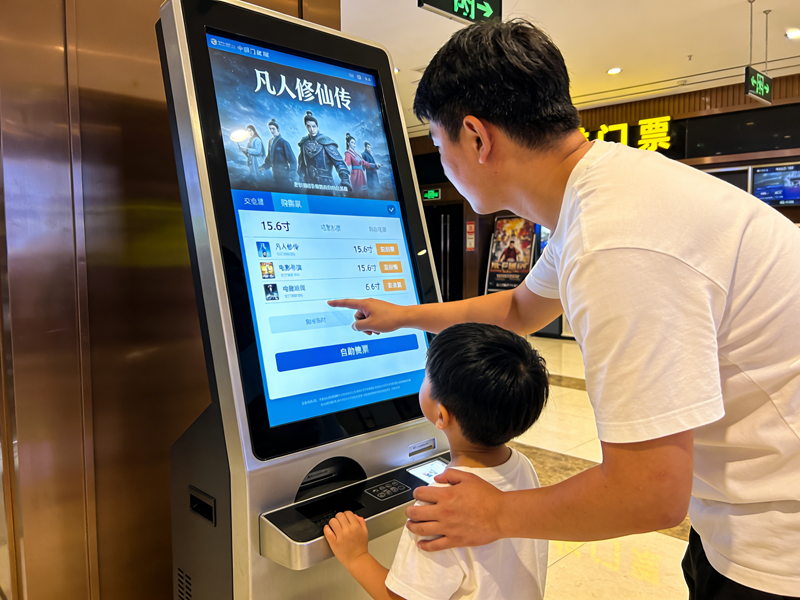
Den integrerer skærmoutput og berøringskontrol i én enkeltstående enhed. Desuden, den understøtter direkte skærmtryk for at afslutte kommandoer uden ekstra værktøjer. Denne artikel forklarer dens kernedefinition, nøglefunktioner, populære typer, praktiske fordele og anvendelige scenarier for at hjælpe dig med at træffe kloge valg af udstyr.
Grundlæggende definition af en berøringsskærm
En berøringsskærm er en alt-i-en interaktiv skærm. Den kombinerer et standarddisplaypanel og indbygget berøringsfølende hardware.
1. Integreret dobbeltfunktionsdesign
I modsætning til almindelige skærme, denne enhed leverer billeder og interaktiv kontrol på samme tid. Brugere justerer indstillinger, vælg muligheder og styresystemer direkte på skærmens overflade. Det fjerner afhængighed af eksternt inputtilbehør.
2. Uafhængig plug-and-play hardware
En touchscreen-skærm er en komplet færdig enhed. Den har indbyggede kontroltavler, signalporte og drevmoduler. Således, den forbinder med værter og begynder at fungere efter simpel ledningsføring.
3. Scenariebaseret funktionsdifferentiering
Desuden, den har to hovedkategorier til forskellige krav. Kommercielle modeller fokuserer på glat interaktion. Industrielle versioner prioriterer stabilitet, holdbarhed og miljøtilpasningsevne.
Kernearbejdsmekanisme for en touchscreen-skærm
Hver berøringsskærm følger en enkel og effektiv arbejdscyklus for alle interaktive handlinger.
1. Generer berøringssignaler i realtid
Først, finger- eller værktøjskontakt udløser små ændringer på følelaget. Forskellige skærmtyper producerer kapacitansforskydninger eller trykinduktionssignaler. Disse ændringer fungerer som gyldige betjeningsinstruktioner.
2. Optag nøjagtige koordinatdata
Næste, interne sensorer fanger øjeblikkeligt signalændringer. De låser den nøjagtige berøringsposition og sporer glidende bevægelser. Hele processen afsluttes på millisekunder.
3. Behandl og filtrer ugyldige signaler
Så, den indbyggede chip filtrerer utilsigtet berøring og miljøinterferens. Den beholder kun effektive driftsdata. Dette trin garanterer præcis og stabil kontrol.
4. Udfør funktioner og visuel feedback
Endelig, systemet kører den tilsvarende kommando. Monitoren opdaterer skærmindholdet for at bekræfte en vellykket betjening. Denne sløjfe understøtter langvarig gentagen brug.
Almindelige typer touchscreen-skærme
Forskellige typer berøringsskærme passer til forskellige arbejdsmiljøer og betjeningsvaner.
1. Kapacitive berøringsskærme
Kapacitive modeller registrerer menneskekroppens mikrostrømsignaler. De tilbyder følsom respons og en jævn multi-touch-oplevelse. I mellemtiden, de leverer klare visningseffekter til kontor- og detailscener.
2. Resistive touchscreen-skærme
Resistive modeller er afhængige af fysisk pres for at aktivere signaler. De understøtter behandskede hænder og stylus-betjening. Af denne grund, de passer til støvede, fugtige industrielle værkstedsmiljøer.
3. Infrarød touchscreen skærme
Infrarøde modeller bruger et perifert infrarødt lysgitter til positionering. De har en stærk anti-kollision og anti-interferens evne. Desuden, de tilpasser sig godt til store offentlige interaktive scenarier.
Vigtige praktiske egenskaber ved kvalitetsberøringsskærme
Fremragende touchscreen-skærme har unikke egenskaber, som almindelige skærme ikke kan matche.
1. Intuitiv og hurtig betjening
Direkte tryk på skærmen reducerer overflødige betjeningstrin. Nyt personale mestrer enhedsstyring på kort tid. Det forbedrer i høj grad det daglige arbejde og serviceeffektiviteten.
2. Pladsbesparende integreret struktur
Alt-i-én-designet eliminerer rodet ledningsføring til tastatur og mus. Det rydder op på kontrolborde og udstyrsplatforme. Det skaber et pænt og standardiseret arbejdsrum.
3. Stærk miljøtilpasningsevne
Berøringsskærme i industriel kvalitet modstår støv, vandsprøjt og temperaturændringer. De opretholder en stabil ydeevne under 24-timers kontinuerlig drift. De sænker fejlraten for udstyr effektivt.
4. Høj kompatibilitet med almindelige enheder
Disse skærme understøtter universel interfaceforbindelse. De parrer problemfrit med desktops, bærbare computere og industrielle kontrolværter. De behøver ingen kompleks debugging til daglig brug.
Hovedapplikationsscenarier for touchscreen-skærme
Touchscreen-skærme viser stor praktisk værdi inden for flere kommercielle og industrielle områder.
1. Industriel automationsstyring
Arbejdere bruger disse monitorer til at justere maskinparametre og kontrollere driftsdata. Stabil berøringsydelse tilpasser sig værkstedets vibrationer og støvforhold. Det sikrer præcis produktionskontrol.
2. Detail- og cateringservice
Selvbetjente bestillings- og betalingsterminaler anvender touchscreen-skærme. De forenkler kundens betjeningstrin og forkorter køtiden. De løfter den overordnede butiksservicekvalitet.
3. Smarte kontor- og konferencelokaler
Kontor- og konferenceberøringsskærme understøtter hurtig dokumentkontrol og skærmskift. De gør kontorkommunikation mere effektiv og intelligent.
4. Offentlige henvendelser og udstillingsfaciliteter
Public service-udstyr bruger holdbare touchscreen-skærme. De understøtter højfrekvent besøgsdrift og reducerer det daglige vedligeholdelsesarbejde.
Ofte stillede spørgsmål om Touchscreen-skærme
Q1: Hvad er den største forskel mellem en touchscreen-skærm og en almindelig skærm?
A1: En almindelig skærm viser kun billeder. En touchscreen-monitor tilføjer indbyggede sensorsystemer for at understøtte direkte manuel kontrol uden ekstra tilbehør.
Q2: Kan en touchscreen-skærm arbejde med enhver computerenhed?
A2: Ja. De fleste touchscreen-skærme bruger universelle plug-and-play-grænseflader. De arbejder med næsten alle almindelige desktops, bærbare og industrielle værtsenheder.
Q3: Hvilken type touchscreen-skærm passer bedst til industriværksteder?
A3: Resistive og infrarøde berøringsskærme er ideelle. De understøtter betjening af handsker og modstår hårde værkstedsmiljøpåvirkninger.
Q4: Har touchscreen-skærme brug for professionel installation?
A4: Ingen. De har enkle ledninger og plug-and-play-design. Almindelig personale kan afslutte installationen og grundlæggende fejlfinding hurtigt.
Q5: Hvordan kan jeg holde en touchscreen-skærm følsom og holdbar?
A5: Regelmæssig skånsom rengøring fjerner støv og pletter. Undgå skarpe ridser og ætsende væsker for at opretholde en langsigtet stabil berøringsydelse.
Konklusion
For at opsummere, en berøringsskærm er en multifunktionel integreret skærm, der kombinerer visuel visning og berøringsstyring. Det har flere typer, der matcher kontor, kommercielle og industrielle scenarier. Det forenkler driftsprocesser, sparer arbejdsplads og forbedrer den samlede driftseffektivitet. Desuden, holdbare industrimodeller tilpasser sig barske miljøer og reducerer langsigtede vedligeholdelsesomkostninger.
Hvis du ønsker at købe høj kvalitet, scenariematchede touchscreen-skærme til din udstyrsopgradering eller nye projektimplementering, udfyld venligst høringsformularen på vores officielle hjemmeside. Lad den ønskede skærmstørrelse stå, brugsmiljø og funktionskrav. Vores professionelle team vil levere tilpassede, omkostningseffektive løsninger til dig med det samme.
