
Les fast-foods modernes privilégient la rapidité et la précision pour leur service quotidien. Les files d'attente aux guichets manuels s'accumulent souvent rapidement pendant les heures de pointe. Ils créent également de petites erreurs de commande dues à une mauvaise communication verbale..
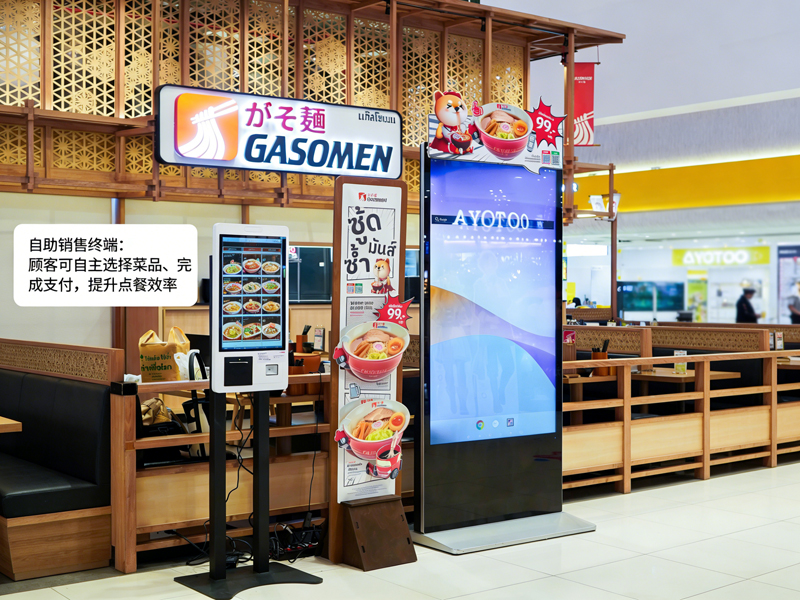
Pour cette raison, Les machines de commande automatique deviennent un équipement standard en magasin. Ces écran tactile les terminaux permettent aux clients de passer des commandes de manière indépendante. En outre, ils réduisent le temps d'attente et standardisent chaque détail de la commande. Ce guide pratique montre aux nouveaux utilisateurs le processus complet de fonctionnement, compétences utiles et correctifs courants pour les machines à commande automatique.
Vérifications avant utilisation pour les machines à commande automatique
Quelques vérifications rapides vous aident à faire fonctionner la machine en douceur et à éviter des erreurs mineures.
1. Réveiller l'écran de veille
D'abord, appuyez doucement sur l'écran sombre pour activer l'appareil. La machine quitte le mode veille et charge immédiatement la page d'accueil officielle de commande..
2. Confirmer les paramètres de base du magasin
Suivant, vérifiez l'option de type de commande dans la barre supérieure. Basculez entre un service sur place ou à emporter en fonction de vos besoins réels. Cette étape évite les erreurs de classification des commandes.
3. Préparez votre moyen de paiement
Préparez votre paiement mobile ou votre carte à l'avance. La préparation rapide des paiements réduit considérablement la durée de votre opération.
Guide étape par étape pour utiliser les machines de commande automatique
Suivez ces étapes claires pour terminer une commande complète sur les machines de commande automatique.
1. Parcourez les menus et sélectionnez les aliments
Parcourir les aliments classés, listes de boissons et de combos à l'écran. Appuyez sur chaque article pour l'ajouter à votre panier virtuel. Le système met à jour votre liste de commandes en temps réel.
2. Personnalisez les détails des repas individuels
La plupart des repas prennent en charge des ajustements personnalisés. Vous pouvez supprimer des ingrédients, modifier les portions ou ajouter des éléments d'accompagnement. De plus, tous les changements de prix s'affichent instantanément sur l'interface.
3. Appliquer des promotions et des combos valides
Vérifiez les offres en cours du magasin sur la page de promotion. Sélectionnez des combos ou des coupons éligibles pour déduire votre coût total. Le système calcule automatiquement les prix finaux précis.
4. Examinez attentivement la liste complète des commandes
Vérifiez tous les éléments, paramètres personnalisés et frais totaux. Supprimez les mauvaises sélections ou ajoutez les articles manquants avant de procéder au paiement. Cette étape évite les ajustements après paiement.
5. Sélectionnez le mode de paiement et effectuez les transactions
Choisissez votre canal de paiement préféré dans la liste contextuelle. Suivez les invites à l'écran pour terminer la numérisation ou le glissement de la carte. La machine confirme le paiement réussi en quelques secondes.
6. Récupérez les reçus et attendez le ramassage
Enfin, prenez le reçu de commande imprimé avec votre numéro de commande unique. Conservez le reçu en lieu sûr et attendez les alertes de repas au comptoir de retrait du magasin.
Conseils pratiques pour un meilleur fonctionnement de la machine
Ces conseils simples vous aident à utiliser les machines de commande automatique plus rapidement et avec plus de précision..
1. Sélectionnez des éléments par lots pour gagner du temps
Choisissez tous les repas de votre groupe en une seule opération. Vous évitez les clics répétés sur l'écran et rationalisez l'ensemble du processus.
2. Terminez toutes les modifications avant le paiement
Le système verrouille les détails de la commande après un paiement réussi. Ainsi, vous devez effectuer toutes les personnalisations et modifications à l'avance.
3. Suivez les invites à l'écran en cas d'erreurs
Si l'écran affiche des rappels, lis d'abord les conseils. Résolvez immédiatement les petits problèmes tels que les sélections vides ou les coupons expirés.
4. Utilisez les modes multilingues pour une compréhension facile
La machine prend en charge plusieurs options de langue. Changez de langue familière pour éviter tout malentendu sur le contenu du menu.
Problèmes mineurs courants & Corrections rapides
Vous pouvez résoudre la plupart des problèmes de petites machines sans l'aide du personnel..
1. Réponse lente de l'écran
Appuyez doucement sur le bouton et attendez 1 à 2 secondes. Des tapotements lourds ou répétés n'accéléreront pas la réponse du système.
2. Échec de la soumission du paiement
Vérifiez d'abord l'état de votre réseau et le solde de votre compte. Alors, réessayez le processus de paiement ou passez à un autre mode de paiement.
3. Affichages promotionnels manquants
Actualisez la page d'accueil pour synchroniser les dernières activités du magasin. Le contenu obsolète disparaît souvent après une actualisation rapide.
FAQ sur les machines de commande automatique KFC
Q1: Les machines de commande automatique sont-elles difficiles pour les nouveaux utilisateurs?
A1: Non. L'interface utilise des icônes simples et des conseils d'étape. N'importe quel utilisateur peut terminer sa commande en une minute sans formation.
Q2: Puis-je modifier ma commande après avoir payé sur la machine?
A2: Rarement. Le système verrouille les commandes après paiement. Vous devez confirmer tous les détails avant de soumettre votre transaction.
Q3: Les machines de commande automatique prennent-elles en charge toutes les réductions en magasin?
A3: Oui. Le terminal synchronise les promotions du magasin en temps réel, combos et coupons. Il applique automatiquement les remises valides.
Q4: Que dois-je faire si la machine se bloque soudainement?
A4: Arrêtez d'abord votre opération en cours. Avertir le personnel sur place pour redémarrer et déboguer l'appareil pour une utilisation normale.
Q5: Dois-je utiliser des machines de commande automatique pour passer des commandes?
A5: Non. La commande en libre-service est facultative. Vous pouvez toujours choisir la commande au comptoir traditionnelle si vous préférez.
Conclusion
Pour résumer, Les machines de commande automatique chez KFC offrent un service rapide, expérience de commande précise et conviviale. Chaque étape de l'opération comporte des conseils clairs, personnalisation flexible et facturation transparente. Ces terminaux intelligents réduisent la pression dans les files d'attente et les erreurs de commande, tant pour les clients que pour les exploitants de magasins.. Ils sont devenus un standard, outil de service efficace pour les scénarios de restauration rapide modernes.
Si vous souhaitez équiper votre fast-food ou votre traiteur d'écurie, Machines de commande automatique faciles à utiliser, veuillez remplir le formulaire de demande sur notre site officiel. Partagez l'échelle de votre magasin, espace d'aménagement et exigences fonctionnelles, et notre équipe vous fournira des solutions de terminaux professionnelles personnalisées.
