消息

随时了解最新的触摸显示器新闻

科技趋势, 新产品发布, 行业洞察

以及满足您需求的实际应用技巧.

哪些触摸屏适合 Smoothie Bar 附加选择信息亭?

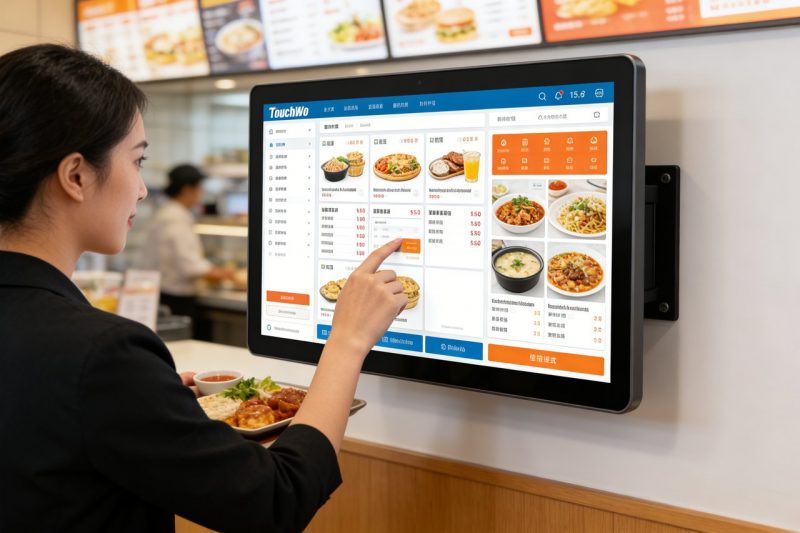
Smoothie bars thrive on customization—customers love picking their base, fruits, and add-ins (think protein powder, chia seeds, or nut butters) to create a drink that’s uniquely theirs. But manual add-in selection—where customers tell staff their preferences or mark a paper checklist—slows down service, leads to errors, and frustrates guests during peak hours.A Smoothie Add-In Kiosk Touch Screen solves these pain points by putting customization directly in customers’ hands.

Smoothie Add-In Kiosk Touch Screen

These specialized 触摸屏 are designed for the fast-paced, messy environment of smoothie bars, letting guests browse add-ins, select options, and confirm their order in seconds. 然而, not all touch screens fit smoothie bar kiosks—some are too clunky, too fragile, or not user-friendly enough for quick customer interactions. This guide breaks down which touch screens work best for smoothie bar add-in selection, 优先考虑的关键功能, top models by bar size, troubleshooting tips, and FAQs to help you make the right choice. Whether you run a small neighborhood smoothie shop or a busy chain, these insights will help you streamline customization, speed up service, and keep customers coming back for their perfect smoothie.

Key Features That Make a Smoothie Add-In Kiosk Touch Screen a Good Fit

Not all touch screens are designed for smoothie bar add-in kiosks—look for these non-negotiable features to ensure a seamless, user-friendly experience for both customers and staff.

1. 直觉的, Customer-Friendly Interface (Fast Customization)

Smoothie customers want to customize quickly—no complicated menus or confusing navigation.
大的, colorful icons for add-in categories (例如, “Protein,” “Seeds,” “Fruits,” “Nut Butters”) make browsing easy.
Simple tap-to-select functionality lets customers add or remove add-ins with one touch—no typing required.
Clear visuals (photos of add-ins, portion sizes) help customers make decisions fast, reducing time per kiosk use.
A progress bar shows customers how many add-ins they’ve selected, preventing over-customization or missed options.

2. 耐用的, Easy-to-Clean Design (For Smoothie Bar Messes)

Smoothie bars are messy—spills, sticky fruit residue, and frequent cleaning are inevitable.
IP65 splash resistance protects against smoothie spills, fruit juices, and cleaning sprays, preventing internal damage.
光滑的, non-porous glass surface wipes clean with a sanitizing cloth in seconds—critical for food safety.
9H scratch-resistant glass resists scratches from nails, straws, or accidental bumps.
Sturdy kiosk mounting (countertop or wall-mounted) prevents tipping or damage from busy customers.

3. Bright, Anti-Glare Display (Visible in All Lighting)

Smoothie bars often have bright natural light or overhead lighting—touch screens must be easy to read.
高亮度显示器 (500+ 尼特) ensure visibility even in direct sunlight (for outdoor kiosks or storefront windows).
Anti-glare coating reduces reflections, so customers can see add-in options clearly without squinting.
Adjustable brightness lets you tweak the screen for dim or bright environments, maintaining readability all day.

4. Fast Response Time (No Lag During Peak Hours)

During busy morning or afternoon rushes, laggy touch screens frustrate customers and slow down service.
Responsive touch technology (10ms or faster response time) registers taps instantly, even with wet or sticky fingers.
No lag when switching between add-in categories or selecting multiple options—critical for high-traffic periods.
Lightweight software ensures the kiosk runs smoothly, even with constant use throughout the day.

5. Compatibility with Smoothie Bar POS & Inventory Systems

Efficiency depends on your touch screen working with the tools you already use.
Syncs with your smoothie bar POS system to send custom orders directly to the blender station, eliminating manual entry.
Integrates with inventory management tools to alert staff when add-ins are running low (例如, “Low on chia seeds”).
Auto-updates add-in options and prices, so customers always see accurate choices (no more “out of stock” disappointments).

Top Smoothie Add-In Kiosk Touch Screens (By Bar Size)

The best Smoothie Add-In Kiosk Touch Screen depends on your bar’s size, traffic, and customization needs. Here are the top models for different business types:

1. Elo 10” Compact Touch Screen (Ideal for Small Smoothie Bars)

A space-saving option for small shops with limited counter space and moderate traffic.
Key benefits: 10-英寸显示屏, intuitive tap-to-select interface, and IP65 splash resistance.
Critical features: 快速响应时间, anti-glare coating, and syncs with basic POS systems.
最适合: Small neighborhood smoothie bars, kiosks in gyms, or pop-up smoothie stands.
额外福利: Lightweight design (fits small counters), 2-年保修, and easy installation.

2. ViewSonic 15” Industrial Touch Screen (Perfect for High-Traffic Bars)

A high-performance model for busy smoothie bars with heavy foot traffic (例如, malls, college campuses).
Key benefits: 15-inch large display, multi-touch functionality (multiple customers can interact at once), and rugged design.
Critical features: 快速响应时间, advanced POS integration, 和库存同步.
最适合: High-traffic smoothie chains, mall kiosks, or bars with 50+ customers per hour.
额外福利: 工业级耐用性, 3-年保修, and anti-glare, 高亮度显示.

3. Planar 8” Budget-Friendly Touch Screen (Great for New Smoothie Bars)

A cost-effective option for new startups or small bars on a tight budget.
Key benefits: 8-英寸显示屏, basic add-in selection features, and IP65 splash resistance.
Critical features: Simple interface, fast response time, and compatibility with entry-level POS systems.
最适合: New smoothie businesses, pop-up stands, or bars just adding self-service kiosks.
额外福利: 低功耗, quick setup, and a 1-year manufacturer warranty.

4. NEC 12” Premium Touch Screen (For High-End Smoothie Bars)

A premium model for bars that prioritize customer experience and brand consistency.
Key benefits: 12-inch FHD display, customizable interface (add your logo, brand colors), and advanced analytics.
Critical features: Multi-touch functionality, real-time inventory alerts, and POS integration.
最适合: High-end smoothie bars, health-focused cafes, or chains that want a polished, branded kiosk experience.
额外福利: 防眩光显示屏, waterproof enclosure, 和专业的安装支持.

How to Choose the Right Smoothie Add-In Kiosk Touch Screen

Follow these simple steps to find a touch screen that fits your smoothie bar’s unique needs and workflow.

1. Assess Your Bar’s Size and Traffic

Start by evaluating how much space you have and how many customers you serve daily.
Small bars (10–20 customers/hour): Opt for a compact 8–10 inch touch screen to save counter space.
High-traffic bars (30+ customers/hour): Choose a larger 12–15 inch screen with multi-touch functionality to handle multiple customers.
Outdoor or bright spaces: Prioritize anti-glare, high-brightness displays for visibility.

2. Prioritize Durability and Cleanliness

Smoothie bars are messy—don’t compromise on a touch screen that’s easy to clean and tough.
Ensure the screen has IP65 splash resistance to handle spills and cleaning.
Choose a smooth, non-porous surface that wipes clean quickly (critical for food safety compliance).
Look for scratch-resistant glass to withstand daily use and accidental damage.

3. Check Compatibility with Your POS and Inventory Tools

Avoid extra work by choosing a touch screen that syncs with your current systems.
Confirm it integrates with your smoothie bar POS system to send orders directly to the blender station.
If you use inventory management software, ensure the touch screen alerts you to low add-in stock.
Ask the manufacturer if the screen can auto-update add-in options when you change your menu.

4. Test the Interface for Customer Friendliness

Your customers will use the touch screen—make sure it’s intuitive for all ages.
Test how quickly you can select add-ins (should take 30 seconds or less for a full customization).
Look for simple navigation (no hidden menus) and clear visuals (photos of add-ins help customers decide).
Ensure the screen is easy to use with wet or sticky fingers (common in smoothie bars).

Troubleshooting Common Smoothie Add-In Kiosk Touch Screen Issues

Minor glitches can slow down service—here’s how to fix them fast.

1. Touch Screen Is Unresponsive (Sticky Spills or Residue)

Wipe the screen with a soft microfiber cloth and a 50/50 mix of distilled water and isopropyl alcohol.
避免使用刺激性清洁剂 (氨, 漂白) that damage the screen’s protective coating.
If the screen is still unresponsive, power cycle the kiosk (unplug and plug back in) to reset it.

2. Add-In Options Aren’t Updating (Out of Stock or New Add-Ins)

Check if the touch screen is synced with your POS system—reconnect if it’s offline.
Update the menu in your POS system; the touch screen should auto-sync within a few minutes.
Restart the kiosk to force a sync if updates aren’t showing up.

3. Screen Is Too Dim or Glare Makes It Hard to Read

Adjust the screen’s brightness in the settings menu (increase for bright environments).
Clean the screen with a microfiber cloth to remove smudges that cause extra glare.
If using an outdoor kiosk, add a sunshade to block direct sunlight.

FAQs About Smoothie Add-In Kiosk Touch Screens

Q1: Can customers select multiple add-ins at once on the touch screen?

A1: 是的! All recommended models have multi-select functionality—customers can tap multiple add-ins (例如, protein powder + chia seeds + peanut butter) 几秒钟内.

Q2: Is the touch screen easy to clean after smoothie spills?

A2: 绝对地. The IP65 splash-resistant, non-porous surface wipes clean with a sanitizing cloth in seconds—no scrubbing required.

第三季度: Do I need to train staff to use the touch screen?

A3: No—most models have an intuitive interface that requires minimal training. Staff can learn to troubleshoot basic issues (例如, unresponsive screen) in 10–15 minutes.

第四季度: Will the touch screen work with my existing smoothie bar POS system?

A4: Most Smoothie Add-In Kiosk Touch Screens integrate seamlessly with popular POS systems (Toast, Square, Clover) without needing a full replacement.

Q5: Can I customize the touch screen to match my brand?

A5: Yes—premium models let you add your logo, brand colors, and custom messaging to the interface, creating a cohesive brand experience.

Q6: How long does the touch screen last in a busy smoothie bar?

A6: With proper cleaning and maintenance, a quality touch screen lasts 3–5 years. 耐用的, industrial-grade models can last even longer in high-traffic environments.

Q7: Does the touch screen work with wet or sticky fingers?

A7: 是的. The responsive touch technology registers taps even with wet or sticky fingers—perfect for customers who’ve just handled fruit or smoothies.

结论

The right Smoothie Add-In Kiosk Touch Screen puts customization in your customers’ hands, streamlines service, and reduces errors—all while keeping your smoothie bar running efficiently. By prioritizing an intuitive interface, 耐用的设计, bright display, and seamless integration, you can choose a touch screen that fits your bar’s size, traffic, and brand.

No more slow manual add-in selection, frustrated customers, or order errors. A purpose-built Smoothie Add-In Kiosk Touch Screen saves time, boosts customer satisfaction, and helps you stand out in a competitive market—key to growing your smoothie business.

Ready to find the perfect Smoothie Add-In Kiosk Touch Screen for your bar? Fill out the form on our website to share your bar’s size, daily traffic, and existing POS system. 我们的餐饮服务技术专家将推荐最佳兼容型号, 提供安装提示, and answer any questions to help you streamline customization and keep your customers happy. Let’s make your smoothie bar the go-to spot for personalized, fast service—start today!

提交下面的表格以获取更多信息

或获得个性化优惠.


    *我们尊重您的机密性,所有信息均受到保护