
Las barras de batidos prosperan gracias a la personalización: a los clientes les encanta elegir su base, frutas, y complementos (piensa en proteína en polvo, semillas de chía, o mantequillas de nueces) para crear una bebida que sea exclusivamente suya. Pero la selección manual de complementos, donde los clientes le dicen al personal sus preferencias o marcan una lista de verificación en papel, ralentiza el servicio., conduce a errores, y frustra a los invitados durante las horas pico. Una pantalla táctil del kiosco complementario Smoothie resuelve estos puntos débiles al poner la personalización directamente en manos de los clientes..
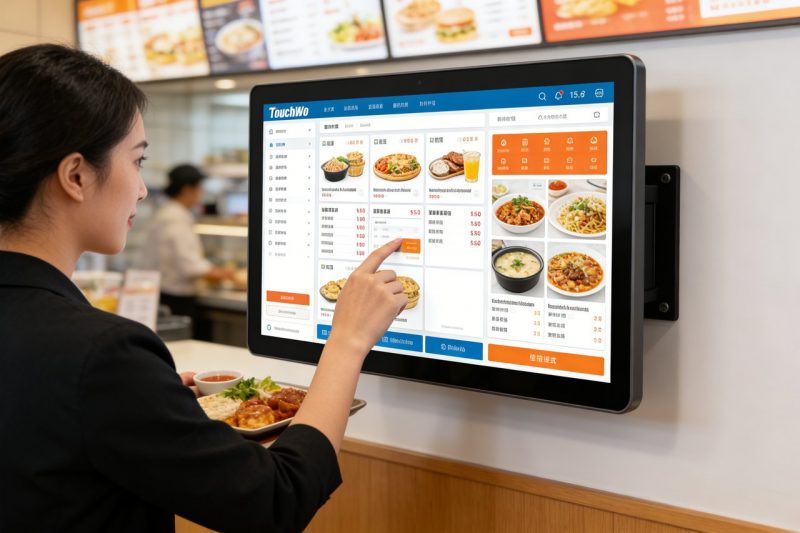
Estos especializados pantallas táctiles están diseñados para personas de ritmo rápido, ambiente desordenado de bares de batidos, permitir a los invitados explorar complementos, seleccionar opciones, y confirmar su pedido en segundos. Sin embargo, No todas las pantallas táctiles se adaptan a los quioscos de las barras de batidos; algunas son demasiado torpes, demasiado frágil, o no es lo suficientemente fácil de usar para interacciones rápidas con los clientes. Esta guía desglosa qué pantallas táctiles funcionan mejor para la selección de complementos de barra de batidos, características clave para priorizar, mejores modelos por tamaño de barra, consejos para solucionar problemas, y preguntas frecuentes para ayudarle a tomar la decisión correcta. Ya sea que dirija una pequeña tienda de batidos de barrio o una cadena muy concurrida, Estos conocimientos le ayudarán a optimizar la personalización., acelerar el servicio, y haga que los clientes regresen por su batido perfecto.
Características clave que hacen que la pantalla táctil del quiosco complementario Smoothie sea una buena opción
No todas las pantallas táctiles están diseñadas para quioscos complementarios de barra de batidos; busque estas características no negociables para garantizar una conexión perfecta, Experiencia fácil de usar tanto para los clientes como para el personal..
1. Intuitivo, Interfaz amigable para el cliente (Personalización rápida)
Los clientes de Smoothie quieren personalizar rápidamente, sin menús complicados ni navegación confusa..
Grande, iconos coloridos para categorías de complementos (p.ej., "Proteína,” “Semillas," "Fruta,“Mantequillas de nueces”) facilitar la navegación.
La sencilla funcionalidad de tocar para seleccionar permite a los clientes agregar o eliminar complementos con un solo toque, sin necesidad de escribir.
Imágenes claras (fotos de complementos, tamaños de porciones) ayudar a los clientes a tomar decisiones rápidamente, Reducir el tiempo por uso del quiosco..
Una barra de progreso muestra a los clientes cuántos complementos han seleccionado, evitando la personalización excesiva o las opciones perdidas.
2. Durable, Diseño fácil de limpiar (Para desorden en la barra de batidos)
Las barras de batidos ensucian: se derraman, residuos de fruta pegajosos, y la limpieza frecuente es inevitable.
La resistencia a salpicaduras IP65 protege contra derrames de batidos, jugos de frutas, y aerosoles de limpieza, evitando daños internos.
Liso, La superficie de vidrio no porosa se limpia con un paño desinfectante en segundos, algo fundamental para la seguridad alimentaria..
9El vidrio resistente a los rayones resiste los rayones de las uñas., pajitas, o golpes accidentales.
Montaje de quiosco resistente (encimera o pared) evita vuelcos o daños causados por clientes ocupados.
3. Brillante, Pantalla antideslumbrante (Visible en toda iluminación)
Las barras de batidos suelen tener luz natural brillante o iluminación cenital; las pantallas táctiles deben ser fáciles de leer.
Pantallas de alto brillo (500+ liendres) Garantizar la visibilidad incluso bajo la luz solar directa. (para quioscos al aire libre o escaparates).
El revestimiento antideslumbrante reduce los reflejos, para que los clientes puedan ver las opciones complementarias claramente sin entrecerrar los ojos.
El brillo ajustable le permite ajustar la pantalla para entornos oscuros o brillantes, manteniendo la legibilidad todo el día.
4. Tiempo de respuesta rápido (Sin retrasos durante las horas pico)
Durante las horas punta de la mañana o de la tarde, Las pantallas táctiles retrasadas frustran a los clientes y ralentizan el servicio..
Tecnología táctil responsiva (10ms o tiempo de respuesta más rápido) registra grifos al instante, incluso con los dedos mojados o pegajosos.
Sin demoras al cambiar entre categorías de complementos o seleccionar múltiples opciones: fundamental para períodos de mucho tráfico.
El software liviano garantiza que el quiosco funcione sin problemas, incluso con uso constante durante todo el día.
5. Compatibilidad con TPV Smoothie Bar & Sistemas de inventario
La eficiencia depende de que su pantalla táctil funcione con las herramientas que ya utiliza.
Se sincroniza con el sistema POS de su barra de batidos para enviar pedidos personalizados directamente a la estación de licuadora, eliminando la entrada manual.
Se integra con herramientas de gestión de inventario para alertar al personal cuando los complementos se están agotando. (p.ej., “Bajo contenido de semillas de chía”).
Opciones y precios de complementos de actualizaciones automáticas, para que los clientes siempre vean opciones precisas (No más decepciones por falta de existencias.).
Las mejores pantallas táctiles del quiosco complementario Smoothie (Por tamaño de barra)
La mejor pantalla táctil del quiosco complementario Smoothie depende del tamaño de su barra, tráfico, y necesidades de personalización. Aquí están los mejores modelos para diferentes tipos de negocios.:
1. Pantalla táctil compacta Elo de 10” (Ideal para barras de batidos pequeñas)
Una opción de ahorro de espacio para tiendas pequeñas con espacio de mostrador limitado y tráfico moderado.
Beneficios clave: 10-pantalla en pulgadas, interfaz intuitiva de tocar para seleccionar, y resistencia a salpicaduras IP65.
Características críticas: Tiempo de respuesta rápido, revestimiento antideslumbrante, y se sincroniza con sistemas POS básicos.
Lo mejor para: Pequeños bares de batidos de barrio, quioscos en gimnasios, o puestos de batidos emergentes.
Beneficios adicionales: Diseño ligero (se adapta a mostradores pequeños), 2-año de garantía, y fácil instalación.
2. Pantalla táctil industrial ViewSonic de 15" (Perfecto para bares con mucho tráfico)
Un modelo de alto rendimiento para bares de batidos con mucho tráfico peatonal (p.ej., centros comerciales, campus universitarios).
Beneficios clave: 15-pantalla grande en pulgadas, funcionalidad multitáctil (varios clientes pueden interactuar a la vez), y diseño robusto.
Características críticas: Tiempo de respuesta rápido, integración avanzada de POS, y sincronización de inventario.
Lo mejor para: Cadenas de batidos de alto tráfico, quioscos del centro comercial, o barras con 50+ clientes por hora.
Beneficios adicionales: Durabilidad de grado industrial, 3-año de garantía, y antideslumbrante, pantalla de alto brillo.
3. Pantalla táctil Planar de 8” económica (Ideal para nuevas barras de batidos)
Una opción rentable para nuevas empresas o bares pequeños con un presupuesto ajustado.
Beneficios clave: 8-pantalla en pulgadas, funciones básicas de selección de complementos, y resistencia a salpicaduras IP65.
Características críticas: Interfaz sencilla, tiempo de respuesta rápido, y compatibilidad con sistemas POS de nivel básico.
Lo mejor para: Nuevos negocios de batidos, soportes emergentes, o bares añadiendo quioscos de autoservicio.
Beneficios adicionales: Bajo consumo de energía, configuración rápida, y una garantía del fabricante de 1 año.
4. Pantalla táctil premium NEC de 12” (Para barras de batidos de alta gama)
Un modelo premium para bares que prioriza la experiencia del cliente y la coherencia de la marca.
Beneficios clave: 12-pantalla FHD de pulgadas, interfaz personalizable (añade tu logotipo, colores de la marca), y análisis avanzado.
Características críticas: Funcionalidad multitáctil, alertas de inventario en tiempo real, e integración de POS.
Lo mejor para: Barras de batidos de alta gama, cafés centrados en la salud, o cadenas que quieren un pulido, experiencia de quiosco de marca.
Beneficios adicionales: Pantalla antirreflejo, recinto impermeable, y soporte de instalación profesional.
Cómo elegir la pantalla táctil del quiosco complementario de batidos adecuada
Siga estos sencillos pasos para encontrar una pantalla táctil que se adapte a las necesidades y al flujo de trabajo únicos de su barra de batidos..
1. Evalúe el tamaño y el tráfico de su bar
Empiece por evaluar cuánto espacio tiene y a cuántos clientes atiende diariamente.
bares pequeños (10–20 clientes/hora): Opte por una pantalla táctil compacta de 8 a 10 pulgadas para ahorrar espacio en el mostrador.
Bares de alto tráfico (30+ clientes/hora): Elija una pantalla más grande de 12 a 15 pulgadas con funcionalidad multitáctil para atender a varios clientes.
Espacios exteriores o luminosos: Prioriza el antideslumbrante, pantallas de alto brillo para mayor visibilidad.
2. Priorice la durabilidad y la limpieza
Las barras de batidos ensucian: no renuncies a una pantalla táctil que sea fácil de limpiar y resistente.
Asegúrese de que la pantalla tenga resistencia a salpicaduras IP65 para manejar derrames y limpieza.
Elige un suave, Superficie no porosa que se limpia rápidamente. (fundamental para el cumplimiento de la seguridad alimentaria).
Busque vidrio resistente a rayones para resistir el uso diario y daños accidentales..
3. Verifique la compatibilidad con su POS y herramientas de inventario
Evite trabajo adicional eligiendo una pantalla táctil que se sincronice con sus sistemas actuales.
Confirme que se integra con el sistema POS de su barra de batidos para enviar pedidos directamente a la estación de licuadora.
Si utiliza software de gestión de inventario, Asegúrese de que la pantalla táctil le avise cuando haya pocas existencias adicionales..
Pregúntele al fabricante si la pantalla puede actualizar automáticamente las opciones complementarias cuando cambia su menú.
4. Pruebe la interfaz para que sea amigable con el cliente
Sus clientes utilizarán la pantalla táctil; asegúrese de que sea intuitiva para todas las edades..
Pruebe qué tan rápido puede seleccionar complementos (debería tomar 30 segundos o menos para una personalización completa).
Busque navegación sencilla (sin menús ocultos) y visuales claros (fotos de complementos ayudan a los clientes a decidir).
Asegúrese de que la pantalla sea fácil de usar con los dedos mojados o pegajosos. (común en barras de batidos).
Solución de problemas comunes con la pantalla táctil del quiosco del complemento Smoothie
Los fallos menores pueden ralentizar el servicio: aquí se explica cómo solucionarlos rápidamente.
1. La pantalla táctil no responde (Derrames o residuos pegajosos)
Limpie la pantalla con un paño de microfibra suave y un 50/50 mezcla de agua destilada y alcohol isopropílico.
Evite los limpiadores fuertes (amoníaco, lejía) que dañan la capa protectora de la pantalla.
Si la pantalla aún no responde, Apague y encienda el quiosco (desenchufe y vuelva a enchufar) para restablecerlo.
2. Las opciones de complemento no se actualizan (Agotado o nuevos complementos)
Verifique si la pantalla táctil está sincronizada con su sistema POS; vuelva a conectarse si está fuera de línea.
Actualiza el menú en tu sistema POS; la pantalla táctil debería sincronizarse automáticamente en unos minutos.
Reinicie el quiosco para forzar una sincronización si las actualizaciones no aparecen.
3. La pantalla está demasiado oscura o el brillo dificulta la lectura
Ajusta el brillo de la pantalla en el menú de configuración. (aumento para ambientes brillantes).
Limpia la pantalla con un paño de microfibra para eliminar las manchas que causan brillo adicional..
Si usa un quiosco al aire libre, agregue una sombrilla para bloquear la luz solar directa.
Preguntas frecuentes sobre las pantallas táctiles del quiosco complementario Smoothie
Q1: ¿Pueden los clientes seleccionar varios complementos a la vez en la pantalla táctil??
A1: Sí! Todos los modelos recomendados tienen funcionalidad de selección múltiple: los clientes pueden aprovechar varios complementos (p.ej., proteína en polvo + semillas de chía + manteca de cacahuete) en segundos.
Q2: ¿Es fácil limpiar la pantalla táctil después de que se derrame un batido??
A2: Absolutamente. El IP65 resistente a salpicaduras, La superficie no porosa se limpia con un paño desinfectante en segundos, no es necesario fregar..
Q3: ¿Necesito capacitar al personal para utilizar la pantalla táctil??
A3: No, la mayoría de los modelos tienen una interfaz intuitiva que requiere una formación mínima.. El personal puede aprender a solucionar problemas básicos. (p.ej., pantalla que no responde) en 10 a 15 minutos.
Q4: ¿Funcionará la pantalla táctil con mi sistema POS de barra de batidos existente??
A4: La mayoría de las pantallas táctiles de los quioscos complementarios Smoothie se integran perfectamente con los sistemas POS populares (Tostada, Cuadrado, Trébol) sin necesidad de un reemplazo completo.
Q5: ¿Puedo personalizar la pantalla táctil para que coincida con mi marca??
A5: Sí, los modelos premium te permiten agregar tu logotipo, colores de la marca, y mensajes personalizados a la interfaz, crear una experiencia de marca cohesiva.
Q6: ¿Cuánto dura la pantalla táctil en un bar de batidos concurrido??
A6: Con una limpieza y mantenimiento adecuados, una pantalla táctil de calidad dura entre 3 y 5 años. Durable, Los modelos de grado industrial pueden durar incluso más en entornos de mucho tráfico..
P7: ¿La pantalla táctil funciona con los dedos mojados o pegajosos??
A7: Sí. La tecnología táctil sensible registra toques incluso con dedos mojados o pegajosos, perfecta para clientes que acaban de manipular frutas o batidos..
Conclusión
La pantalla táctil adecuada del Smoothie Add-In Kiosk pone la personalización en manos de sus clientes, agiliza el servicio, y reduce los errores, todo mientras mantiene su barra de batidos funcionando de manera eficiente. Priorizando una interfaz intuitiva, diseño duradero, pantalla brillante, e integración perfecta, puedes elegir una pantalla táctil que se ajuste al tamaño de tu barra, tráfico, y marca.
No más selección manual lenta de complementos, clientes frustrados, o errores de pedido. Una pantalla táctil de quiosco adicional Smoothie especialmente diseñada ahorra tiempo, aumenta la satisfacción del cliente, y le ayuda a destacarse en un mercado competitivo: clave para hacer crecer su negocio de batidos.
Listo para encontrar la pantalla táctil del quiosco complementario Smoothie perfecta para su bar? Complete el formulario en nuestro sitio web para compartir el tamaño de su barra, tráfico diario, y sistema POS existente. Nuestros expertos en tecnología de servicios de alimentos recomendarán el mejor modelo compatible., proporcionar consejos de instalación, y responda cualquier pregunta para ayudarle a optimizar la personalización y mantener contentos a sus clientes. Hagamos de su barra de batidos el lugar ideal para disfrutar de bebidas personalizadas., servicio rápido: comience hoy!
