
スムージー バーはカスタマイズが得意です - 顧客はベースを選ぶのが好きです, 果物, およびアドイン (プロテインパウダーを考える, チアシード, またはナッツバター) 自分だけのオリジナルドリンクを作るために. しかし、顧客がスタッフに好みを伝えたり、紙のチェックリストに印を付けたりする手動のアドイン選択は、サービスの速度を低下させます。, エラーにつながる, スムージー アドイン キオスク タッチ スクリーンは、顧客が直接カスタマイズできるようにすることで、これらの問題点を解決します。.
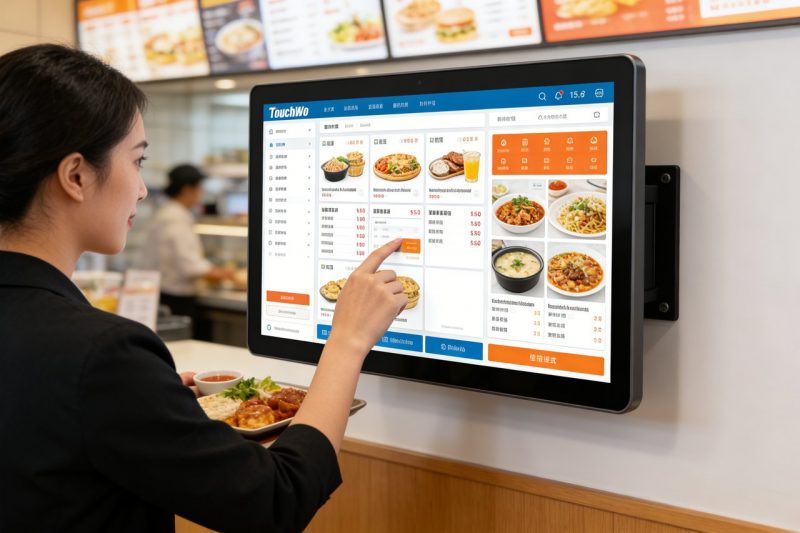
これらの専門的な タッチスクリーン ペースの速い人向けに設計されています, スムージーバーの乱雑な環境, ゲストにアドインを閲覧させる, オプションを選択する, 数秒で注文を確認します. しかし, すべてのタッチ スクリーンがスムージー バー キオスクに適合するわけではありません。一部のタッチ スクリーンは不格好すぎます, もろすぎる, または顧客との迅速なやり取りを行うには十分なほどユーザーフレンドリーではない. このガイドでは、スムージー バー アドインの選択に最適なタッチ スクリーンを詳しく説明します。, 優先すべき重要な機能, バーサイズ別の上位モデル, トラブルシューティングのヒント, 正しい選択をするための FAQ と. 近所の小さなスムージー ショップを経営している場合でも、賑やかなチェーン店を経営している場合でも, これらの洞察は、カスタマイズを合理化するのに役立ちます, サービスのスピードアップ, 顧客が完璧なスムージーを求めて戻ってくるようにします.
スムージー アドイン キオスクのタッチ スクリーンを適切に適合させる主な機能
すべてのタッチ スクリーンがスムージー バー アドイン キオスク用に設計されているわけではありません。シームレスな操作性を確保するには、これらの譲れない機能を検討してください。, 顧客とスタッフの両方にとって使いやすいエクスペリエンス.
1. 直感的, 顧客フレンドリーなインターフェース (素早いカスタマイズ)
Smoothie の顧客は、複雑なメニューやわかりにくいナビゲーションを必要とせず、迅速にカスタマイズしたいと考えています。.
大きい, アドイン カテゴリのカラフルなアイコン (例えば。, "タンパク質,「種」," "フルーツ,「ナッツバター」) ブラウジングを簡単にする.
シンプルなタップ選択機能により、入力する必要がなく、ワンタッチでアドインを追加または削除できます。.
鮮明なビジュアル (アドインの写真, 分量) 顧客が迅速に意思決定できるよう支援する, キオスクの 1 回あたりの使用時間を短縮する.
進行状況バーには、顧客が選択したアドインの数が表示されます, 過剰なカスタマイズやオプションの欠落を防ぐ.
2. 耐久性のある, お手入れが簡単なデザイン (スムージーバーメッセ用)
スムージーバーは汚い - こぼれる, 粘着性のある果物の残り, 頻繁な掃除は避けられません.
IP65 の飛沫耐性により、スムージーのこぼれを防ぎます。, フルーツジュース, そしてお掃除スプレー, 内部損傷の防止.
スムーズ, 非多孔質ガラス表面は消毒布で数秒で拭き取れます - 食品の安全にとって重要です.
9爪の傷に強いH耐傷性ガラス, ストロー, または偶発的な衝突.
頑丈なキオスク取り付け (カウンタートップまたは壁掛け) 忙しいお客様による転倒や破損を防ぎます.
3. 明るい, アンチグレアディスプレイ (あらゆる照明下で視認可能)
スムージー バーには明るい自然光や頭上照明が設置されていることが多く、タッチ スクリーンは読みやすくなければなりません.
高輝度ディスプレイ (500+ ニット) 直射日光下でも視認性を確保 (屋外キオスクまたは店頭ウィンドウ用).
アンチグレアコーティングにより反射を軽減, 顧客が目を細めずにアドイン オプションをはっきりと確認できるようにする.
明るさを調整できるので、薄暗い環境や明るい環境に合わせて画面を微調整できます, 一日中読みやすさを維持する.
4. 速い応答時間 (ピーク時間帯でも遅延なし)
朝や午後の忙しい時間帯, タッチスクリーンの遅れにより顧客がイライラし、サービスが遅くなる.
レスポンシブタッチテクノロジー (10ミリ秒以上の応答時間) タップを即座に登録します, 濡れた指やベタベタした指でも.
アドイン カテゴリ間で切り替えたり、複数のオプションを選択したりする際に遅延が発生しないため、トラフィックが多い時期には重要です.
軽量のソフトウェアによりキオスクのスムーズな動作が保証されます, 一日中継続的に使用しても.
5. スムージーバーPOSとの互換性 & 在庫システム
効率は、タッチ スクリーンがすでに使用しているツールと連携するかどうかに依存します。.
スムージーバー POS システムと同期して、カスタム注文をブレンダーステーションに直接送信します, 手入力を排除する.
在庫管理ツールと統合して、アドインが少なくなったときにスタッフに警告します (例えば。, 「チアシードが少ない」).
アドインのオプションと価格を自動更新します, 顧客が常に正確な選択肢を確認できるようにする (「在庫切れ」でがっかりすることはもうありません).
トップのスムージー アドイン キオスク タッチ スクリーン (バーサイズ別)
最適なスムージー アドイン キオスク タッチ スクリーンはバーのサイズによって異なります, 渋滞, カスタマイズのニーズ. 業種別の上位モデルはこちら:
1. Elo 10 インチ コンパクト タッチ スクリーン (小型のスムージーバーに最適)
カウンタースペースが限られており、人通りも少ない小規模店舗向けの省スペースオプション.
主な利点: 10-インチディスプレイ, 直感的なタップして選択するインターフェイス, IP65の飛沫耐性.
重要な機能: 速い応答時間, アンチグレアコーティング, 基本的な POS システムと同期します.
こんな方に最適: 近所の小さなスムージーバー, ジムのキオスク, またはポップアップスムージースタンド.
追加の特典: 軽量設計 (小さなカウンターにぴったり), 2-年保証, そして簡単な取り付け.
2. ViewSonic 15 インチ工業用タッチ スクリーン (人通りの多いバーに最適)
客足の多いスムージーバー向けの高性能モデル (例えば。, モール, 大学のキャンパス).
主な利点: 15-インチの大型ディスプレイ, マルチタッチ機能 (複数の顧客が同時に対話できる), そして頑丈なデザイン.
重要な機能: 速い応答時間, 高度なPOS統合, そして在庫の同期.
こんな方に最適: 交通量の多いスムージー チェーン, モールのキオスク, またはバー 50+ 1時間あたりの客数.
追加の特典: 工業グレードの耐久性, 3-年保証, そしてアンチグレア, 高輝度ディスプレイ.
3. Planar 8 インチの手頃な価格のタッチ スクリーン (新しいスムージーバーに最適)
新しいスタートアップや予算が限られている小規模バー向けの費用対効果の高いオプション.
主な利点: 8-インチディスプレイ, 基本的なアドイン選択機能, IP65の飛沫耐性.
重要な機能: シンプルなインターフェース, 速い応答時間, エントリーレベルのPOSシステムとの互換性.
こんな方に最適: 新規スムージー事業, ポップアップスタンド, またはセルフサービスのキオスクを追加するだけのバー.
追加の特典: 低消費電力, クイックセットアップ, そして1年間のメーカー保証.
4. NEC 12 インチ プレミアム タッチ スクリーン (高級スムージーバー向け)
顧客体験とブランド一貫性を重視したバー向けプレミアムモデル.
主な利点: 12-インチ FHD ディスプレイ, カスタマイズ可能なインターフェース (ロゴを追加します, ブランドカラー), 高度な分析.
重要な機能: マルチタッチ機能, リアルタイムの在庫アラート, とPOSの統合.
こんな方に最適: 高級スムージーバー, 健康志向のカフェ, または磨きが必要なチェーン, ブランドのキオスク体験.
追加の特典: アンチグレアディスプレイ, 防水エンクロージャ, 専門的な設置サポート.
適切なスムージー アドイン キオスク タッチ スクリーンを選択する方法
以下の簡単な手順に従って、スムージー バー固有のニーズとワークフローに合ったタッチ スクリーンを見つけてください。.
1. バーの規模と客数を評価する
まずは、どのくらいのスペースがあるか、毎日何人の顧客にサービスを提供しているかを評価することから始めます。.
小さなバー (10–20人の顧客/時間): カウンターのスペースを節約するには、コンパクトな 8 ~ 10 インチのタッチ スクリーンを選択してください.
人通りの多いバー (30+ 顧客/時間): 複数の顧客に対応できるように、マルチタッチ機能を備えた大きな 12 ~ 15 インチの画面を選択してください。.
屋外または明るい場所: 防眩性を優先, 視認性を高める高輝度ディスプレイ.
2. 耐久性と清潔性を重視
スムージーバーは汚れやすいため、掃除が簡単で丈夫なタッチ スクリーンを妥協しないでください.
スクリーンがこぼれや洗浄に対応できるように IP65 の防沫性を備えていることを確認します。.
滑らかなものを選ぶ, 非多孔質の表面なのですぐに拭き取れます (食品安全コンプライアンスにとって重要).
毎日の使用や偶発的な損傷に耐えられる耐傷性ガラスを探してください。.
3. POS および在庫ツールとの互換性を確認する
現在のシステムと同期するタッチ スクリーンを選択することで、余分な作業を回避できます.
スムージーバー POS システムと統合され、注文をブレンダーステーションに直接送信できることを確認します。.
在庫管理ソフトをご利用の場合, アドインの在庫が少なくなった場合、タッチ スクリーンで警告が表示されることを確認します。.
メニューを変更したときに画面のアドイン オプションを自動更新できるかどうかメーカーに問い合わせてください。.
4. インターフェースの顧客フレンドリー性をテストする
顧客はタッチ スクリーンを使用します。すべての年齢層にとって直感的であることを確認してください.
アドインをどれだけ早く選択できるかをテストする (取るべきです 30 完全なカスタマイズの場合は数秒以内).
シンプルなナビゲーションを探す (隠しメニューはありません) そして鮮明なビジュアル (アドインの写真は顧客の判断に役立ちます).
濡れた指やベタベタした指でも画面が使いやすいようにする (スムージーバーによくある).
Smoothie アドイン キオスクのタッチ スクリーンに関する一般的な問題のトラブルシューティング
軽微な不具合によりサービスが低下する可能性があります。問題を迅速に修正する方法は次のとおりです。.
1. タッチスクリーンが反応しない (ベタベタしたこぼれや残留物)
柔らかいマイクロファイバー布で画面を拭きます。 50/50 蒸留水とイソプロピルアルコールの混合物.
刺激の強いクリーナーを避ける (アンモニア, 漂白剤) 画面の保護コーティングを損傷するもの.
それでも画面が反応しない場合, キオスクの電源を入れ直します (プラグを抜き、再度差し込む) それをリセットするには.
2. アドイン オプションが更新されない (在庫切れまたは新しいアドイン)
タッチ スクリーンが POS システムと同期しているかどうかを確認し、オフラインの場合は再接続します.
POS システムのメニューを更新する; タッチスクリーンは数分以内に自動同期するはずです.
更新が表示されない場合は、キオスクを再起動して強制的に同期します.
3. 画面が暗すぎるか、まぶしくて読みにくい
設定メニューで画面の明るさを調整します (明るい環境では増加).
余分なぎらつきの原因となる汚れを取り除くために、マイクロファイバーの布で画面を拭きます。.
屋外キオスクを使用する場合, 直射日光を防ぐためにサンシェードを追加する.
Smoothie アドイン キオスク タッチ スクリーンに関するよくある質問
Q1: 顧客はタッチ スクリーンで複数のアドインを一度に選択できますか?
A1: はい! すべての推奨モデルには複数選択機能があり、顧客は複数のアドインをタップできます (例えば。, プロテインパウダー + チアシード + ピーナッツバター) 数秒で.
Q2: スムージーをこぼした後のタッチスクリーンの掃除は簡単ですか??
A2: 絶対に. IP65の防滴性能, 非多孔質の表面は消毒用布で数秒で拭き取れます。こする必要はありません。.
Q3: タッチスクリーンを使用できるようにスタッフを訓練する必要がありますか??
A3: いいえ、ほとんどのモデルには最小限のトレーニングを必要とする直観的なインターフェイスが備わっています。. スタッフは基本的な問題のトラブルシューティングを学ぶことができます (例えば。, 反応しない画面) 10 ~ 15 分以内.
Q4: タッチスクリーンは既存のスムージーバー POS システムで動作しますか??
A4: ほとんどの Smoothie アドイン キオスク タッチ スクリーンは、一般的な POS システムとシームレスに統合されます (トースト, 四角, クローバー) 完全な交換を必要とせずに.
Q5: ブランドに合わせてタッチスクリーンをカスタマイズできますか?
A5: はい - プレミアム モデルではロゴを追加できます, ブランドカラー, インターフェースへのカスタムメッセージング, 一貫したブランド体験を生み出す.
Q6: 忙しいスムージーバーではタッチスクリーンはどのくらい持続しますか?
A6: 適切な清掃とメンテナンスを行うことで、, 高品質のタッチスクリーンは 3 ~ 5 年間持続します. 耐久性のある, 産業グレードのモデルは、交通量の多い環境でもさらに長く使用できます.
Q7: タッチ スクリーンは濡れた指やベタベタした指でも機能しますか??
A7: はい. 応答性の高いタッチ技術により、濡れた指やベタベタした指でもタップを登録できるため、フルーツやスムージーを扱ったばかりのお客様に最適です.
結論
適切な Smoothie アドイン キオスク タッチ スクリーンにより、顧客がカスタマイズできるようになります, サービスを合理化します, スムージーバーの効率的な稼働を維持しながら、エラーを削減します. 直感的なインターフェイスを優先することで, 耐久性のあるデザイン, 明るいディスプレイ, シームレスな統合, バーのサイズに合ったタッチスクリーンを選択できます, 渋滞, そしてブランド.
アドインの手動選択に時間がかかることはもうありません, イライラした顧客, または注文ミス. 専用の Smoothie アドイン キオスク タッチ スクリーンにより時間を節約, 顧客満足度を向上させます, 競争市場での優位性をサポートし、スムージー ビジネスを成長させる鍵となります.
あなたのバーに最適なスムージー アドイン キオスク タッチ スクリーンを見つける準備ができています? 当社ウェブサイトのフォームに記入してバーのサイズを共有してください, 毎日の交通量, 既存のPOSシステムと. フードサービス技術の専門家が最適な適合機種をご提案いたします, インストールのヒントを提供する, カスタマイズを効率化し、顧客を満足させるためにあらゆる質問に答えます. あなたのスムージーバーをパーソナライズされたものに最適なスポットにしましょう, 迅速なサービス - 今日から始めましょう!
