
Смузі-бари процвітають завдяки персоналізації — клієнти люблять вибирати свою основу, фрукти, і надбудови (подумайте протеїновий порошок, насіння чіа, або горіхове масло) щоб створити унікальний напій. Але ручний вибір надбудови, коли клієнти повідомляють персоналу про свої вподобання або позначають паперовий контрольний список, уповільнює обслуговування, призводить до помилок, і розчаровує гостей у години пік. Сенсорний екран кіоску Smoothie Add-In вирішує ці проблеми, передаючи налаштування безпосередньо в руки клієнтів.
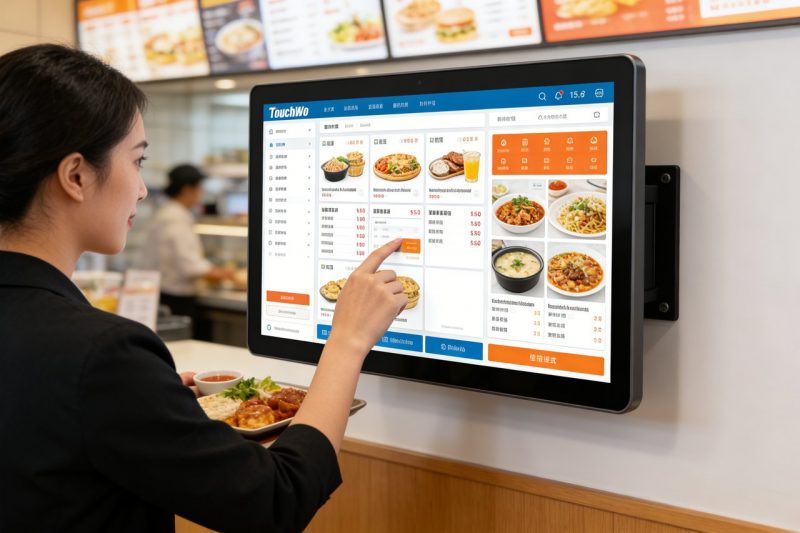
Ці спеціалізовані сенсорні екрани призначені для швидких, безладне середовище смузі-барів, дозволяючи гостям переглядати надбудови, вибрати параметри, і підтвердити своє замовлення за лічені секунди. Проте, не всі сенсорні екрани підходять для кіосків із смузі-барами — деякі з них занадто незграбні, занадто крихкий, або недостатньо зручний для швидкої взаємодії з клієнтом. У цьому посібнику описано, які сенсорні екрани найкраще підходять для вибору надбудови смузі-бару, основні функції, які слід визначити пріоритетом, топові моделі за розміром штанги, поради щодо усунення несправностей, і поширені запитання, які допоможуть вам зробити правильний вибір. Незалежно від того, чи ви керуєте невеликою місцевою крамницею смузі чи жвавою мережею, ці відомості допоможуть вам оптимізувати налаштування, прискорити обслуговування, і змушуйте клієнтів повертатися за ідеальним смузі.
Основні функції, завдяки яким сенсорний екран кіоску надбудови Smoothie добре підходить
Не всі сенсорні екрани призначені для додаткових кіосків із смузі-барами — зверніть увагу на ці функції, які не підлягають обговоренню, щоб забезпечити безперебійну, зручний досвід як для клієнтів, так і для персоналу.
1. Інтуїтивно зрозумілий, Зручний інтерфейс (Швидке налаштування)
Клієнти Smoothie хочуть швидко налаштувати – без складних меню чи заплутаної навігації.
Великий, кольорові піктограми для категорій надбудов (напр., «Білок,” “Насіння,” “Фрукти,«Горіхове масло») полегшити перегляд.
Проста функція вибору дотиком дає змогу клієнтам додавати або видаляти надбудови одним дотиком — не потрібно вводити текст.
Чіткі візуальні ефекти (фотографії надбудов, розміри порцій) допомогти клієнтам швидко приймати рішення, скорочення часу використання кіоску.
Індикатор виконання показує клієнтам, скільки надбудов вони вибрали, запобігання надмірному налаштуванню або пропущеним параметрам.
2. Міцний, Дизайн, який легко очищається (Для смузі-бару)
Смузі-батончики брудні — розливаються, липкі залишки фруктів, і частого прибирання не уникнути.
Стійкість до бризок IP65 захищає від проливання смузі, фруктові соки, та очищувальні спреї, запобігання внутрішнім пошкодженням.
Гладкий, Непориста скляна поверхня очищається дезінфікуючою тканиною за лічені секунди — критично важливо для безпеки харчових продуктів.
9Скло H, стійке до подряпин, стійке до подряпин від нігтів, соломкою, або випадкові удари.
Міцне кріплення кіоску (стільницю або настінний) запобігає чайовим або пошкодженням від зайнятих клієнтів.
3. Яскравий, Антибліковий дисплей (Видно при будь-якому освітленні)
Смузі-бари часто мають яскраве природне освітлення або верхнє освітлення — сенсорні екрани мають легко читатися.
Дисплеї високої яскравості (500+ гниди) забезпечують видимість навіть під прямими сонячними променями (для зовнішніх кіосків або вітрин).
Антиблікове покриття зменшує відблиски, щоб клієнти могли чітко бачити параметри надбудов, не жмурячись.
Регульована яскравість дозволяє налаштувати екран для тьмяного або яскравого середовища, збереження читабельності протягом усього дня.
4. Швидкий час відгуку (Без затримок у години пік)
Під час напруженої ранкової або післяобідньої роботи, відстаючі сенсорні екрани розчаровують клієнтів і сповільнюють обслуговування.
Технологія чуйного дотику (10час відповіді мс або швидше) миттєво реєструє натискання, навіть мокрими або липкими пальцями.
Відсутність затримки під час перемикання між категоріями надбудов або вибору кількох параметрів — критично в періоди великого трафіку.
Легке програмне забезпечення забезпечує безперебійну роботу кіоску, навіть при постійному використанні протягом дня.
5. Сумісність із Smoothie Bar POS & Системи інвентаризації
Ефективність залежить від роботи вашого сенсорного екрана з інструментами, які ви вже використовуєте.
Синхронізується з POS-системою вашого смузі-бару, щоб надсилати індивідуальні замовлення безпосередньо на блендерну станцію, усунення ручного введення.
Інтегрується з інструментами управління запасами, щоб сповіщати персонал, коли надбудови закінчуються (напр., “Мало насіння чіа”).
Автоматично оновлює параметри додатків і ціни, тому клієнти завжди бачать правильний вибір (більше ніяких розчарувань «немає в наявності».).
Найкращі сенсорні екрани для кіоску надбудови Smoothie (За розміром бару)
Найкращий сенсорний екран кіоску надбудови Smoothie залежить від розміру вашого бару, трафік, і потреби налаштування. Ось топові моделі для різних типів бізнесу:
1. Компактний сенсорний екран Elo 10 дюймів (Ідеально підходить для маленьких смузі-барів)
Компактний варіант для невеликих магазинів з обмеженою площею прилавків і помірною прохідністю.
Ключові переваги: 10-дюймовий дисплей, інтуїтивно зрозумілий інтерфейс натискання для вибору, і захист від бризок IP65.
Критичні особливості: Швидкий час відгуку, антиблікове покриття, і синхронізується з базовими системами POS.
Найкраще для: Маленькі смузі-бари по сусідству, кіоски в спортзалах, або висувні підставки для смузі.
Додаткові пільги: Легка конструкція (підходить для невеликих лічильників), 2-рік гарантії, і простий монтаж.
2. Промисловий сенсорний екран ViewSonic 15 дюймів (Ідеально підходить для барів з великою відвідуваністю)
Високоефективна модель для зайнятих смузі-барів із інтенсивним відвідуванням людей (напр., торгові центри, кампуси коледжів).
Ключові переваги: 15-великий дюймовий дисплей, функціональність мультитач (декілька клієнтів можуть взаємодіяти одночасно), і міцний дизайн.
Критичні особливості: Швидкий час відгуку, розширена інтеграція POS, і синхронізація запасів.
Найкраще для: Смузі-мережі з високим трафіком, кіоски торгового центру, або бруски з 50+ клієнтів за годину.
Додаткові пільги: Довговічність промислового рівня, 3-рік гарантії, і антивідблиск, дисплей високої яскравості.
3. Планарний 8-дюймовий бюджетний сенсорний екран (Чудово підходить для нових смузі-барів)
Економічний варіант для нових стартапів або невеликих барів із обмеженим бюджетом.
Ключові переваги: 8-дюймовий дисплей, основні функції вибору надбудов, і захист від бризок IP65.
Критичні особливості: Простий інтерфейс, швидкий час відгуку, і сумісність із POS-системами початкового рівня.
Найкраще для: Нові смузі-бізнеси, спливаючі стенди, або бари, які просто додають кіоски самообслуговування.
Додаткові пільги: Низьке енергоспоживання, швидке налаштування, і 1 рік гарантії від виробника.
4. 12-дюймовий сенсорний екран NEC Premium (Для смузі-барів високого класу)
Модель преміум-класу для барів, які надають пріоритет клієнтському досвіду та стабільності бренду.
Ключові переваги: 12-дюймовий дисплей FHD, настроюваний інтерфейс (додати свій логотип, фірмові кольори), і розширена аналітика.
Критичні особливості: Функція мультитач, сповіщення про запаси в реальному часі, і інтеграція POS.
Найкраще для: Елітні смузі-батончики, кафе, орієнтовані на здоров'я, або ланцюжки, які потрібно відполірувати, досвід фірмового кіоску.
Додаткові пільги: Антибліковий дисплей, водонепроникний корпус, та професійна підтримка встановлення.
Як вибрати правильний сенсорний екран кіоску надбудови Smoothie
Виконайте ці прості кроки, щоб знайти сенсорний екран, який відповідає унікальним потребам і робочому процесу вашого смузі-бару.
1. Оцініть розмір і відвідуваність свого бару
Почніть з оцінки того, скільки у вас місця та скільки клієнтів ви обслуговуєте щодня.
Маленькі бари (10–20 клієнтів/год): Виберіть компактний 8–10-дюймовий сенсорний екран, щоб заощадити простір.
Бари з високою відвідуваністю (30+ клієнтів/год): Виберіть більший 12–15-дюймовий екран із функцією мультидотику, щоб працювати з кількома клієнтами.
Відкритий або світлий простір: Надайте перевагу антивідблиску, високояскраві дисплеї для видимості.
2. Ставте пріоритет довговічності та чистоті
Смузі-батончики безладні — не йдіть на компроміс із сенсорним екраном, який легко чистити та міцний.
Переконайтеся, що екран має захист від бризок за стандартом IP65, щоб впоратися з пролиттям і чищенням.
Вибирайте гладкий, непориста поверхня, яка швидко очищається (має важливе значення для дотримання вимог безпеки харчових продуктів).
Шукайте стійке до подряпин скло, яке витримає щоденне використання та випадкові пошкодження.
3. Перевірте сумісність із вашим POS та інструментами інвентаризації
Уникайте додаткової роботи, вибираючи сенсорний екран, який синхронізується з поточними системами.
Переконайтеся, що він інтегрований із POS-системою вашого смузі-бару, щоб надсилати замовлення безпосередньо на блендерну станцію.
Якщо ви використовуєте програмне забезпечення для управління запасами, переконайтеся, що сенсорний екран сповістить про низький запас надбудови.
Запитайте у виробника, чи може екран автоматично оновлювати параметри надбудови, коли ви змінюєте меню.
4. Перевірте інтерфейс на зручність для клієнтів
Ваші клієнти використовуватимуть сенсорний екран — переконайтеся, що він інтуїтивно зрозумілий для будь-якого віку.
Перевірте, як швидко ви можете вибрати надбудови (слід приймати 30 секунд або менше для повного налаштування).
Шукайте просту навігацію (немає прихованих меню) і чіткі візуальні ефекти (фотографії надбудов допомагають клієнтам прийняти рішення).
Переконайтеся, що екраном легко користуватися мокрими або липкими пальцями (поширений у смузі-барах).
Усунення поширених проблем із сенсорним екраном кіоску надбудови Smoothie
Незначні збої можуть уповільнити роботу служби — ось як їх швидко виправити.
1. Сенсорний екран не реагує (Липкі розливи або залишки)
Протріть екран м’якою тканиною з мікрофібри та a 50/50 суміші дистильованої води та ізопропілового спирту.
Уникайте жорстких чистячих засобів (аміак, відбілювач) які пошкоджують захисне покриття екрана.
Якщо екран усе ще не реагує, вимкніть кіоск (вимкніть і підключіть знову) щоб скинути його.
2. Параметри надбудови не оновлюються (Немає в наявності або нові надбудови)
Перевірте, чи сенсорний екран синхронізовано з системою POS — повторно підключіться, якщо він офлайн.
Оновіть меню у вашій POS-системі; сенсорний екран має автоматично синхронізуватися протягом кількох хвилин.
Перезапустіть кіоск, щоб примусово синхронізувати, якщо оновлення не відображаються.
3. Екран надто тьмяний або відблиски ускладнюють читання
Відрегулюйте яскравість екрана в меню налаштувань (збільшити для освітленого середовища).
Очистіть екран серветкою з мікрофібри, щоб видалити плями, які створюють додаткові відблиски.
Якщо використовується відкритий кіоск, додайте парасольку, щоб заблокувати прямі сонячні промені.
Поширені запитання про сенсорні екрани кіоску надбудови Smoothie
Q1: Чи можуть клієнти вибрати кілька надбудов одночасно на сенсорному екрані?
A1: так! Усі рекомендовані моделі мають функцію багаторазового вибору — клієнти можуть натискати кілька надбудов (напр., білковий порошок + насіння чіа + арахісового масла) за секунди.
Q2: Чи легко чистити сенсорний екран після розливання смузі?
A2: Абсолютно. Стійкість до бризок IP65, непориста поверхня очищається за допомогою дезінфікуючої тканини за лічені секунди — не потрібно чистити.
Q3: Чи потрібно навчати персонал користуватися сенсорним екраном?
A3: Ні — більшість моделей мають інтуїтивно зрозумілий інтерфейс, який вимагає мінімального навчання. Персонал може навчитися вирішувати основні проблеми (напр., екран не реагує) через 10–15 хвилин.
Q4: Чи працюватиме сенсорний екран із наявною POS-системою смузі-бару?
A4: Більшість сенсорних екранів кіоску Smoothie Add-In легко інтегруються з популярними POS-системами (Тости, Квадратний, Конюшина) без необхідності повної заміни.
Q5: Чи можу я налаштувати сенсорний екран відповідно до мого бренду?
A5: Так, моделі преміум-класу дозволяють додати свій логотип, фірмові кольори, і користувацькі повідомлення в інтерфейсі, створення цілісного бренду.
Q6: Як довго працює сенсорний екран у зайнятому смузі-барі?
A6: При належному чищенні та догляді, якісний сенсорний екран служить 3–5 років. Міцний, моделі промислового класу можуть служити ще довше в умовах інтенсивного руху.
Q7: Чи працює сенсорний екран з мокрими або липкими пальцями?
A7: так. Чуйна сенсорна технологія реєструє натискання навіть мокрими чи липкими пальцями — ідеально підходить для клієнтів, які щойно брали фрукти чи смузі.
Висновок
Правильний сенсорний екран Smoothie Add-In Kiosk дає змогу налаштовувати ваші клієнти, оптимізує обслуговування, і зменшує кількість помилок, забезпечуючи ефективну роботу смузі-бару. Надавши перевагу інтуїтивно зрозумілому інтерфейсу, довговічна конструкція, яскравий дисплей, і бездоганна інтеграція, ви можете вибрати сенсорний екран, який відповідає розміру вашої панелі, трафік, і бренд.
Більше ніяких повільних ручних надбудов, розчаровані клієнти, або помилки замовлення. Спеціально створений сенсорний екран Smoothie Add-In Kiosk економить час, підвищує задоволеність клієнтів, і допоможе вам виділитися на конкурентному ринку — це ключ до розвитку вашого бізнесу з виробництва смузі.
Готовий знайти ідеальний сенсорний екран кіоску Smoothie Add-In для вашого бару? Заповніть форму на нашому веб-сайті, щоб повідомити розмір свого бару, щоденний трафік, і існуюча система POS. Наші технічні експерти громадського харчування порекомендують найкращу сумісну модель, надати поради щодо встановлення, і відповісти на будь-які запитання, щоб допомогти вам оптимізувати налаштування та зробити ваших клієнтів задоволеними. Давайте зробимо ваш смузі-бар улюбленим місцем для персоналізації, швидке обслуговування — почніть сьогодні!
