
Ngành nhà hàng không ngừng tìm cách nâng cao hiệu quả dịch vụ và sự hài lòng của khách hàng. Hàng dài và lỗi đặt hàng thủ công thường cản trở hoạt động hàng ngày. Nhiều chủ cửa hàng tìm kiếm những nâng cấp thiết thực để giải quyết những vấn đề này.Tự đặt hàng Ki-ốt đã trở thành một giải pháp thông minh phổ biến trên khắp các không gian phục vụ ăn uống.
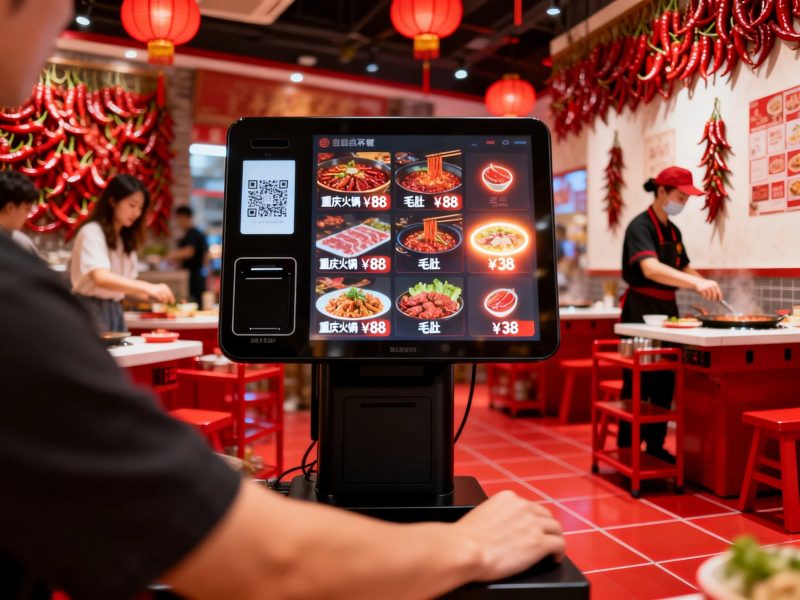
Những thiết bị đầu cuối màn hình cảm ứng này cho phép khách hoàn thành đơn hàng một cách độc lập. Họ cũng cắt giảm khối lượng công việc cho nhân viên tại chỗ và chuẩn hóa quy trình dịch vụ. Bài viết này đề cập đến các chức năng cốt lõi, lợi thế chính, mẹo triển khai và các câu hỏi thường gặp về Kiosk tự đặt hàng.
Chức năng cốt lõi của ki-ốt tự đặt hàng
Ki-ốt tự đặt hàng hiện đại có đầy đủ các tính năng phù hợp với nhu cầu dịch vụ của nhà hàng.
1. Duyệt menu và chọn mục
Người dùng xem danh sách thực phẩm được phân loại và chi tiết giá trên màn hình. Họ nhấn vào biểu tượng để thêm bữa ăn, đồ uống và món ăn phụ theo yêu cầu của họ. Giao diện vẫn đơn giản cho mọi lứa tuổi.
2. Điều chỉnh đơn hàng được cá nhân hóa
Du khách có thể sửa đổi khẩu phần ăn hoặc loại bỏ các thành phần cụ thể. Họ xây dựng các đơn hàng phù hợp với sở thích riêng của mình một cách dễ dàng. Tất cả các thay đổi hiển thị trên màn hình trong thời gian thực.
3. Ứng dụng thanh toán và chiết khấu tự động
Hệ thống tính tổng chi phí ngay sau khi lựa chọn. Nó kích hoạt combo, phiếu giảm giá và ưu đãi giới hạn tự động. Mọi hóa đơn đều chính xác và minh bạch.
4. Hỗ trợ thanh toán nhiều lần
Các ki-ốt này hoạt động với các phương thức thanh toán phổ biến. Khách hoàn tất giao dịch trong vài giây. Hệ thống ghi nhận dữ liệu thanh toán và xác nhận đơn hàng ngay lập tức.
5. Đồng bộ hóa dữ liệu đơn hàng theo thời gian thực
Đơn đặt hàng đã gửi gửi trực tiếp đến thiết bị đầu cuối nhà bếp. Đầu bếp nhận được lời nhắc sản xuất rõ ràng mà không bị chậm trễ. Liên kết này rút ngắn thời gian chờ đợi bữa ăn rất nhiều.
Lợi ích chính của việc sử dụng ki-ốt tự đặt hàng
Nhà hàng đạt được nhiều lợi ích lâu dài sau khi triển khai Kiosk Tự Đặt Hàng.
1. Giảm thời gian xếp hàng của khách hàng
Nhiều ki-ốt phục vụ khách cùng lúc. Họ phân chia lượng người đi bộ đông đúc trong giờ cao điểm. Như vậy, cửa hàng cải thiện doanh thu dịch vụ mỗi ngày.
2. Giảm lỗi đặt hàng thủ công
Khách tự chọn và kiểm tra tất cả các món. Họ tránh thông tin sai lệch giữa khách hàng và nhân viên. Sự thay đổi này giúp giảm số lượng đơn đặt hàng sai và lãng phí thực phẩm.
3. Tối ưu hóa khối lượng công việc của nhân viên
Kiosk đảm nhận công việc đặt hàng lặp đi lặp lại. Nhân viên tập trung vào việc chuẩn bị thức ăn và hướng dẫn tại chỗ. Doanh nghiệp sắp xếp nguồn nhân lực hợp lý hơn.
4. Chuẩn hóa dịch vụ tại cửa hàng
Tất cả các địa điểm đều tuân theo các bước đặt hàng và quy tắc định giá giống nhau. Khách hàng có được trải nghiệm dịch vụ nhất quán. Nó giúp xây dựng hình ảnh cửa hàng chuyên nghiệp.
5. Thu thập dữ liệu kinh doanh hữu ích
Hệ thống kiosk ghi nhận số lượng đơn hàng hàng ngày và các mặt hàng thông dụng. Chủ sở hữu phân tích dữ liệu để điều chỉnh thực đơn và kế hoạch tiếp thị. Nó hỗ trợ quản lý cửa hàng thông minh.
Lời khuyên triển khai thực tế cho ki-ốt tự đặt hàng
Bố cục và cài đặt phù hợp giúp Kiosk tự đặt hàng hoạt động với hiệu suất tốt nhất.
1. Lựa chọn vị trí lắp đặt phù hợp
Đặt ki-ốt ở khu vực sảnh mở. Giữ đủ không gian xung quanh mỗi thiết bị để khách sử dụng. Tránh những góc đông đúc cản trở người dùng truy cập.
2. Cập nhật nội dung thường xuyên
Làm mới menu, giá cả và khuyến mãi thường xuyên. Thông tin lỗi thời sẽ khiến khách hàng bối rối. Chức năng cập nhật từ xa giúp công việc này trở nên đơn giản.
3. Giữ thiết bị sạch sẽ và được bảo trì tốt
Lau màn hình cảm ứng và vỏ mỗi ngày. Loại bỏ vết dầu và bụi để giữ phản ứng cảm ứng nhạy cảm. Chăm sóc cơ bản giúp kéo dài tuổi thọ của thiết bị.
4. Đặt hướng dẫn rõ ràng trên màn hình
Thêm lời nhắc thao tác đơn giản trên giao diện. Người dùng mới có thể học các bước một cách nhanh chóng mà không cần trợ giúp thêm. Nó cải thiện sự trôi chảy trong hoạt động tổng thể.
Các kịch bản ứng dụng phổ biến trong ngành nhà hàng
Kiosk tự đặt hàng phù hợp với hầu hết các loại môi trường dịch vụ ăn uống.
1. Nhà hàng thức ăn nhanh
Dịch vụ nhanh đòi hỏi hiệu quả cao. Ki-ốt xử lý lượng khách hàng lớn và tăng tốc độ xử lý đơn hàng. Chúng là một thiết lập tiêu chuẩn cho chuỗi thức ăn nhanh.
2. Cửa hàng ăn uống bình dân
Những nơi này cần lựa chọn đặt hàng linh hoạt. Ki-ốt hỗ trợ kết hợp bữa ăn đa dạng và tùy chỉnh cá nhân. Họ nâng cao trải nghiệm ăn uống tổng thể.
3. Cửa hàng đồ ăn nhẹ và đồ uống
Không gian phục vụ nhỏ có diện tích quầy hạn chế. Ki-ốt tự đặt hàng nhỏ gọn tiết kiệm không gian sàn và đơn giản hóa dịch vụ hàng ngày.
4. Phòng ăn lớn
Địa điểm lớn phải đối mặt với nhóm khách hàng phân tán. Nhiều ki-ốt giải tán đám đông và giữ trật tự dịch vụ trong thời gian đông khách.
Câu hỏi thường gặp về ki-ốt tự đặt hàng
Q1: Khách hàng có cần nhân viên trợ giúp để sử dụng Kiosk tự đặt hàng không?
A1: KHÔNG. Giao diện có hướng dẫn rõ ràng. Hầu hết người dùng có thể hoàn thành toàn bộ quá trình đặt hàng một cách độc lập.
Q2: Ki-ốt tự đặt hàng có thể hoạt động với hệ thống bếp hiện có không?
A2: Đúng. Model tiêu chuẩn hỗ trợ kết nối dữ liệu mượt mà. Đồng bộ thông tin đơn hàng với các thiết bị hiển thị nhà bếp một cách ổn định.
Q3: Các ki-ốt tự đặt hàng có khó bảo trì không??
A3: KHÔNG. Dọn dẹp hàng ngày và cập nhật nội dung thường xuyên là đủ. Kiểm tra chuyên nghiệp chỉ diễn ra trong khoảng thời gian dài.
Q4: Những ki-ốt này có thể chạy ổn định trong nhiều giờ không??
A4: Đúng. Các thiết bị cấp thương mại hỗ trợ sử dụng liên tục 24 giờ. Họ duy trì hiệu suất ổn định trong giờ làm việc cao điểm.
Q5: Tôi có thể đặt các chương trình khuyến mãi độc quyền của cửa hàng trên các ki-ốt không?
A5: Chắc chắn. Bạn có thể thêm combo tùy chỉnh và quy tắc giảm giá. Hệ thống sẽ tự động áp dụng các ưu đãi này cho các đơn hàng đủ điều kiện.
Phần kết luận
Tóm lại, Ki-ốt tự đặt hàng đã trở thành thiết bị thông minh thiết yếu trong ngành nhà hàng. Họ tích hợp đặt hàng, thanh toán, thanh toán và đồng bộ hóa dữ liệu thành một quy trình làm việc. Họ cắt hàng đợi, giảm sai sót, giảm bớt áp lực của nhân viên và hiện thực hóa dịch vụ tiêu chuẩn hóa. Triển khai hợp lý và bảo trì hàng ngày sẽ tối đa hóa giá trị của chúng cho các doanh nghiệp cung cấp dịch vụ ăn uống.
Nếu bạn dự định cài đặt Kiosk Tự Đặt Hàng hiệu suất cao để nâng cấp hoặc khai trương nhà hàng của mình, vui lòng điền vào mẫu yêu cầu trên trang web chính thức của chúng tôi. Chia sẻ quy mô cửa hàng của bạn, bố trí không gian và nhu cầu chức năng. Đội ngũ chuyên nghiệp của chúng tôi sẽ tạo ra các giải pháp tùy chỉnh và hỗ trợ kỹ thuật đáng tin cậy cho bạn.
