
Các ki-ốt tự phục vụ thống trị ngành bán lẻ hiện đại, không gian phục vụ ăn uống và dịch vụ công cộng. Hầu hết khách hàng dựa vào thẻ và thanh toán di động để thanh toán nhanh. Dù vậy, nhiều người dùng vẫn thích giao dịch tiền mặt để mua hàng hàng ngày.
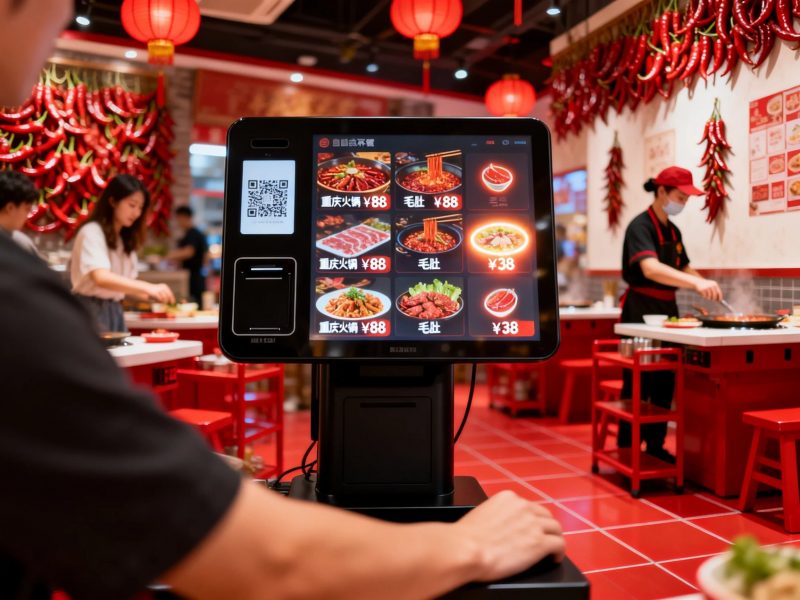
Điều này đặt ra một câu hỏi phổ biến cho người dùng mới. Mọi người thường thắc mắc liệu một ki-ốt thông thường có chấp nhận tiền mặt không. Câu trả lời phụ thuộc hoàn toàn vào cấu hình phần cứng của từng đơn vị kiosk. Trong thực tế, nhiều ki-ốt thương mại hỗ trợ thanh toán bằng tiền mặt, trong khi các mẫu cơ bản chỉ hỗ trợ chế độ không dùng tiền mặt. Bài viết này giải thích các loại ki-ốt hỗ trợ tiền mặt, các bước vận hành, giới hạn và lời khuyên thiết thực.
Các ki-ốt tiêu chuẩn có chấp nhận thanh toán bằng tiền mặt không
Không phải mọi kiốt hỗ trợ chèn tiền mặt. Kiosk thuộc hai loại cốt lõi dựa trên phần cứng thanh toán.
1. Các ki-ốt tự phục vụ có thể dùng tiền mặt
Các ki-ốt thương mại tùy chỉnh tích hợp các mô-đun tiền mặt chuyên nghiệp. Các thiết bị này bao gồm máy nhận tiền và máy nhận tiền xu.. Họ trực tiếp chấp nhận tiền mặt thực tế từ người dùng và xác minh tiền giấy hợp lệ.
2. Các ki-ốt cơ bản chỉ dùng tiền mặt
Các ki-ốt cấp đầu vào loại bỏ phần cứng tiền mặt để cắt giảm chi phí. Họ chỉ hỗ trợ quét di động, quẹt thẻ và thanh toán không tiếp xúc. Những ki-ốt đơn giản này không thể xử lý bất kỳ giao dịch tiền mặt nào.
3. Sự khác biệt ứng dụng chính
Các ki-ốt hỗ trợ tiền mặt phục vụ các cửa hàng công cộng có lượng người qua lại cao. Chúng phù hợp với những người dùng mang theo tiền vật chất. Các ki-ốt không dùng tiền mặt nhắm đến các cửa hàng bán lẻ hiện đại thúc đẩy thanh toán kỹ thuật số.
Cách chèn và thanh toán tiền mặt qua ki-ốt
Các ki-ốt hoạt động bằng tiền mặt sử dụng một cách đơn giản, quy trình chuẩn hóa cho tất cả người dùng. Toàn bộ quy trình làm việc chỉ mất vài giây.
1. Hoàn thành lựa chọn đơn hàng trước
Đầu tiên, duyệt menu hoặc danh sách sản phẩm trên màn hình kiosk. Xác nhận tất cả các hạng mục và kiểm tra số tiền thanh toán cuối cùng trước khi thanh toán.
2. Chọn chế độ thanh toán tiền mặt
Kế tiếp, chọn tùy chọn thanh toán tiền mặt trên trang thanh toán. Màn hình kích hoạt máy chấp nhận tiền mặt tích hợp và hiển thị lời nhắc thanh toán.
3. Chèn tiền giấy hoặc tiền xu
Sau đó, đặt tiền sạch và không bị hư hại vào khe chuyên dụng. Kiosk quét từng hóa đơn ngay lập tức và cập nhật số tiền đã thanh toán.
4. Nhận thay đổi tự động
Nếu bạn trả thêm tiền mặt, ki-ốt tính toán sự thay đổi tự động. Nó phân phối tiền xu hoặc tiền giấy nhỏ thông qua khe trả lại.
5. Xác nhận thanh toán và thu thập biên lai
Cuối cùng, xác minh trạng thái thanh toán đã hoàn thành. In và giữ biên lai để hoàn tất quá trình tự phục vụ đầy đủ.
Các giới hạn chính đối với thanh toán bằng tiền mặt trên ki-ốt
Các ki-ốt hỗ trợ tiền mặt có những hạn chế sử dụng nhỏ để hoạt động ổn định. Người dùng cần tuân theo các quy tắc đơn giản.
1. Chỉ chấp nhận tiền còn nguyên vẹn hợp lệ
Ki-ốt chỉ nhận biết sạch, tiền giấy không bị hư hại. Họ từ chối rách, tiền gấp hoặc tiền giả để tránh lỗi hệ thống.
2. Hỗ trợ phạm vi mệnh giá cố định
Hầu hết các ki-ốt chỉ chấp nhận mệnh giá chính thống chung. Họ hiếm khi hỗ trợ các giá trị tiền giấy cực lớn hoặc hiếm để kiểm soát an toàn.
3. Yêu cầu đổ tiền vào hộp đựng tiền thường xuyên
Nhân viên phải dọn sạch hộp đựng tiền nội bộ thường xuyên. Bộ nhớ đầy sẽ ngăn ki-ốt chấp nhận thanh toán bằng tiền mặt mới.
Lợi ích cốt lõi của ki-ốt tương thích với tiền mặt
Ki-ốt có chức năng thu tiền mang lại dịch vụ linh hoạt hơn cho doanh nghiệp và khách hàng.
1. Phục vụ mọi nhóm khách hàng
Họ hỗ trợ cả thanh toán kỹ thuật số và tiền mặt. Họ phục vụ người dùng lớn tuổi và những người không có công cụ thanh toán di động.
2. Giảm giao dịch thất bại
Thanh toán bằng tiền mặt tránh rủi ro lỗi mạng. Nó duy trì dịch vụ chạy ngay cả với mạng thiết bị yếu hoặc ngoại tuyến.
3. Cải thiện tính toàn diện của dịch vụ cửa hàng
Chế độ thanh toán kép loại bỏ rào cản thanh toán. Chúng thúc đẩy sự hài lòng của khách hàng và tăng tỷ lệ giao dịch thực tế.
Câu hỏi thường gặp về việc đưa tiền mặt vào ki-ốt
Q1: Tất cả các ki-ốt có thể nhận thanh toán bằng tiền mặt không?
A1: KHÔNG. Chỉ các ki-ốt có mô-đun chấp nhận tiền mặt tích hợp mới hỗ trợ chèn tiền mặt. Các ki-ốt không dùng tiền mặt cơ bản chỉ xử lý các giao dịch kỹ thuật số.
Q2: Ki-ốt có thể đổi tiền mặt chính xác không?
A2: Đúng. Các ki-ốt hỗ trợ tiền mặt đủ điều kiện tính toán thay đổi một cách chính xác. Họ phân phát đúng tiền xu và tiền giấy sau mỗi lần thanh toán vượt mức.
Q3: Tại sao ki-ốt từ chối tiền mặt của tôi?
A3: Bị hư hại, tiền giấy bẩn hoặc bị gấp nhiều sẽ bị từ chối. Ngoài ra, hộp đựng tiền đầy đủ cũng ngừng nhận tiền mới.
Q4: Các ki-ốt tiền mặt có an toàn cho việc sử dụng kinh doanh không?
A4: Đúng. Những ki-ốt này có niêm phong két đựng tiền chống trộm và hồ sơ giao dịch. Họ đảm bảo lưu trữ tiền mặt an toàn và nguồn vốn có thể truy nguyên.
Q5: Tôi có thể tùy chỉnh các ki-ốt để thanh toán bằng tiền mặt và kỹ thuật số không?
A5: Tuyệt đối. Bạn có thể thêm mô-đun tiền mặt vào các ki-ốt tiêu chuẩn. Thiết kế chế độ kép này phù hợp hoàn hảo với thói quen thanh toán đa dạng của khách hàng.
Phần kết luận
Để kết luận, bạn có thể bỏ tiền mặt vào ki-ốt nếu thiết bị có phần cứng nhận tiền mặt chuyên nghiệp. Các ki-ốt tương thích với tiền mặt hỗ trợ chèn tiền giấy, dịch vụ thay đổi tự động và thanh toán ngoại tuyến. Chúng bổ sung cho các chức năng không dùng tiền mặt và mang lại trải nghiệm tự phục vụ toàn diện. Trong khi đó, ki-ốt cơ bản chỉ hỗ trợ thanh toán kỹ thuật số và không thể xử lý tiền mặt thực tế. Các ki-ốt chế độ kép cải thiện tính linh hoạt của dịch vụ và mở rộng phạm vi phủ sóng khách hàng cho các doanh nghiệp hiện đại.
Nếu bạn cần các ki-ốt chế độ kép tùy chỉnh hỗ trợ cả thanh toán bằng tiền mặt và kỹ thuật số để nâng cấp cửa hàng của bạn, vui lòng điền vào mẫu yêu cầu trên trang web chính thức của chúng tôi. Chia sẻ nhu cầu về chức năng thanh toán và tình huống kinh doanh của bạn, và nhóm của chúng tôi sẽ cung cấp các giải pháp kiosk phù hợp chuyên nghiệp.
