
تهيمن أكشاك الخدمة الذاتية على تجارة التجزئة الحديثة, أماكن تقديم الطعام والخدمة العامة. يعتمد معظم العملاء على الدفع بالبطاقة والهاتف المحمول لإجراء عملية الدفع السريعة. ومع ذلك, لا يزال العديد من المستخدمين يفضلون المعاملات النقدية للمشتريات اليومية.
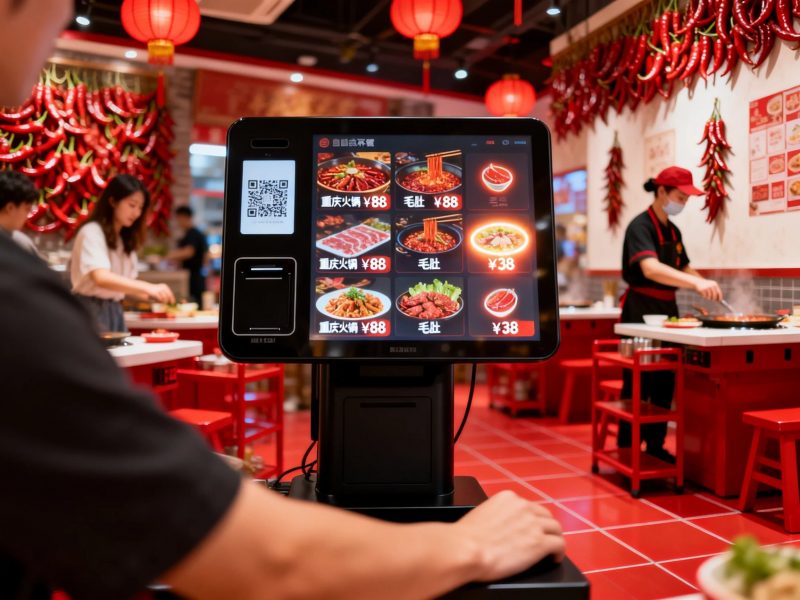
وهذا يثير سؤالاً شائعًا للمستخدمين الجدد. كثيرًا ما يتساءل الناس عما إذا كان الأكشاك العادية تقبل النقد المادي. تعتمد الإجابة كليًا على تكوين الأجهزة لكل وحدة كشك. في الحقيقة, تدعم العديد من الأكشاك التجارية الدفع النقدي, بينما تدعم النماذج الأساسية الأوضاع غير النقدية فقط. تشرح هذه المقالة أنواع الأكشاك المدعومة نقدًا, خطوات التشغيل, الحدود والنصائح العملية.
هل تقبل الأكشاك القياسية الدفع النقدي؟
ليس كل الأكشاك يدعم الإدراج النقدي. تنقسم الأكشاك إلى فئتين أساسيتين بناءً على أجهزة الدفع.
1. أكشاك الخدمة الذاتية التي تعمل بالدفع النقدي
تدمج الأكشاك التجارية المخصصة وحدات نقدية احترافية. وتشمل هذه الأجهزة أجهزة قبول الفواتير وأجهزة استقبال العملات المعدنية. إنهم يقبلون النقد المادي مباشرة من المستخدمين ويتحققون من الأوراق النقدية الصالحة.
2. الأكشاك الأساسية غير النقدية فقط
تقوم الأكشاك المبتدئة بإزالة الأجهزة النقدية لخفض التكاليف. أنها تدعم فقط عمليات المسح المحمول, الضربات الشديدة للبطاقة والمدفوعات بدون تلامس. لا تستطيع هذه الأكشاك البسيطة معالجة أي معاملات نقدية.
3. الاختلافات الرئيسية في التطبيق
تخدم الأكشاك التي تدعم النقد المتاجر العامة ذات الحركة المرورية العالية. إنها تناسب المستخدمين الذين يحملون أموالًا مادية. تستهدف الأكشاك غير النقدية متاجر البيع بالتجزئة الحديثة التي تروج للمدفوعات الرقمية.
كيفية إدراج ودفع النقود من خلال كشك
تستخدم الأكشاك التي تعمل نقدًا طريقة بسيطة, عملية موحدة لجميع المستخدمين. يستغرق سير العمل بأكمله بضع ثوانٍ فقط.
1. أكمل اختيار الطلب أولاً
أولاً, تصفح القوائم أو قوائم المنتجات على شاشة الكشك. قم بتأكيد كافة العناصر والتحقق من المبلغ النهائي المستحق قبل السداد.
2. اختر طريقة الدفع النقدي
التالي, اختر خيار الدفع النقدي في صفحة الخروج. تقوم الشاشة بتنشيط متقبل النقد المدمج وتعرض مطالبات الدفع.
3. أدخل الأوراق النقدية أو العملات المعدنية
ثم, ضع النقود النظيفة وغير التالفة في الفتحة المخصصة. يقوم الكشك بمسح كل فاتورة على الفور وتحديث المبلغ المدفوع.
4. تلقي التغيير التلقائي
إذا كنت تدفع نقدا اضافية, يقوم الكشك بحساب التغيير تلقائيًا. يقوم بتوزيع العملات المعدنية أو الأوراق النقدية الصغيرة من خلال فتحة الإرجاع.
5. تأكيد الدفع واستلام الإيصال
أخيراً, التحقق من حالة الدفع المكتملة. قم بطباعة الإيصال والاحتفاظ به لإنهاء عملية الخدمة الذاتية الكاملة.
الحدود الرئيسية للمدفوعات النقدية على الأكشاك
الأكشاك التي تدعم الدفع النقدي لديها قيود استخدام صغيرة من أجل التشغيل المستقر. يحتاج المستخدمون إلى اتباع قواعد بسيطة.
1. قبول فقط العملة السليمة الصحيحة
الأكشاك تعترف بالنظافة فقط, الأوراق النقدية غير التالفة. يرفضون ممزقة, النقود المطوية أو المزيفة لتجنب أخطاء النظام.
2. دعم نطاقات طائفة ثابتة
تقبل معظم الأكشاك فقط الطوائف السائدة. نادرًا ما يدعمون قيم الأوراق النقدية الكبيرة جدًا أو النادرة للتحكم في السلامة.
3. تتطلب تفريغ صندوق النقد بشكل منتظم
يجب على الموظفين إفراغ صناديق النقد الداخلية بشكل روتيني. سيؤدي التخزين الكامل إلى منع الكشك من قبول المدفوعات النقدية الجديدة.
الفوائد الأساسية للأكشاك المتوافقة مع النقد
توفر الأكشاك ذات الوظائف النقدية خدمة أكثر مرونة للشركات والعملاء.
1. خدمة جميع فئات العملاء
أنها تدعم كلاً من المدفوعات الرقمية والنقدية. إنها تلبي احتياجات المستخدمين المسنين والأشخاص الذين ليس لديهم أدوات الدفع عبر الهاتف المحمول.
2. تقليل المعاملات الفاشلة
الدفع النقدي يتجنب مخاطر فشل الشبكة. فهو يحافظ على تشغيل الخدمة حتى مع شبكات الأجهزة الضعيفة أو غير المتصلة بالإنترنت.
3. تحسين شمولية خدمة المتجر
تعمل طرق الدفع المزدوجة على إزالة حواجز الدفع. أنها تعزز رضا العملاء وزيادة معدلات المعاملات الفعلية.
الأسئلة الشائعة حول وضع النقود في الكشك
س 1: يمكن لجميع الأكشاك قبول المدفوعات النقدية?
A1: لا. الأكشاك التي تحتوي على وحدات متقبلة للنقد مدمجة فقط هي التي تدعم إدخال النقود. تقوم الأكشاك الأساسية غير النقدية بمعالجة المعاملات الرقمية فقط.
Q2: يمكن للأكشاك أن تعطي تغييرًا نقديًا دقيقًا?
A2: نعم. تقوم الأكشاك المؤهلة التي تدعم النقد بحساب التغيير بدقة. يقومون بتوزيع العملات المعدنية والأوراق النقدية الصحيحة بعد كل دفعة زائدة.
س 3: لماذا يرفض الكشك أموالي النقدية؟?
A3: تالف, الأوراق النقدية المتسخة أو المطوية بشدة تؤدي إلى الرفض. فضلاً عن ذلك, صناديق تخزين النقود الكاملة تمنع أيضًا تناول النقود الجديدة.
س 4: هل أكشاك النقد آمنة للاستخدام التجاري؟?
A4: نعم. قامت هذه الأكشاك بإغلاق صناديق النقد وسجلات المعاملات المضادة للسرقة. أنها تضمن تخزين نقدي آمن وأموال يمكن تتبعها.
س5: هل يمكنني تخصيص الأكشاك للمدفوعات النقدية والرقمية؟?
A5: قطعاً. يمكنك إضافة وحدات نقدية إلى الأكشاك القياسية. يناسب هذا التصميم ذو الوضع المزدوج عادات الدفع المتنوعة للعملاء بشكل مثالي.
خاتمة
في الختام, يمكنك وضع النقود في الكشك إذا كان الجهاز يحتوي على أجهزة احترافية لقبول النقود. الأكشاك المتوافقة مع النقد تدعم إدراج الأوراق النقدية, خدمات التغيير التلقائي والدفع دون اتصال بالإنترنت. إنها تكمل الوظائف غير النقدية وتقدم تجارب خدمة ذاتية شاملة. في أثناء, الأكشاك الأساسية تدعم فقط المدفوعات الرقمية ولا يمكنها معالجة النقد المادي. تعمل الأكشاك ذات الوضع المزدوج على تحسين مرونة الخدمة وتوسيع تغطية العملاء للشركات الحديثة.
إذا كنت بحاجة إلى أكشاك مخصصة ذات الوضع المزدوج تدعم الدفعات النقدية والرقمية لترقية متجرك, يرجى ملء نموذج الاستفسار على موقعنا الرسمي. شارك احتياجات وظيفة الدفع الخاصة بك وسيناريوهات العمل, وسيقدم فريقنا حلول الأكشاك الاحترافية المصممة خصيصًا.
