
Geleneksel masaüstü monitörler kullanıcılar için yalnızca görsel içerik görüntüler. Her işlem adımını tamamlamak için harici farelere ve klavyelere güveniyorlar. Bu ekstra araçlar endüstriyel kontrol için iş akışlarını yavaşlatır, perakende satış hizmeti ve ofis görevleri.Bu nedenle, Dokunmatik Monitörler, modern endüstrilerde ana akım etkileşimli görüntüleme cihazları haline geldi.
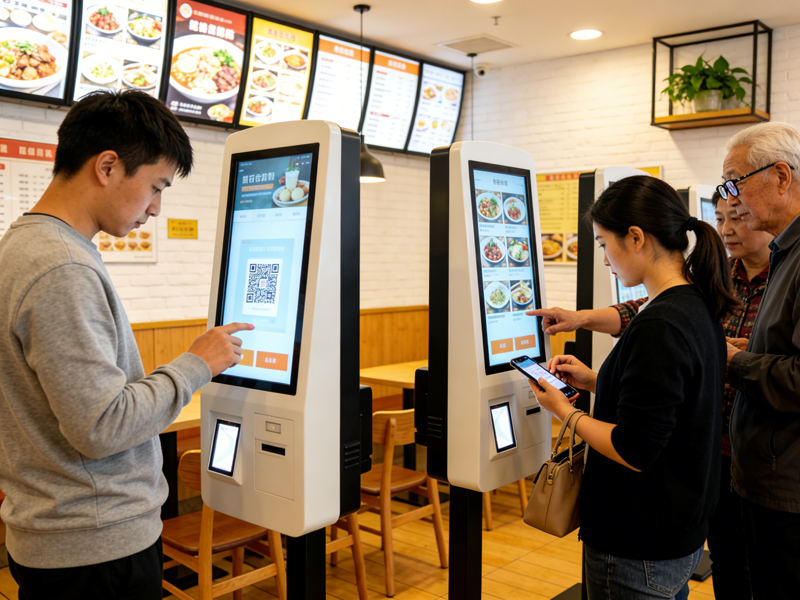
Ekran işlevini ve dokunmatik kontrolü tek bir ünitede birleştiriyor. Ek olarak, insan-bilgisayar etkileşimini basitleştirir ve ekstra aksesuar maliyetlerinden tasarruf sağlar. Bu kılavuz tanımı açıkça açıklamaktadır, çalışma prensipleri, yaygın türler, Dokunmatik monitörün temel avantajları ve kullanım senaryoları.
Dokunmatik Monitör Tam Olarak Nedir?
Dokunmatik monitörler hepsi bir arada ekran yerleşik dokunma algılama katmanlarına sahip cihazlar. Normal ekranlardan ve bağımsız ekranlardan farklıdırlar dokunmatik paneller.
1. Entegre çift fonksiyonlu tasarım
Birinci, dokunmatik monitör net görsel çıktı sağlar. Bu sırada, doğrudan dokunmayı destekliyorlar, Ekran yüzeyinde kaydırma ve parametre ayarı. Kullanıcılar çoğu günlük işlem için harici giriş cihazlarını atlar.
2. Bağımsız tak ve çalıştır cihazlar
Bölünmüş dokunmatik ekran kitlerinin aksine, dokunmatik monitörler komple bitmiş ürünlerdir. Yerleşik kontrol panoları var, sinyal portları ve koruyucu yapılar. Böylece, kullanıcılar basit bağlantıdan sonra bunları doğrudan yükleyebilir ve kullanabilirler.
3. Ticari ve endüstriyel konumlandırma
Dokunmatik monitörler profesyonel senaryo kullanımına odaklanır. Uzun saatler süren sürekli çalışmaya uyum sağlarlar, sıradan tüketici ekranlarının aksine. Endüstriyel atölyelere hizmet veriyorlar, perakende terminalleri ve akıllı kontrol odaları mükemmel.
Dokunmatik Monitörler Nasıl Çalışır? (Temel Çalışma Süreci)
Tüm standart dokunmatik monitörler basit bir, Her dokunma eylemi için istikrarlı dört adımlı çalışma döngüsü.
1. Fiziksel algılama sinyallerini tetikleyin
Parmaklar veya onaylı araçlar ekrana dokunduğunda, algılama katmanı küçük fiziksel değişiklikler yaratır. Bu değişiklikler kapasitans değişimlerini içerir, basınç teması veya kızılötesi ışık blokajı.
2. Doğru koordinat verilerini yakalayın
Sonraki, dahili sensörler bu ince değişiklikleri anında yakalar. Tam dokunma konumunu ve operasyon takibini gerçek zamanlı olarak hesaplarlar. Bu işlemin tamamlanması yalnızca milisaniye sürer.
3. Verileri ana sisteme aktarın
Daha sonra, Yerleşik kontrol panosu, koordinat verilerini bağlı bilgisayara veya ana cihaza gönderir. Kararlı sinyalleri gecikme veya veri kaybı olmadan iletir.
4. Komutları ve geri bildirimleri yürütme
Nihayet, ana sistem dokunma talimatına yanıt verir. Monitör, başarılı çalışmayı onaylamak için ekran içeriğini günceller. Bu döngü tam bir insan-bilgisayar etkileşimini oluşturur.
Yaygın Dokunmatik Monitör Türleri ve Çalışma Özellikleri
Farklı dokunmatik monitör türleri, farklı çalışma ortamları için benzersiz algılama teknolojisini benimser.
1. Kapasitif Dokunmatik Monitörler
Kapasitif modeller, temas noktalarını bulmak için insan vücudundaki mikro akımı algılar. Ultra hızlı yanıt ve sorunsuz çalışma özelliğine sahiptirler. Üstelik, esnek ofis ve ticari kullanım için çoklu dokunma hareketlerini desteklerler.
2. Dirençli Dokunmatik Monitörler
Dirençli tipler, dokunma sinyallerini etkinleştirmek için fiziksel basınca dayanır. Eldivenli elleri ve kalemle çalışmayı kabul ediyorlar. Buradan, tozlu yakışıyorlar, nemli ve sert endüstriyel atölye sahneleri.
3. Kızılötesi Dokunmatik Monitörler
Kızılötesi monitörler konumlandırma için çevreleyen kızılötesi ışık ızgaralarını kullanır. Güçlü anti-parazit yeteneğine sahipler. Ayrıca, uzun vadeli istikrarlı performansla büyük boyutlu ekran uygulamalarını desteklerler.
Profesyonel Dokunmatik Monitör Kullanmanın Temel Avantajları
Dokunmatik monitörler, geleneksel ekran ekipmanlarıyla karşılaştırıldığında benzersiz pratik değer sağlar.
1. Operasyon iş akışlarını basitleştirin
Kullanıcılar ayarları ve veri kontrollerini doğrudan ekrana dokunarak tamamlar. Gereksiz fare ve klavye adımlarını kestiler. Sırayla, günlük iş verimliliği gözle görülür şekilde artar.
2. Kurulum ve alan maliyetlerinden tasarruf edin
Tek bir entegre cihaz, birden fazla dağınık aksesuarın yerini alır. Masaüstünü ve kontrol kabini alanını düzenler. Ayrıca yerinde kurulum için kablolama karmaşıklığını da azaltır.
3. Ekipman çalışma doğruluğunu iyileştirin
Doğrudan dokunmatik kontrol, manuel çalıştırma hatalarını azaltır. Çalışanlar makine parametrelerini ve verilerini daha hassas bir şekilde ayarlıyor. Bu avantaj üretim ve hizmet kalitesini istikrara kavuşturur.
4. Çeşitli çalışma senaryolarına uyum sağlayın
Ofislere uygun farklı dokunmatik monitör versiyonları, perakende, endüstriyel ve kamusal alanlar. Özelleştirilmiş toz geçirmez, su geçirmez ve geniş sıcaklıktaki modeller zorlu ortam taleplerini karşılar.
Dokunmatik Monitörler Hakkında SSS
1. Çeyrek: Dokunmatik monitörler ile normal monitörler arasındaki fark nedir?
A1: Dokunmatik monitörlerde doğrudan kontrol için yerleşik algılama katmanları bulunur. Normal monitörler yalnızca görüntüleri gösterir ve çalışması için harici giriş aygıtlarına ihtiyaç duyarlar.
2. Çeyrek: Dokunmatik monitörler tüm sıradan bilgisayarlarla çalışabilir mi??
A2: Evet. Çoğu dokunmatik monitör evrensel arayüzleri benimser. Ana masaüstü ve dizüstü cihazlarla tak ve çalıştır kullanımını desteklerler.
3. Çeyrek: Endüstriyel dokunmatik monitörler ticari modellerden farklı mıdır??
A3: Evet. Endüstriyel dokunmatik monitörler daha kalın koruyucu yapılara sahiptir. Toza direniyorlar, Uzun süreli atölye çalışması için titreşim ve sıcaklık değişiklikleri.
4. Çeyrek: Dokunmatik monitörlerin profesyonel kuruluma ihtiyacı var mı??
A4: HAYIR. Basit kablolamayı ve sabit montajı desteklerler. Sıradan bakım personeli kurulumu ve hata ayıklamayı hızlı bir şekilde tamamlayabilir.
S5: Dokunmatik monitörler eldivenle çalışmayı destekler?
A5: Dirençli ve kızılötesi dokunmatik monitörler eldivenli kullanımı destekler. Standart kapasitif modeller yalnızca çıplak parmakla çalışmaya uyum sağlar.
Çözüm
Kısacası, Dokunmatik Monitörler, ekran ve dokunmatik kontrol işlevlerini birleştiren entegre etkileşimli görüntüleme cihazlarıdır. Sinyal tetikleme yoluyla çalışırlar, veri yakalama, iletim ve komut yürütme. Çoklu tipler ofise uyum sağlar, Yüksek stabilite ve rahatlıkla ticari ve endüstriyel senaryolar. İş akışlarını basitleştirirler, yerden tasarruf edin ve operasyonel hataları etkili bir şekilde azaltın.
Görüntüleme ekipmanınızı yükseltmeyi veya projeniz için özelleştirilmiş Dokunmatik Monitörler satın almayı planlıyorsanız, bizimle iletişime geçmekten çekinmeyin. Lütfen resmi web sitemizdeki danışma formunu doldurun., ve ekran boyutunuzu bırakın, kullanım ortamı ve işlevsel gereksinimler. Profesyonel ekibimiz size hedefe yönelik ürün çözümleri ve ayrıntılı teknik parametreler sunacaktır..