
Batony smoothie lubią personalizację – klienci uwielbiają wybierać bazę, owoce, i dodatki (pomyśl o proszku białkowym, nasiona chia, lub masła orzechowe) aby stworzyć napój, który będzie ich wyjątkowy. Ręczny wybór dodatków – gdy klienci informują pracowników o swoich preferencjach lub zaznaczają papierową listę kontrolną – spowalnia obsługę, prowadzi do błędów, i frustruje gości w godzinach szczytu. Ekran dotykowy kiosku z dodatkiem Smoothie rozwiązuje te problemy, oddając personalizację bezpośrednio w ręce klientów.
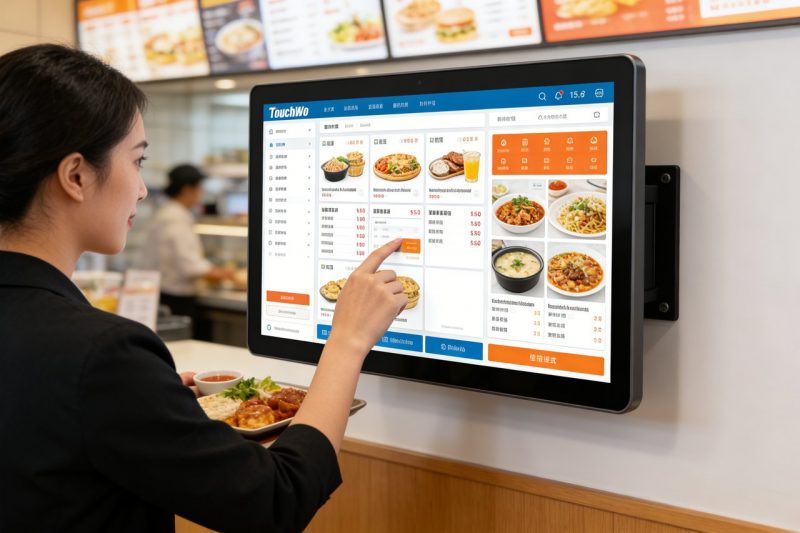
Te wyspecjalizowane ekrany dotykowe są przeznaczone dla osób dynamicznych, niechlujne otoczenie barów smoothie, umożliwiając gościom przeglądanie dodatków, wybierz opcje, i potwierdź zamówienie w ciągu kilku sekund. Jednakże, nie wszystkie ekrany dotykowe pasują do kiosków z barami smoothie — niektóre są zbyt nieporęczne, zbyt kruche, lub nie jest wystarczająco przyjazny dla użytkownika, aby umożliwić szybką interakcję z klientem. W tym przewodniku omówiono, które ekrany dotykowe najlepiej sprawdzają się w przypadku wyboru dodatku do batonu smoothie, kluczowe funkcje, którym należy nadać priorytet, najlepsze modele według rozmiaru paska, wskazówki dotyczące rozwiązywania problemów, oraz często zadawane pytania, które pomogą Ci dokonać właściwego wyboru. Niezależnie od tego, czy prowadzisz mały lokalny sklep ze smoothie, czy ruchliwą sieć, te spostrzeżenia pomogą Ci usprawnić dostosowywanie, przyspieszyć obsługę, i spraw, aby klienci wracali po doskonały koktajl.
Kluczowe funkcje, które sprawiają, że ekran dotykowy kiosku z dodatkami Smoothie jest dobrze dopasowany
Nie wszystkie ekrany dotykowe są przeznaczone do kiosków z dodatkowymi batonami smoothie — szukaj tych niepodlegających negocjacjom funkcji, aby zapewnić bezproblemową obsługę, przyjazne dla użytkownika doświadczenie zarówno dla klientów, jak i personelu.
1. Intuicyjny, Przyjazny dla klienta interfejs (Szybka personalizacja)
Klienci smoothie chcą szybko dostosowywać ofertę – bez skomplikowanych menu i mylącej nawigacji.
Duży, kolorowe ikony kategorii dodatków (np., "Białko,” „Nasiona,” „Owoce,„Masła orzechowe”) ułatwiają przeglądanie.
Prosta funkcja „dotknij, aby wybrać” umożliwia klientom dodawanie i usuwanie dodatków jednym dotknięciem — bez konieczności pisania.
Wyraźne efekty wizualne (zdjęcia dodatków, rozmiary porcji) pomóż klientom szybko podejmować decyzje, skrócenie czasu korzystania z kiosku.
Pasek postępu pokazuje klientom, ile dodatków wybrali, zapobieganie nadmiernemu dostosowywaniu lub pominięciu opcji.
2. Wytrzymały, Konstrukcja łatwa w czyszczeniu (Do smoothie barowych)
Batony smoothie są brudne – rozlane ciecze, lepkie pozostałości owoców, i częste czyszczenie są nieuniknione.
Odporność na zachlapania IP65 chroni przed rozlaniem smoothie, soki owocowe, i spraye czyszczące, zapobieganie uszkodzeniom wewnętrznym.
Gładki, nieporowatą powierzchnię szklaną można w ciągu kilku sekund wyczyścić ściereczką dezynfekcyjną – co ma kluczowe znaczenie dla bezpieczeństwa żywności.
9Szkło odporne na zarysowania H jest odporne na zarysowania od paznokci, słomki, lub przypadkowe uderzenia.
Solidne mocowanie kiosku (na blacie lub na ścianie) zapobiega przewróceniu się lub uszkodzeniom spowodowanym przez zapracowanych klientów.
3. Jasny, Wyświetlacz przeciwodblaskowy (Widoczne w każdym oświetleniu)
Batony smoothie często mają jasne, naturalne światło lub oświetlenie od góry — ekrany dotykowe muszą być łatwe do odczytania.
Wyświetlacze o wysokiej jasności (500+ gnidy) zapewniają widoczność nawet w pełnym słońcu (do kiosków zewnętrznych lub witryn sklepowych).
Powłoka przeciwodblaskowa redukuje odbicia, dzięki czemu klienci mogą wyraźnie zobaczyć opcje dodatków, bez mrużenia oczu.
Regulowana jasność pozwala dostosować ekran do ciemnych lub jasnych środowisk, utrzymanie czytelności przez cały dzień.
4. Szybki czas reakcji (Brak opóźnień w godzinach szczytu)
Podczas pracowitych porannych lub popołudniowych szczytów, opóźnione ekrany dotykowe frustrują klientów i spowalniają obsługę.
Responsywna technologia dotykowa (10ms lub szybszy czas reakcji) natychmiast rejestruje dotknięcia, nawet mokrymi lub lepkimi palcami.
Brak opóźnień podczas przełączania między kategoriami dodatków lub wybierania wielu opcji – ma to kluczowe znaczenie w okresach dużego ruchu.
Lekkie oprogramowanie zapewnia płynne działanie kiosku, nawet przy ciągłym użytkowaniu przez cały dzień.
5. Kompatybilność z Smoothie Bar POS & Systemy magazynowe
Wydajność zależy od tego, czy ekran dotykowy współpracuje z narzędziami, z których już korzystasz.
Synchronizuje się z systemem POS smoothie barów, aby wysyłać niestandardowe zamówienia bezpośrednio do stacji blendera, eliminując ręczne wprowadzanie.
Integruje się z narzędziami do zarządzania zapasami, aby ostrzegać personel, gdy kończy się ilość dodatków (np., “Mało nasion chia”).
Automatycznie aktualizuje opcje dodatków i ceny, dzięki czemu klienci zawsze widzą trafne wybory (koniec z rozczarowaniami związanymi z brakami w magazynie).
Najlepsze ekrany dotykowe w kioskach z dodatkami do smoothie (Według rozmiaru paska)
Najlepszy ekran dotykowy kiosku z dodatkami Smoothie zależy od rozmiaru paska, ruch drogowy, i potrzeby dostosowywania. Oto najlepsze modele dla różnych rodzajów działalności:
1. Kompaktowy ekran dotykowy Elo 10”. (Idealny do małych batoników smoothie)
Opcja oszczędzająca miejsce dla małych sklepów z ograniczoną przestrzenią na ladach i umiarkowanym ruchem.
Kluczowe korzyści: 10-calowy wyświetlacz, intuicyjny interfejs typu „dotknij, aby wybrać”., i odporność na zachlapania IP65.
Funkcje krytyczne: Szybki czas reakcji, powłoka przeciwodblaskowa, i synchronizuje się z podstawowymi systemami POS.
Najlepsze dla: Małe sąsiedzkie bary smoothie, kioski na siłowniach, lub wyskakujące stojaki na smoothie.
Dodatkowe korzyści: Lekka konstrukcja (pasuje do małych lad), 2-rok gwarancji, i łatwy montaż.
2. Przemysłowy ekran dotykowy ViewSonic 15”. (Idealny do barów o dużym natężeniu ruchu)
Model o wysokiej wydajności dla ruchliwych barów smoothie o dużym natężeniu ruchu pieszego (np., centra handlowe, kampusy uniwersyteckie).
Kluczowe korzyści: 15-calowy duży wyświetlacz, funkcjonalność wielodotyku (wielu klientów może jednocześnie wchodzić w interakcję), i wytrzymała konstrukcja.
Funkcje krytyczne: Szybki czas reakcji, zaawansowana integracja POS, i synchronizacja zapasów.
Najlepsze dla: Łańcuchy smoothie o dużym natężeniu ruchu, kioski w centrach handlowych, lub bary z 50+ klientów na godzinę.
Dodatkowe korzyści: Trwałość na poziomie przemysłowym, 3-rok gwarancji, i przeciwodblaskowe, wyświetlacz o wysokiej jasności.
3. Planarny, niedrogi ekran dotykowy o przekątnej 8 cali (Świetne do nowych batonów smoothie)
Ekonomiczna opcja dla nowych startupów lub małych barów z napiętym budżetem.
Kluczowe korzyści: 8-calowy wyświetlacz, podstawowe funkcje wyboru dodatków, i odporność na zachlapania IP65.
Funkcje krytyczne: Prosty interfejs, szybki czas reakcji, i kompatybilność z podstawowymi systemami POS.
Najlepsze dla: Nowe firmy produkujące smoothie, stojaki typu pop-up, lub bary, do których dodano kioski samoobsługowe.
Dodatkowe korzyści: Niskie zużycie energii, szybka konfiguracja, oraz roczną gwarancję producenta.
4. Wysokiej klasy ekran dotykowy NEC o przekątnej 12 cali (Do wysokiej klasy batonów smoothie)
Model premium dla barów, dla których priorytetem jest doświadczenie klienta i spójność marki.
Kluczowe korzyści: 12-calowy wyświetlacz FHD, konfigurowalny interfejs (dodaj swoje logo, kolory marki), i zaawansowaną analitykę.
Funkcje krytyczne: Funkcjonalność wielodotykowa, alerty dotyczące zapasów w czasie rzeczywistym, i integracja punktów sprzedaży.
Najlepsze dla: Wysokiej klasy batony smoothie, kawiarnie prozdrowotne, lub łańcuchy, które wymagają wypolerowania, doświadczenie kiosku z marką.
Dodatkowe korzyści: Wyświetlacz przeciwodblaskowy, wodoodporna obudowa, i profesjonalną pomoc montażową.
Jak wybrać odpowiedni ekran dotykowy kiosku z dodatkiem smoothie
Wykonaj te proste kroki, aby znaleźć ekran dotykowy pasujący do unikalnych potrzeb i sposobu pracy Twojego baru smoothie.
1. Oceń wielkość i ruch w swoim barze
Zacznij od oceny, ile masz miejsca i ilu klientów obsługujesz dziennie.
Małe bary (10–20 klientów/godz): Wybierz kompaktowy ekran dotykowy o przekątnej 8–10 cali, aby zaoszczędzić miejsce na blacie.
Bary o dużym natężeniu ruchu (30+ klientów/godz): Wybierz większy ekran o przekątnej 12–15 cali z funkcją wielodotyku, aby obsługiwać wielu klientów.
Miejsca na zewnątrz lub jasne: Priorytetowo traktuj ochronę przed odblaskami, wyświetlacze o wysokiej jasności zapewniające widoczność.
2. Priorytetem jest trwałość i czystość
Batony smoothie są brudne — nie idź na kompromis w sprawie ekranu dotykowego, który jest łatwy do czyszczenia i wytrzymały.
Upewnij się, że ekran ma odporność na zachlapania IP65, aby poradzić sobie z rozlaniem i czyszczeniem.
Wybierz gładką, nieporowata powierzchnia, którą można szybko wyczyścić (ma kluczowe znaczenie dla zgodności z wymogami bezpieczeństwa żywności).
Szukaj szkła odpornego na zarysowania, które wytrzyma codzienne użytkowanie i przypadkowe uszkodzenia.
3. Sprawdź zgodność z narzędziami POS i magazynowymi
Unikaj dodatkowej pracy, wybierając ekran dotykowy, który synchronizuje się z obecnymi systemami.
Potwierdź, że integruje się z systemem POS Twojego smoothie baru, aby wysyłać zamówienia bezpośrednio do stacji blendera.
Jeśli korzystasz z oprogramowania do zarządzania zapasami, upewnij się, że ekran dotykowy powiadamia Cię o niskim stanie zapasów dodatków.
Zapytaj producenta, czy ekran może automatycznie aktualizować opcje dodatków po zmianie menu.
4. Przetestuj interfejs pod kątem przyjazności dla klienta
Twoi klienci będą korzystać z ekranu dotykowego – zadbaj o to, aby był on intuicyjny dla osób w każdym wieku.
Sprawdź, jak szybko możesz wybierać dodatki (powinien wziąć 30 sekund lub mniej, aby uzyskać pełną personalizację).
Poszukaj prostej nawigacji (żadnych ukrytych menu) i wyraźne efekty wizualne (zdjęcia dodatków pomagają klientom podjąć decyzję).
Upewnij się, że ekran można łatwo obsługiwać mokrymi lub lepkimi palcami (powszechne w barach smoothie).
Rozwiązywanie typowych problemów z ekranem dotykowym kiosku z dodatkiem Smoothie
Drobne usterki mogą spowolnić działanie usługi — oto, jak je szybko naprawić.
1. Ekran dotykowy nie odpowiada (Lepkie rozlane ciecze lub pozostałości)
Przetrzyj ekran miękką ściereczką z mikrofibry i 50/50 mieszanina wody destylowanej i alkoholu izopropylowego.
Unikaj ostrych środków czyszczących (amoniak, wybielacz) które uszkadzają powłokę ochronną ekranu.
Jeśli ekran nadal nie odpowiada, wyłącz i wyłącz kiosk (odłącz i podłącz ponownie) aby go zresetować.
2. Opcje dodatków nie są aktualizowane (Brak w magazynie lub nowe dodatki)
Sprawdź, czy ekran dotykowy jest zsynchronizowany z systemem POS — połącz się ponownie, jeśli jest w trybie offline.
Zaktualizuj menu w swoim systemie POS; ekran dotykowy powinien zostać automatycznie zsynchronizowany w ciągu kilku minut.
Uruchom ponownie kiosk, aby wymusić synchronizację, jeśli aktualizacje nie pojawiają się.
3. Ekran jest zbyt ciemny lub odblaski utrudniają czytanie
Dostosuj jasność ekranu w menu ustawień (zwiększyć dla jasnych środowisk).
Wyczyść ekran ściereczką z mikrofibry, aby usunąć smugi powodujące dodatkowe odblaski.
Jeśli korzystasz z kiosku zewnętrznego, dodaj osłonę przeciwsłoneczną, aby zablokować bezpośrednie światło słoneczne.
Często zadawane pytania dotyczące ekranów dotykowych kiosków z dodatkami Smoothie
Pytanie 1: Czy klienci mogą wybierać wiele dodatków jednocześnie na ekranie dotykowym??
A1: Tak! Wszystkie zalecane modele mają funkcję wielokrotnego wyboru — klienci mogą korzystać z wielu dodatków (np., proszek białkowy + nasiona chia + masło orzechowe) w kilka sekund.
Pytanie 2: Czy ekran dotykowy można łatwo wyczyścić po rozlaniu smoothie??
A2: Absolutnie. Odporny na zachlapania IP65, nieporowatą powierzchnię można w ciągu kilku sekund wyczyścić ściereczką dezynfekcyjną – bez konieczności szorowania.
Pytanie 3: Czy muszę szkolić personel w obsłudze ekranu dotykowego??
A3: Nie — większość modeli ma intuicyjny interfejs, który wymaga minimalnego przeszkolenia. Personel może nauczyć się rozwiązywania podstawowych problemów (np., niereagujący ekran) za 10–15 minut.
Pytanie 4: Czy ekran dotykowy będzie współpracował z moim istniejącym systemem POS z barami smoothie??
A4: Większość ekranów dotykowych kiosków z dodatkami Smoothie bezproblemowo integruje się z popularnymi systemami POS (Toast, Kwadrat, Koniczyna) bez konieczności całkowitej wymiany.
Pytanie 5: Czy mogę dostosować ekran dotykowy do mojej marki??
A5: Tak – modele premium umożliwiają dodanie Twojego logo, kolory marki, i niestandardowe komunikaty do interfejsu, tworzenie spójnego doświadczenia marki.
Pytanie 6: Jak długo wytrzymuje ekran dotykowy w zajętym barze smoothie?
A6: Przy odpowiednim czyszczeniu i konserwacji, wysokiej jakości ekran dotykowy wytrzymuje 3–5 lat. Wytrzymały, modele klasy przemysłowej mogą wytrzymać jeszcze dłużej w środowiskach o dużym natężeniu ruchu.
Pytanie 7: Czy ekran dotykowy działa przy mokrych lub lepkich palcach??
A7: Tak. Czuła technologia dotykowa rejestruje dotknięcia nawet mokrymi lub lepkimi palcami – idealne rozwiązanie dla klientów, którzy właśnie pili owoce lub koktajle.
Wniosek
Odpowiedni ekran dotykowy kiosku z dodatkami Smoothie umożliwia personalizację w rękach Twoich klientów, usprawnia obsługę, i redukuje błędy — a wszystko to przy jednoczesnym zapewnieniu wydajnego działania Twojego smoothie baru. Stawiając na pierwszym miejscu intuicyjny interfejs, trwała konstrukcja, jasny wyświetlacz, i bezproblemową integrację, możesz wybrać ekran dotykowy pasujący do rozmiaru Twojego paska, ruch drogowy, i marka.
Koniec z powolnym, ręcznym wybieraniem dodatków, sfrustrowani klienci, lub błędy w zamówieniu. Specjalnie zaprojektowany ekran dotykowy kiosku z dodatkami Smoothie oszczędza czas, zwiększa zadowolenie klientów, i pomaga wyróżnić się na konkurencyjnym rynku – co jest kluczem do rozwoju Twojej firmy produkującej smoothie.
Gotowy do znalezienia idealnego ekranu dotykowego z dodatkiem Smoothie do Twojego baru? Wypełnij formularz na naszej stronie i podaj rozmiar swojego paska, codzienny ruch, i istniejącego systemu POS. Nasi eksperci ds. technologii gastronomicznych polecą najlepszy kompatybilny model, podać wskazówki dotyczące instalacji, i odpowiedz na wszelkie pytania, które pomogą Ci usprawnić dostosowywanie i zapewnić zadowolenie klientów. Sprawmy, że Twój bar z smoothie stanie się miejscem, do którego chętniej będziesz personalizować, szybka obsługa — zacznij już dziś!
