
Persekitaran kerja dan komersil moden mengikuti mod operasi yang mudah dan cekap. Monitor tradisional bergantung pada tetikus dan papan kekunci luaran untuk melengkapkan setiap tindakan kawalan. Aksesori tambahan ini mengacaukan ruang kerja dan memperlahankan aliran kerja harian.A monitor skrin sentuh menyelesaikan titik kesakitan ini dengan sempurna.
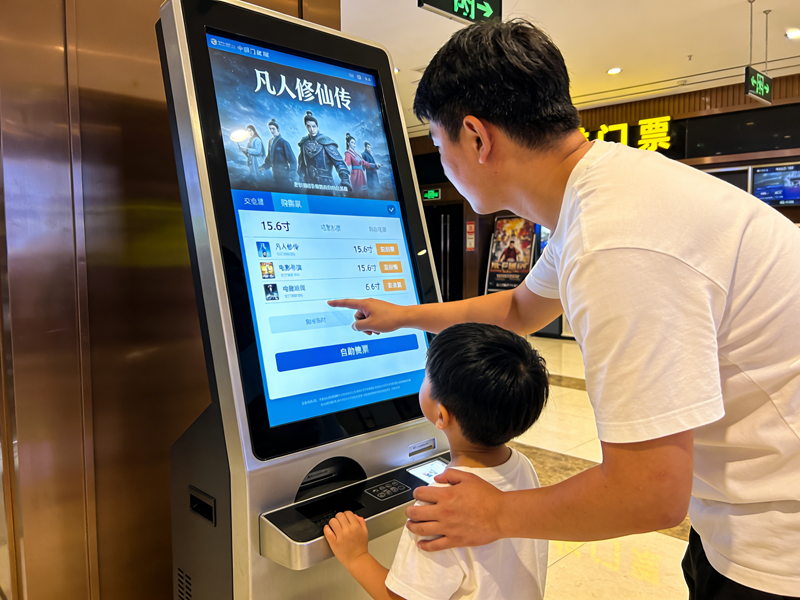
Ia menyepadukan output paparan dan kawalan sentuh ke dalam satu peranti kendiri. Selain itu, ia menyokong pengetik skrin terus untuk menyelesaikan arahan tanpa alat tambahan. Artikel ini menerangkan definisi terasnya, ciri utama, jenis popular, kelebihan praktikal dan senario yang boleh digunakan untuk membantu anda membuat pilihan peralatan yang bijak.
Definisi Asas Monitor Skrin Sentuh
Monitor skrin sentuh ialah peranti paparan interaktif semua-dalam-satu. Ia menggabungkan panel paparan standard dan perkakasan penderiaan sentuh terbina dalam.
1. Reka bentuk dwi-fungsi bersepadu
Tidak seperti paparan biasa, peranti ini menyampaikan visual dan kawalan interaktif pada masa yang sama. Pengguna melaraskan tetapan, pilih pilihan dan sistem kawalan terus pada permukaan skrin. Ia menghilangkan pergantungan pada aksesori input luaran.
2. Perkakasan pasang dan main bebas
Monitor skrin sentuh ialah peranti siap lengkap. Ia mempunyai papan kawalan terbina dalam, port isyarat dan modul pemacu. Justeru, ia bersambung dengan hos dan mula berfungsi selepas pendawaian mudah.
3. Pembezaan fungsi berasaskan senario
Tambahan pula, ia mempunyai dua kategori utama untuk permintaan yang berbeza. Model komersial memberi tumpuan kepada interaksi yang lancar. Versi industri mengutamakan kestabilan, ketahanan dan kebolehsuaian persekitaran.
Mekanisme Kerja Teras Monitor Skrin Sentuh
Setiap monitor skrin sentuh mengikut kitaran kerja yang mudah dan cekap untuk semua tindakan interaktif.
1. Hasilkan isyarat sentuhan masa nyata
Pertama, sentuhan jari atau alat mencetuskan perubahan kecil pada lapisan penderiaan. Jenis skrin yang berbeza menghasilkan anjakan kapasitans atau isyarat aruhan tekanan. Perubahan ini bertindak sebagai arahan operasi yang sah.
2. Tangkap data koordinat yang tepat
Seterusnya, penderia dalaman serta-merta menangkap perubahan isyarat. Mereka mengunci kedudukan sentuhan yang tepat dan menjejaki pergerakan gelongsor. Keseluruhan proses selesai dalam milisaat.
3. Memproses dan menapis isyarat tidak sah
Kemudian, cip terbina dalam menapis sentuhan tidak sengaja dan gangguan alam sekitar. Ia hanya mengekalkan data operasi yang berkesan. Langkah ini menjamin kawalan yang tepat dan stabil.
4. Laksanakan fungsi dan maklum balas visual
Akhirnya, sistem menjalankan arahan yang sepadan. Monitor mengemas kini kandungan skrin untuk mengesahkan operasi yang berjaya. Gelung ini menyokong penggunaan berulang jangka panjang.
Jenis Biasa Monitor Skrin Sentuh
Jenis monitor skrin sentuh yang berbeza sesuai dengan persekitaran kerja dan tabiat operasi yang pelbagai.
1. Monitor skrin sentuh kapasitif
Model kapasitif merasakan isyarat arus mikro badan manusia. Mereka menawarkan tindak balas sensitif dan pengalaman pelbagai sentuhan yang lancar. Sementara itu, ia memberikan kesan paparan yang jelas untuk adegan pejabat dan runcit.
2. Monitor skrin sentuh rintangan
Model rintangan bergantung pada tekanan fizikal untuk mengaktifkan isyarat. Mereka menyokong tangan bersarung tangan dan operasi stylus. Atas sebab ini, mereka sesuai dengan berdebu, persekitaran bengkel industri yang lembap.
3. Monitor skrin sentuh inframerah
Model inframerah menggunakan grid cahaya inframerah persisian untuk kedudukan. Mereka memiliki keupayaan anti-perlanggaran dan anti-gangguan yang kuat. Selain itu, mereka menyesuaikan diri dengan baik kepada senario interaktif awam bersaiz besar.
Ciri Praktikal Utama Monitor Skrin Sentuh Berkualiti
Monitor skrin sentuh yang sangat baik membawa ciri unik yang tidak dapat dipadankan oleh paparan biasa.
1. Operasi intuitif dan pantas
Ketik skrin terus memotong langkah pengendalian yang berlebihan. Kawalan peranti induk kakitangan baharu dalam masa yang singkat. Ia sangat meningkatkan kecekapan kerja dan perkhidmatan harian.
2. Struktur bersepadu penjimatan ruang
Reka bentuk semua-dalam-satu menghapuskan papan kekunci dan pendawaian tetikus yang tidak kemas. Ia mengemaskan meja kawalan dan platform peralatan. Ia mewujudkan ruang kerja yang kemas dan standard.
3. Kebolehsuaian persekitaran yang kuat
Monitor skrin sentuh gred industri menahan habuk, percikan air dan perubahan suhu. Mereka mengekalkan prestasi yang stabil di bawah operasi berterusan 24 jam. Mereka menurunkan kadar kegagalan peralatan dengan berkesan.
4. Keserasian tinggi dengan peranti arus perdana
Monitor ini menyokong sambungan antara muka universal. Mereka berpasangan dengan lancar dengan desktop, komputer riba dan hos kawalan industri. Mereka tidak memerlukan penyahpepijatan yang kompleks untuk kegunaan harian.
Senario Aplikasi Utama untuk Monitor Skrin Sentuh
Monitor skrin sentuh menunjukkan nilai praktikal yang hebat dalam pelbagai bidang komersial dan perindustrian.
1. Kawalan automasi industri
Pekerja menggunakan monitor ini untuk melaraskan parameter mesin dan menyemak data operasi. Prestasi sentuhan yang stabil menyesuaikan diri dengan getaran bengkel dan keadaan habuk. Ia memastikan kawalan pengeluaran yang tepat.
2. Perkhidmatan runcit dan katering
Terminal pesanan dan pembayaran layan diri menggunakan monitor skrin sentuh. Mereka memudahkan langkah operasi pelanggan dan memendekkan masa beratur. Mereka meningkatkan kualiti perkhidmatan kedai secara keseluruhan.
3. Bilik pejabat dan persidangan pintar
Pemantau skrin sentuh pejabat dan persidangan menyokong kawalan dokumen pantas dan penukaran skrin. Mereka menjadikan komunikasi pejabat lebih cekap dan pintar.
4. Siasatan awam dan kemudahan paparan
Peralatan perkhidmatan awam menggunakan monitor skrin sentuh yang tahan lama. Mereka menyokong operasi pelawat frekuensi tinggi dan mengurangkan kerja penyelenggaraan harian.
Soalan Lazim Mengenai Monitor Skrin Sentuh
Q1: Apakah perbezaan utama antara monitor skrin sentuh dan monitor biasa?
A1: Monitor biasa hanya memaparkan imej. Monitor skrin sentuh menambah sistem penderiaan terbina dalam untuk menyokong kawalan manual langsung tanpa aksesori tambahan.
S2: Bolehkah monitor skrin sentuh berfungsi dengan mana-mana peranti komputer?
A2: Ya. Kebanyakan monitor skrin sentuh menggunakan antara muka plug-and-play universal. Mereka berfungsi dengan hampir semua desktop arus perdana, komputer riba dan peranti hos industri.
Q3: Jenis monitor skrin sentuh mana yang paling sesuai dengan bengkel industri?
A3: Monitor skrin sentuh rintangan dan inframerah adalah ideal. Mereka menyokong operasi bersarung tangan dan menentang gangguan persekitaran bengkel yang keras.
Q4: Adakah monitor skrin sentuh memerlukan pemasangan profesional?
A4: Tidak. Ia menampilkan pendawaian ringkas dan reka bentuk plug-and-play. Kakitangan biasa boleh menyelesaikan pemasangan dan penyahpepijatan asas dengan cepat.
S5: Bagaimanakah saya boleh memastikan monitor skrin sentuh sensitif dan tahan lama?
A5: Pembersihan lembut yang kerap menghilangkan habuk dan kotoran. Elakkan calar tajam dan cecair menghakis untuk mengekalkan prestasi sentuhan stabil jangka panjang.
Kesimpulan
Untuk meringkaskan, monitor skrin sentuh ialah peranti paparan bersepadu pelbagai fungsi yang menggabungkan paparan visual dan kawalan sentuh. Ia mempunyai pelbagai jenis untuk dipadankan dengan pejabat, senario komersial dan perindustrian. Ia memudahkan proses operasi, menjimatkan ruang kerja dan meningkatkan kecekapan operasi keseluruhan. Tambahan pula, model industri tahan lama menyesuaikan diri dengan persekitaran yang keras dan mengurangkan kos penyelenggaraan jangka panjang.
Jika anda ingin membeli yang berkualiti tinggi, monitor skrin sentuh dipadankan senario untuk peningkatan peralatan anda atau penggunaan projek baharu, sila isi borang perundingan di laman web rasmi kami. Tinggalkan saiz skrin yang anda perlukan, persekitaran penggunaan dan permintaan fungsi. Pasukan profesional kami akan menyediakan disesuaikan, penyelesaian kos efektif untuk anda dengan segera.
