消息

随时了解最新的触摸显示器新闻

科技趋势, 新产品发布, 行业洞察

以及满足您需求的实际应用技巧.

How Do Touch Screens Help Café Ingredient Substitution?

Cafés today face a growing demand for personalized, dietary-friendly options. From vegan lattes to gluten-free pastries, customers expect seamless ingredient substitutions that don’t slow down service or compromise taste. Manual substitution—relying on staff to memorize dietary rules, check ingredient lists, or scribble notes—leads to errors, delays, and frustrated guests.A Café Ingredient Substitution 触摸屏 changes this by putting accurate, quick substitution tools directly in staff (or customer) hands.

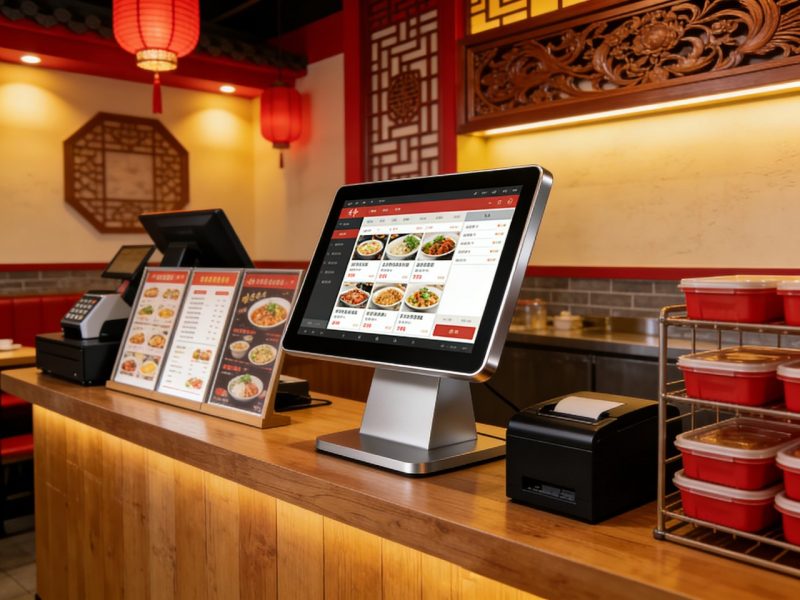
Café Ingredient Substitution Touch Screen

These specialized touch screens are designed for café workflows, making it easy to swap ingredients, check dietary compatibility, and update menus in real time. But how exactly do they help streamline ingredient substitution? This guide breaks down their key benefits, operational ways they assist, 实际用例, maintenance tips, and FAQs to help you understand their value. Whether you run a cozy neighborhood café or a busy urban spot, these insights will help you meet customer dietary needs efficiently and boost satisfaction.

Key Ways a Café Ingredient Substitution Touch Screen Helps Cafés

Café ingredient substitution touch screens solve common pain points of manual swaps, from error reduction to faster service. Here’s how they make a difference daily.

1. Instant, Accurate Substitution Suggestions

One of the biggest challenges is knowing which ingredients work as replacements—touch screens eliminate guesswork.
When a customer requests a substitution (例如, “dairy-free milk instead of cow’s milk”), staff tap the original ingredient on the screen.
The touch screen instantly displays compatible substitutions (例如, oat milk, almond milk, soy milk) that work with the menu item.
It also notes any limitations (例如, “oat milk adds 50 calories” or “soy milk is not available for iced drinks”) to avoid mistakes.
This cuts down substitution time from 30+ seconds to 5 秒, keeping lines moving during peak hours.

2. Streamlines Dietary Compliance & Transparency

Customers with allergies, intolerances, or dietary preferences (素食主义者, 不含麸质) need clear, accurate information.
The touch screen flags allergens (坚果, 奶制品, 麸质) in both original and substitute ingredients, preventing dangerous errors.
It displays detailed dietary labels (例如, “vegan,” “gluten-free,” “nut-free”) for every substitution, building trust with guests.
Staff can quickly show customers the substitution details on the screen, reducing questions and reassuring nervous diners.
This ensures compliance with food safety standards and avoids costly mistakes (例如, serving nuts to a nut-allergic customer).

3. Reduces Staff Training Time & 错误

Memorizing hundreds of ingredient substitutions is impossible for new (and even seasoned) staff—touch screens simplify training.
New hires don’t need to memorize substitution rules; the screen guides them through every swap.
The interface is intuitive, with large icons and simple navigation, so staff can use it with minimal training.
It prevents common errors (例如, substituting a dairy-based cream for a vegan option) by only showing compatible swaps.
This reduces training time by 50% and cuts down substitution errors by 70%, according to café industry data.

4. Real-Time Menu & Substitution Updates

Cafés often run out of ingredients or update menus—touch screens keep substitutions current.
When an ingredient is out of stock (例如, no almond milk), managers can update the touch screen to remove it from substitution options.
New substitutions (例如, “new coconut milk option”) can be added in seconds, ensuring staff always have the latest info.
The screen auto-syncs across all café touch points (counter, 自助服务亭) so everyone has consistent data.
This avoids disappointment (例如, telling a customer a substitution is available when it’s not) and keeps service smooth.

5. Simplifies Custom Order Tracking

Custom orders with multiple substitutions are hard to track manually—touch screens keep everything organized.
Staff can save custom orders (例如, “latte with oat milk, no foam, extra caramel”) with their substitution preferences.
The screen sends the full order (with substitutions) directly to the barista station, eliminating handwritten notes and miscommunication.
It tracks popular substitutions (例如, how often oat milk is requested) to help managers adjust inventory and menu options.

How to Use a Café Ingredient Substitution Touch Screen (Step-by-Step)

Using these touch screens is simple, even during busy café rushes. Follow these steps to make substitutions seamlessly.

1. Select the Menu Item

第一的, 职员 (or customers, for self-service) tap the menu item the customer wants (例如, “vanilla latte”).
The screen displays the item’s original ingredients (例如, cow’s milk, vanilla syrup, espresso) and any default dietary labels.
This gives a clear baseline before making substitutions.

2. Tap the Ingredient to Substitute

下一个, tap the ingredient the customer wants to replace (例如, “cow’s milk”).
A pop-up menu appears with all compatible substitutions (例如, oat, almond, soy milk).
Each substitution includes a short note (例如, “dairy-free,” “adds $0.50”) to inform staff and customers.

3. Confirm the Substitution

After selecting the replacement, tap “confirm” to save the change.
The screen updates the order to show the substituted ingredient and any adjustments (例如, price, dietary labels).
It sends the updated order to the barista station instantly, so the drink or food is prepared correctly.

4. Save Custom Orders (选修的)

For regular customers with consistent substitutions, tap “save custom order” to store their preferences.
Next time the customer visits, staff can pull up their custom order with one tap, saving even more time.
This builds customer loyalty by making their experience faster and more personalized.

Key Features to Look for in a Café Ingredient Substitution Touch Screen

Not all touch screens are built for café ingredient substitution—prioritize these features for maximum efficiency.

1. 直觉的, Café-Friendly Interface

The interface should be simple enough for staff to use during busy rushes.
大的, colorful icons for menu categories and ingredients make navigation fast.
Minimal steps for substitutions (no complicated menus or hidden options).
Customizable dashboards to highlight popular substitutions (例如, dairy-free milks).

2. Dietary & Allergen Integration

Allergen and dietary tracking is non-negotiable for cafés.
Built-in allergen database that flags nuts, 奶制品, 麸质, 大豆, and other common allergens.
Automatic dietary label updates when substitutions are made (例如, “vegan” when dairy is swapped).
Clear visual alerts for high-risk substitutions (例如, “contains nuts” in a substitute).

3. Real-Time Sync & Inventory Integration

The touch screen should work with your café’s existing tools.
Syncs with inventory systems to remove out-of-stock ingredients from substitution options.
Auto-syncs across multiple touch screens (counter, kiosks) 确保一致性.
Integrates with your POS system to update prices when substitutions add cost.

4. 耐用的, 易于清洁的设计

Cafés are messy—touch screens must withstand spills and frequent cleaning.
IP65 splash resistance to protect against coffee spills, milk splatters, and cleaning sprays.
光滑的, non-porous surface that wipes clean with a sanitizing cloth in seconds.
Scratch-resistant glass to handle daily use (例如, taps from nails, 钢笔, or cups).

解决常见触摸屏问题

Minor glitches can slow down substitution service—here’s how to fix them fast.

1. Substitution Options Don’t Update (Out of Stock)

Check if the touch screen is synced with your inventory system—reconnect if it’s offline.
Manually update the screen to remove out-of-stock substitutions (most models have a “quick edit” button).
Restart the touch screen to force a sync if updates aren’t showing up.

2. 触摸屏无响应 (Coffee/Spill Residue)

用柔软的超细纤维布和布擦拭屏幕 50/50 蒸馏水和异丙醇的混合物.
避免使用刺激性清洁剂 (氨, 漂白) 损坏屏幕的保护涂层.
Power cycle the screen (拔下插头并重新插入) if it’s still unresponsive.

3. Allergen Alerts Don’t Appear

Check if the allergen database is up to date—add new allergens or ingredients in the settings.
Verify that the menu item’s original ingredients are correctly entered (missing ingredients cause missing alerts).
Restart the screen to reset the allergen tracking feature.

FAQs About Café Ingredient Substitution Touch Screens

Q1: Can customers use the touch screen for self-service substitutions?

A1: 是的! Most models have a customer-friendly mode that lets guests select their own substitutions, reducing staff workload during peak hours.

Q2: Does the touch screen work with all café menu items (饮料, pastries, 三明治)?

A2: 绝对地. It’s designed to handle all café items—from lattes and smoothies to pastries and sandwiches—with tailored substitution options for each.

第三季度: Can I add custom substitutions (例如, a local dairy-free milk brand)?

A3: 是的. Managers can add custom substitutions, update ingredient lists, and adjust dietary labels in the settings menu in seconds.

第四季度: 我是否需要更换现有的 POS 系统才能使用此触摸屏?

A4: No—most Café Ingredient Substitution Touch Screens integrate seamlessly with popular café POS systems (正方形, 吐司, 三叶草) without a full replacement.

Q5: How long does staff training take for the touch screen?

A5: Minimal—most staff learn to use the basic substitution features in 15–20 minutes. The intuitive interface makes it easy to master.

Q6: Can the touch screen track popular substitutions to help with inventory?

A6: 是的! Premium models include analytics that show which substitutions are most requested (例如, oat milk, gluten-free bread), helping you adjust inventory and menu options.

Q7: Is the touch screen durable enough for a busy café?

A7: 是的. It’s built with splash-resistant, scratch-proof glass and a sturdy frame to withstand coffee spills, daily cleaning, 和大量使用.

结论

A Café Ingredient Substitution Touch Screen is a game-changer for modern cafés looking to meet customer dietary needs efficiently. It simplifies substitutions, 减少错误, speeds up service, and builds trust with guests by ensuring transparency and compliance. Whether you’re handling vegan, 不含麸质, or allergen-friendly requests, these touch screens take the guesswork out of ingredient swaps and keep your café running smoothly.

No more frustrated customers, staff mistakes, or slow service due to manual substitutions. 配有专用触摸屏, you can deliver personalized, dietary-friendly options without sacrificing speed—all while boosting customer loyalty and growing your business.

Ready to upgrade your café with a reliable Café Ingredient Substitution Touch Screen? Fill out the form on our website to share your café’s size, menu type, and dietary needs. 我们的餐饮服务技术专家将推荐最佳兼容型号, 提供安装提示, and answer any questions to help you streamline ingredient substitutions and keep your customers happy. Let’s make your café the go-to spot for personalized, hassle-free orders—start today!

提交下面的表格以获取更多信息

或获得个性化优惠.


    *我们尊重您的机密性,所有信息均受到保护