
สภาพแวดล้อมการทำงานและเชิงพาณิชย์สมัยใหม่ดำเนินตามโหมดการทำงานที่เรียบง่ายและมีประสิทธิภาพ. จอภาพแบบดั้งเดิมอาศัยเมาส์และคีย์บอร์ดภายนอกเพื่อควบคุมทุกการกระทำ. อุปกรณ์เสริมพิเศษเหล่านี้ทำให้พื้นที่ทำงานยุ่งเหยิงและทำให้ขั้นตอนการทำงานในแต่ละวันช้าลงA จอภาพหน้าจอสัมผัส แก้ปัญหาจุดปวดเหล่านี้ได้อย่างลงตัว.
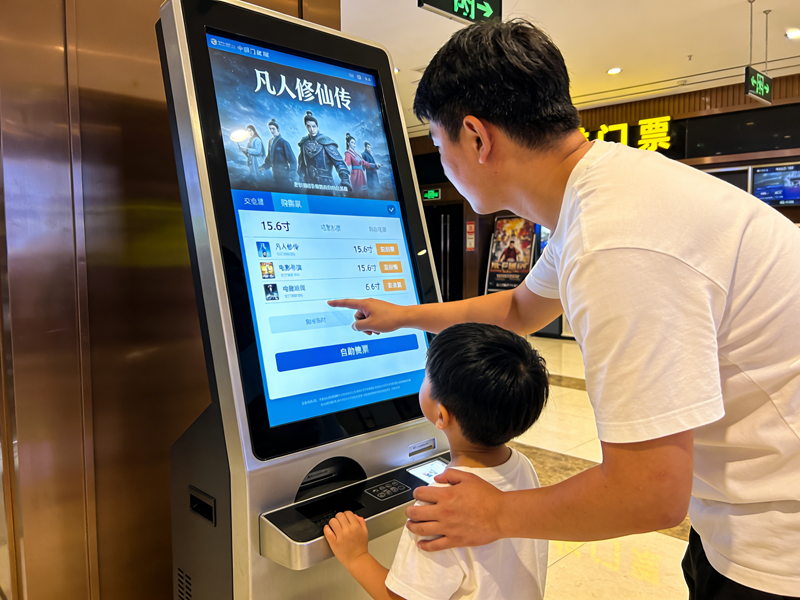
โดยจะรวมเอาท์พุตการแสดงผลและการควบคุมแบบสัมผัสไว้ในอุปกรณ์สแตนด์อโลนเครื่องเดียว. นอกจากนี้, รองรับการแตะหน้าจอโดยตรงเพื่อจบคำสั่งโดยไม่ต้องใช้เครื่องมือเพิ่มเติม. บทความนี้จะอธิบายคำจำกัดความหลัก, คุณสมบัติที่สำคัญ, ประเภทยอดนิยม, ข้อได้เปรียบเชิงปฏิบัติและสถานการณ์ที่เกี่ยวข้องเพื่อช่วยให้คุณตัดสินใจเลือกอุปกรณ์อย่างชาญฉลาด.
คำจำกัดความพื้นฐานของจอภาพหน้าจอสัมผัส
จอภาพหน้าจอสัมผัสเป็นอุปกรณ์แสดงผลแบบโต้ตอบแบบออลอินวัน. ประกอบด้วยแผงจอแสดงผลมาตรฐานและฮาร์ดแวร์ระบบสัมผัสในตัว.
1. การออกแบบฟังก์ชั่นคู่แบบบูรณาการ
ต่างจากจอแสดงผลทั่วไป, อุปกรณ์นี้ให้ภาพและการควบคุมแบบโต้ตอบในเวลาเดียวกัน. ผู้ใช้ปรับการตั้งค่า, เลือกตัวเลือกและระบบควบคุมโดยตรงบนพื้นผิวหน้าจอ. โดยจะลบการพึ่งพาอุปกรณ์เสริมอินพุตภายนอก.
2. ฮาร์ดแวร์ Plug-and-Play อิสระ
จอภาพหน้าจอสัมผัสเป็นอุปกรณ์สำเร็จรูปที่สมบูรณ์. มีแผงควบคุมในตัว, พอร์ตสัญญาณและโมดูลไดรฟ์. ดังนั้น, มันเชื่อมต่อกับโฮสต์และเริ่มทำงานหลังจากเดินสายง่ายๆ.
3. การสร้างความแตกต่างเชิงฟังก์ชันตามสถานการณ์
นอกจากนี้, มีสองประเภทหลักสำหรับความต้องการที่แตกต่างกัน. โมเดลเชิงพาณิชย์มุ่งเน้นไปที่การโต้ตอบที่ราบรื่น. เวอร์ชันอุตสาหกรรมให้ความสำคัญกับความเสถียร, ความทนทานและการปรับตัวต่อสิ่งแวดล้อม.
กลไกการทำงานหลักของจอภาพหน้าจอสัมผัส
จอภาพหน้าจอสัมผัสทุกจอเป็นไปตามวงจรการทำงานที่เรียบง่ายและมีประสิทธิภาพสำหรับการดำเนินการเชิงโต้ตอบทั้งหมด.
1. สร้างสัญญาณสัมผัสแบบเรียลไทม์
อันดับแรก, การสัมผัสด้วยนิ้วหรือเครื่องมือจะทำให้เกิดการเปลี่ยนแปลงเล็กๆ น้อยๆ บนชั้นการตรวจจับ. หน้าจอประเภทต่างๆ จะสร้างการเปลี่ยนแปลงความจุหรือสัญญาณเหนี่ยวนำแรงดัน. การเปลี่ยนแปลงเหล่านี้ทำหน้าที่เป็นคำแนะนำการใช้งานที่ถูกต้อง.
2. บันทึกข้อมูลพิกัดที่แม่นยำ
ต่อไป, เซ็นเซอร์ภายในจะจับการเปลี่ยนแปลงของสัญญาณทันที. โดยจะล็อคตำแหน่งการสัมผัสที่แน่นอนและติดตามการเคลื่อนไหวแบบเลื่อน. กระบวนการทั้งหมดเสร็จสิ้นในหน่วยมิลลิวินาที.
3. ประมวลผลและกรองสัญญาณที่ไม่ถูกต้อง
แล้ว, ชิปในตัวกรองการสัมผัสโดยไม่ได้ตั้งใจและการรบกวนจากสิ่งแวดล้อม. จะเก็บข้อมูลการดำเนินงานที่มีประสิทธิภาพเท่านั้น. ขั้นตอนนี้รับประกันการควบคุมที่แม่นยำและมีเสถียรภาพ.
4. ดำเนินการฟังก์ชั่นและการตอบรับด้วยภาพ
ในที่สุด, ระบบจะรันคำสั่งที่เกี่ยวข้อง. จอภาพจะอัปเดตเนื้อหาบนหน้าจอเพื่อยืนยันการทำงานที่สำเร็จ. ลูปนี้รองรับการใช้งานซ้ำในระยะยาว.
ประเภททั่วไปของจอภาพหน้าจอสัมผัส
จอภาพหน้าจอสัมผัสประเภทต่างๆ เหมาะสมกับสภาพแวดล้อมการทำงานและพฤติกรรมการทำงานที่หลากหลาย.
1. จอภาพหน้าจอสัมผัสแบบคาปาซิทีฟ
โมเดลคาปาซิทีฟจะตรวจจับสัญญาณกระแสไมโครในร่างกายมนุษย์. พวกเขาให้การตอบสนองที่ละเอียดอ่อนและประสบการณ์มัลติทัชที่ราบรื่น. ขณะเดียวกัน, โดยให้เอฟเฟกต์การแสดงผลที่ชัดเจนสำหรับฉากในสำนักงานและร้านค้าปลีก.
2. จอภาพหน้าจอสัมผัสแบบต้านทาน
แบบจำลองความต้านทานขึ้นอยู่กับแรงกดดันทางกายภาพในการเปิดใช้งานสัญญาณ. รองรับการใช้งานมือที่สวมถุงมือและสไตลัส. ด้วยเหตุนี้, เหมาะกับฝุ่นมาก, สภาพแวดล้อมการประชุมเชิงปฏิบัติการทางอุตสาหกรรมที่มีความชื้น.
3. จอภาพหน้าจอสัมผัสแบบอินฟราเรด
รุ่นอินฟราเรดใช้ตารางแสงอินฟราเรดส่วนต่อพ่วงในการกำหนดตำแหน่ง. พวกเขามีความสามารถในการป้องกันการชนและป้องกันการรบกวนที่แข็งแกร่ง. นอกจากนี้, พวกเขาปรับตัวได้ดีกับสถานการณ์การโต้ตอบสาธารณะขนาดใหญ่.
คุณสมบัติหลักที่เป็นประโยชน์ของจอภาพหน้าจอสัมผัสคุณภาพ
จอภาพหน้าจอสัมผัสที่ยอดเยี่ยมมีลักษณะเฉพาะที่จอแสดงผลธรรมดาไม่สามารถเทียบได้.
1. การดำเนินงานที่ใช้งานง่ายและรวดเร็ว
การแตะหน้าจอโดยตรงจะช่วยลดขั้นตอนการทำงานที่ซ้ำซ้อน. การควบคุมอุปกรณ์หลักของพนักงานใหม่ในระยะเวลาอันสั้น. ช่วยปรับปรุงประสิทธิภาพการทำงานและการบริการในแต่ละวันอย่างมาก.
2. โครงสร้างบูรณาการที่ประหยัดพื้นที่
การออกแบบแบบออลอินวันช่วยขจัดปัญหาการเดินสายคีย์บอร์ดและเมาส์ที่ยุ่งเหยิง. มันจัดระเบียบโต๊ะควบคุมและแพลตฟอร์มอุปกรณ์. สร้างพื้นที่ทำงานที่เรียบร้อยและเป็นมาตรฐาน.
3. การปรับตัวด้านสิ่งแวดล้อมที่แข็งแกร่ง
จอภาพทัชสกรีนเกรดอุตสาหกรรมต้านทานฝุ่น, การกระเด็นของน้ำและการเปลี่ยนแปลงของอุณหภูมิ. พวกเขารักษาประสิทธิภาพที่มั่นคงภายใต้การทำงานต่อเนื่องตลอด 24 ชั่วโมง. พวกเขาลดอัตราความล้มเหลวของอุปกรณ์ได้อย่างมีประสิทธิภาพ.
4. ความเข้ากันได้สูงกับอุปกรณ์กระแสหลัก
จอภาพเหล่านี้รองรับการเชื่อมต่ออินเทอร์เฟซสากล. จับคู่กับเดสก์ท็อปได้อย่างราบรื่น, แล็ปท็อปและโฮสต์การควบคุมทางอุตสาหกรรม. ไม่จำเป็นต้องมีการดีบักที่ซับซ้อนสำหรับการใช้งานรายวัน.
สถานการณ์การใช้งานหลักสำหรับจอภาพหน้าจอสัมผัส
จอภาพหน้าจอสัมผัสแสดงคุณค่าในทางปฏิบัติที่ยอดเยี่ยมในสาขาการค้าและอุตสาหกรรมหลายแห่ง.
1. การควบคุมอัตโนมัติทางอุตสาหกรรม
พนักงานใช้จอภาพเหล่านี้เพื่อปรับพารามิเตอร์ของเครื่องจักรและตรวจสอบข้อมูลการทำงาน. ประสิทธิภาพการสัมผัสที่เสถียรปรับให้เข้ากับสภาวะการสั่นสะเทือนและฝุ่นของเวิร์คช็อป. ช่วยให้มั่นใจได้ถึงการควบคุมการผลิตที่แม่นยำ.
2. บริการขายปลีกและจัดเลี้ยง
เครื่องสั่งซื้อและชำระเงินแบบบริการตนเองใช้จอภาพหน้าจอสัมผัส. ช่วยให้ขั้นตอนการดำเนินงานของลูกค้าง่ายขึ้นและลดระยะเวลาในการเข้าคิว. พวกเขายกระดับคุณภาพการบริการของร้านค้าโดยรวม.
3. สำนักงานอัจฉริยะและห้องประชุม
จอภาพหน้าจอสัมผัสในสำนักงานและการประชุมรองรับการควบคุมเอกสารและการสลับหน้าจออย่างรวดเร็ว. ทำให้การสื่อสารในสำนักงานมีประสิทธิภาพและชาญฉลาดยิ่งขึ้น.
4. สิ่งอำนวยความสะดวกการสอบสวนและการแสดงสาธารณะ
อุปกรณ์บริการสาธารณะใช้จอสัมผัสที่ทนทาน. รองรับการดำเนินการของผู้เยี่ยมชมที่มีความถี่สูงและลดงานบำรุงรักษารายวัน.
คำถามที่พบบ่อยเกี่ยวกับจอภาพหน้าจอสัมผัส
ไตรมาสที่ 1: อะไรคือข้อแตกต่างที่สำคัญระหว่างจอภาพแบบสัมผัสและจอภาพปกติ?
A1: จอภาพปกติจะแสดงเฉพาะภาพเท่านั้น. จอภาพหน้าจอสัมผัสเพิ่มระบบการตรวจจับในตัวเพื่อรองรับการควบคุมด้วยตนเองโดยตรงโดยไม่ต้องใช้อุปกรณ์เสริมเพิ่มเติม.
ไตรมาสที่ 2: จอภาพหน้าจอสัมผัสสามารถทำงานร่วมกับอุปกรณ์คอมพิวเตอร์ใดก็ได้?
A2: ใช่. จอภาพหน้าจอสัมผัสส่วนใหญ่ใช้อินเทอร์เฟซแบบปลั๊กแอนด์เพลย์สากล. ใช้งานได้กับเดสก์ท็อปทั่วไปเกือบทั้งหมด, แล็ปท็อปและอุปกรณ์โฮสต์ทางอุตสาหกรรม.
ไตรมาสที่ 3: จอภาพทัชสกรีนประเภทใดที่เหมาะกับโรงงานอุตสาหกรรมที่สุด?
A3: จอภาพหน้าจอสัมผัสแบบต้านทานและอินฟราเรดเหมาะอย่างยิ่ง. รองรับการทำงานที่สวมถุงมือและต้านทานการรบกวนสภาพแวดล้อมในโรงงานอย่างรุนแรง.
ไตรมาสที่ 4: จอภาพหน้าจอสัมผัสจำเป็นต้องติดตั้งโดยมืออาชีพหรือไม่?
A4: เลขที่. มีสายไฟที่เรียบง่ายและการออกแบบ Plug-and-Play. เจ้าหน้าที่ทั่วไปสามารถติดตั้งและแก้ไขจุดบกพร่องพื้นฐานได้อย่างรวดเร็ว.
คำถามที่ 5: ฉันจะทำให้จอภาพหน้าจอสัมผัสมีความละเอียดอ่อนและทนทานได้อย่างไร?
A5: การทำความสะอาดอย่างอ่อนโยนเป็นประจำจะช่วยขจัดฝุ่นและคราบสกปรก. หลีกเลี่ยงรอยขีดข่วนคมและของเหลวที่มีฤทธิ์กัดกร่อนเพื่อรักษาประสิทธิภาพการสัมผัสที่มั่นคงในระยะยาว.
บทสรุป
เพื่อสรุป, จอภาพหน้าจอสัมผัสเป็นอุปกรณ์แสดงผลแบบมัลติฟังก์ชั่นที่รวมการแสดงผลภาพและการควบคุมแบบสัมผัส. มีหลายประเภทเพื่อให้ตรงกับสำนักงาน, สถานการณ์เชิงพาณิชย์และอุตสาหกรรม. มันทำให้กระบวนการดำเนินงานง่ายขึ้น, ประหยัดพื้นที่ทำงานและปรับปรุงประสิทธิภาพการดำเนินงานโดยรวม. นอกจากนี้, โมเดลอุตสาหกรรมที่ทนทานปรับให้เข้ากับสภาพแวดล้อมที่รุนแรงและลดต้นทุนการบำรุงรักษาในระยะยาว.
หากคุณต้องการซื้อคุณภาพสูง, จอภาพสัมผัสที่ตรงกับสถานการณ์สำหรับการอัพเกรดอุปกรณ์ของคุณหรือการปรับใช้โครงการใหม่, กรุณากรอกแบบฟอร์มคำปรึกษาบนเว็บไซต์อย่างเป็นทางการของเรา. ปล่อยให้ขนาดหน้าจอที่คุณต้องการ, สภาพแวดล้อมการใช้งานและความต้องการใช้งาน. ทีมงานมืออาชีพของเราจะปรับแต่งให้, โซลูชั่นที่คุ้มค่าสำหรับคุณทันที.
