
ตู้บริการตนเองครองการค้าปลีกสมัยใหม่, พื้นที่จัดเลี้ยงและบริการสาธารณะ. ลูกค้าส่วนใหญ่พึ่งพาการชำระเงินด้วยบัตรและมือถือเพื่อการชำระเงินที่รวดเร็ว. ยังไงก็ตาม, ผู้ใช้จำนวนมากยังคงชอบการทำธุรกรรมเงินสดสำหรับการซื้อรายวัน.
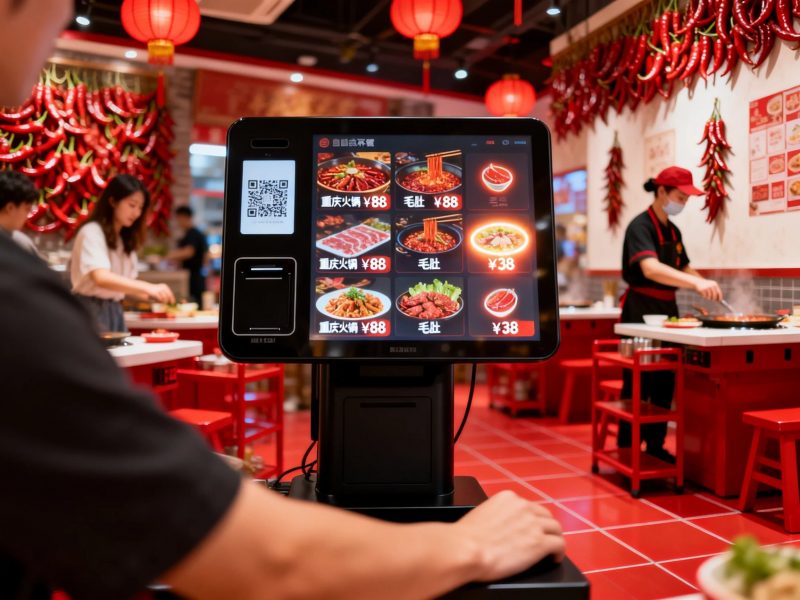
สิ่งนี้ทำให้เกิดคำถามทั่วไปสำหรับผู้ใช้ใหม่. ผู้คนมักสงสัยว่าตู้ทั่วไปรับเงินสดหรือไม่. คำตอบนั้นขึ้นอยู่กับการกำหนดค่าฮาร์ดแวร์ของแต่ละยูนิตคีออสก์ทั้งหมด. ในความเป็นจริง, ซุ้มเชิงพาณิชย์หลายแห่งรองรับการชำระด้วยเงินสด, ในขณะที่รุ่นพื้นฐานรองรับเฉพาะโหมดไร้เงินสดเท่านั้น. บทความนี้จะอธิบายประเภทตู้คีออสก์ที่รองรับเงินสด, ขั้นตอนการดำเนินงาน, ข้อจำกัดและเคล็ดลับการปฏิบัติ.
ตู้มาตรฐานยอมรับการชำระด้วยเงินสดหรือไม่
ไม่ใช่ทุก ซุ้ม รองรับการแทรกเงินสด. คีออสก์แบ่งออกเป็นสองประเภทหลักตามฮาร์ดแวร์การชำระเงิน.
1. ตู้บริการตนเองแบบใช้เงินสด
ซุ้มเชิงพาณิชย์แบบกำหนดเองรวมโมดูลเงินสดแบบมืออาชีพ. อุปกรณ์เหล่านี้ได้แก่เครื่องรับบิลและเครื่องรับเหรียญ. พวกเขารับเงินสดจากผู้ใช้โดยตรงและตรวจสอบธนบัตรที่ถูกต้อง.
2. ตู้พื้นฐานไร้เงินสดเท่านั้น
ตู้คีออสระดับเริ่มต้นจะถอดฮาร์ดแวร์เงินสดออกเพื่อลดต้นทุน. รองรับการสแกนผ่านมือถือเท่านั้น, การรูดบัตรและการชำระเงินแบบไร้สัมผัส. ซุ้มธรรมดาเหล่านี้ไม่สามารถประมวลผลธุรกรรมเงินสดใดๆ ได้.
3. ความแตกต่างในการใช้งานหลัก
ซุ้มเงินสดให้บริการร้านค้าสาธารณะที่มีผู้คนสัญจรไปมาสูง. เหมาะกับผู้ใช้ที่พกเงินติดตัว. ตู้ไร้เงินสดมุ่งเป้าไปที่ร้านค้าปลีกสมัยใหม่ที่ส่งเสริมการชำระเงินดิจิทัล.
วิธีใส่และจ่ายเงินสดผ่านคีออสก์
ตู้เงินสดใช้วิธีง่ายๆ, กระบวนการที่ได้มาตรฐานสำหรับผู้ใช้ทุกคน. ขั้นตอนการทำงานทั้งหมดใช้เวลาเพียงไม่กี่วินาที.
1. เลือกคำสั่งซื้อให้เสร็จสิ้นก่อน
อันดับแรก, เรียกดูเมนูหรือรายการผลิตภัณฑ์บนหน้าจอคีออสก์. ยืนยันรายการทั้งหมดและตรวจสอบจำนวนเงินที่ต้องชำระสุดท้ายก่อนชำระเงิน.
2. เลือกรูปแบบการชำระด้วยเงินสด
ต่อไป, เลือกตัวเลือกการชำระด้วยเงินสดในหน้าชำระเงิน. หน้าจอเปิดใช้งานเครื่องรับเงินสดในตัวและแสดงข้อความแจ้งการชำระเงิน.
3. ใส่ธนบัตรหรือเหรียญ
แล้ว, วางเงินสดที่สะอาดและไม่เสียหายลงในช่องเฉพาะ. คีออสก์จะสแกนบิลแต่ละรายการทันทีและอัปเดตจำนวนเงินที่ชำระ.
4. รับการเปลี่ยนแปลงอัตโนมัติ
หากคุณจ่ายเงินสดเพิ่ม, คีออสก์จะคำนวณการเปลี่ยนแปลงโดยอัตโนมัติ. โดยจะจ่ายเหรียญหรือธนบัตรขนาดเล็กผ่านช่องส่งคืน.
5. ยืนยันการชำระเงินและรับใบเสร็จรับเงิน
ในที่สุด, ตรวจสอบสถานะการชำระเงินที่เสร็จสมบูรณ์. พิมพ์และเก็บใบเสร็จไว้เพื่อเสร็จสิ้นกระบวนการบริการตนเองทั้งหมด.
ข้อจำกัดที่สำคัญสำหรับการชำระด้วยเงินสดบนซุ้ม
ตู้คีออสเงินสดมีข้อจำกัดการใช้งานเล็กน้อยเพื่อการทำงานที่เสถียร. ผู้ใช้ต้องปฏิบัติตามกฎง่ายๆ.
1. ยอมรับเฉพาะสกุลเงินที่ถูกต้องครบถ้วนเท่านั้น
ซุ้มรับรู้เพียงความสะอาดเท่านั้น, ธนบัตรที่ไม่เสียหาย. พวกเขาปฏิเสธการฉีกขาด, เงินสดพับหรือปลอมเพื่อหลีกเลี่ยงข้อผิดพลาดของระบบ.
2. รองรับช่วงนิกายคงที่
ตู้ส่วนใหญ่จะยอมรับเฉพาะสกุลเงินกระแสหลักทั่วไปเท่านั้น. พวกเขาไม่ค่อยสนับสนุนมูลค่าธนบัตรขนาดใหญ่พิเศษหรือหายากเพื่อการควบคุมความปลอดภัย.
3. ต้องล้างกล่องเงินสดเป็นประจำ
พนักงานต้องล้างกล่องเงินสดภายในเป็นประจำ. พื้นที่เก็บข้อมูลเต็มจะทำให้ตู้ไม่รับการชำระเงินด้วยเงินสดใหม่.
ประโยชน์หลักของตู้ที่รองรับเงินสด
ตู้คีออสที่มีฟังก์ชันเงินสดนำเสนอบริการที่ยืดหยุ่นมากขึ้นสำหรับธุรกิจและลูกค้า.
1. ให้บริการลูกค้าทุกกลุ่ม
รองรับการชำระเงินทั้งแบบดิจิทัลและเงินสด. ให้บริการแก่ผู้ใช้สูงอายุและผู้ที่ไม่มีเครื่องมือชำระเงินผ่านมือถือ.
2. ลดการทำธุรกรรมที่ล้มเหลว
การชำระด้วยเงินสดช่วยหลีกเลี่ยงความเสี่ยงที่เครือข่ายจะล้มเหลว. มันยังคงให้บริการทำงานต่อไปแม้กับเครือข่ายอุปกรณ์ที่อ่อนแอหรือออฟไลน์.
3. ปรับปรุงความครอบคลุมการบริการของร้านค้า
โหมดการชำระเงินแบบคู่ช่วยขจัดอุปสรรคในการชำระเงิน. พวกเขาเพิ่มความพึงพอใจของลูกค้าและเพิ่มอัตราการทำธุรกรรมจริง.
คำถามที่พบบ่อยเกี่ยวกับการใส่เงินสดในตู้
ไตรมาสที่ 1: ซุ้มทุกแห่งสามารถรับการชำระเงินด้วยเงินสดได้?
A1: เลขที่. เฉพาะตู้ที่มีโมดูลรับเงินสดในตัวเท่านั้นที่รองรับการแทรกเงินสด. ตู้เงินสดพื้นฐานจะประมวลผลธุรกรรมดิจิทัลเท่านั้น.
ไตรมาสที่ 2: ตู้สามารถให้การเปลี่ยนแปลงเงินสดได้อย่างแม่นยำ?
A2: ใช่. ตู้เงินสดที่ผ่านการรับรองจะคำนวณการเปลี่ยนแปลงอย่างแม่นยำ. พวกเขาจ่ายเหรียญและธนบัตรที่ถูกต้องหลังจากชำระเงินเกินทุกครั้ง.
ไตรมาสที่ 3: เหตุใดตู้คีออสก์จึงปฏิเสธเงินสดของฉัน?
A3: เสียหาย, ธนบัตรที่สกปรกหรือพับแน่นทำให้เกิดการปฏิเสธ. นอกจากนี้, กล่องเก็บเงินสดเต็มยังหยุดการรับเงินสดใหม่อีกด้วย.
ไตรมาสที่ 4: ตู้เก็บเงินสดปลอดภัยสำหรับการใช้งานทางธุรกิจหรือไม่?
A4: ใช่. ตู้เหล่านี้มีการปิดผนึกกล่องเงินสดและบันทึกการทำธุรกรรมป้องกันการโจรกรรม. พวกเขารับประกันการจัดเก็บเงินสดที่ปลอดภัยและเงินทุนที่ตรวจสอบย้อนกลับได้.
คำถามที่ 5: ฉันสามารถปรับแต่งตู้คีออสสำหรับการชำระเงินด้วยเงินสดและดิจิทัลได้หรือไม่?
A5: อย่างแน่นอน. คุณสามารถเพิ่มโมดูลเงินสดลงในตู้มาตรฐานได้. การออกแบบสองโหมดนี้เหมาะกับพฤติกรรมการชำระเงินของลูกค้าที่หลากหลายอย่างสมบูรณ์แบบ.
บทสรุป
เพื่อสรุป, คุณสามารถนำเงินสดเข้าตู้ได้หากอุปกรณ์นั้นมีฮาร์ดแวร์รับเงินสดแบบมืออาชีพ. ตู้รองรับเงินสดรองรับการใส่ธนบัตร, การเปลี่ยนแปลงอัตโนมัติและบริการชำระเงินออฟไลน์. สิ่งเหล่านี้ช่วยเสริมฟังก์ชั่นไร้เงินสดและมอบประสบการณ์การบริการตนเองแบบครอบคลุม. ขณะเดียวกัน, ตู้พื้นฐานรองรับเฉพาะการชำระเงินดิจิทัลเท่านั้น และไม่สามารถประมวลผลเงินสดได้. ตู้คีออสแบบโหมดคู่ช่วยเพิ่มความยืดหยุ่นในการให้บริการและขยายความครอบคลุมของลูกค้าสำหรับธุรกิจยุคใหม่.
หากคุณต้องการตู้คีออสแบบสองโหมดที่ปรับแต่งได้ ซึ่งรองรับทั้งการชำระเงินด้วยเงินสดและดิจิทัลสำหรับการอัปเกรดร้านค้าของคุณ, กรุณากรอกแบบฟอร์มสอบถามบนเว็บไซต์อย่างเป็นทางการของเรา. แบ่งปันความต้องการฟังก์ชั่นการชำระเงินและสถานการณ์ทางธุรกิจของคุณ, และทีมงานของเราจะจัดหาโซลูชันคีออสก์ที่ออกแบบอย่างมืออาชีพ.
