
De fastfoodservice blijft zich vandaag de dag verbeteren op het gebied van snelheid en nauwkeurigheid. Handmatige baliebestellingen zorgen tijdens piekuren vaak voor lange rijen en kleine bestelfouten. Om deze reden, zelfbedieningsapparaten worden standaarduitrusting in fastfoodketens.A kiosk bij KFC is een touchscreen-terminal in de winkel waarmee klanten zelf kunnen bestellen.
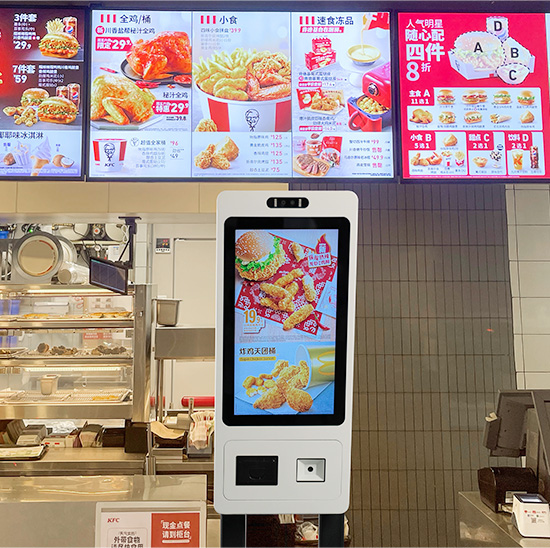
Het stroomlijnt het hele bestelproces zonder volledige assistentie van het personeel. In aanvulling, het zorgt voor een consistente servicekwaliteit en een hogere winkelefficiëntie. In dit artikel wordt de definitie ervan uitgelegd, kernfuncties, werkende stappen, voordelen en veelgestelde vragen.
Basisoverzicht van een kiosk bij KFC
Een kiosk bij KFC is een gespecialiseerde zelfbedieningscateringterminal. Het richt zich op eenvoudig, snel en gestandaardiseerd eten bestellen voor diner- en afhaalgasten.
1. Aangepast fastfood-hardwareontwerp
Deze kiosk maakt gebruik van touchscreens van cateringkwaliteit en stabiele interne systemen. Het is bestand tegen frequent dagelijks tikken en slijtage in de openbare omgeving. Het zorgt de hele dag voor een soepele werking.
2. Speciaal systeem voor het bestellen van eten
Het gebruikt exclusieve bestellogica voor fastfood. Het ondersteunt maaltijdcombinaties, ingrediëntenaanpassingen en winkelpromoties. Het past volledig bij de unieke servicemodi van KFC.
3. Onafhankelijke klantenservice-eenheid
Elke kiosk werkt als een zelfstandig servicestation. Het vermindert het samenkomen van mensen bij traditionele loketten. Het balanceert ook de servicedruk tijdens drukke eettijden.
Kernfuncties van een kiosk bij KFC
Een standaardkiosk bij KFC biedt meerdere praktische functies om de winkelworkflows te optimaliseren.
1. Visueel bladeren door menu's en itemselectie
Klanten bekijken gecategoriseerde menu's, voedselfoto's en realtime prijzen. Ze kiezen maaltijden, drankjes en bijgerechten met eenvoudige schermtaps. De bedieningsstappen blijven vriendelijk voor alle leeftijdsgroepen.
2. Gepersonaliseerde voedselaanpassing
De kiosk maakt flexibele bestelaanpassingen mogelijk. Gebruikers voegen extra toppings toe of verwijderen ongewenste ingrediënten. Het voldoet gemakkelijk aan diverse persoonlijke smaakvoorkeuren.
3. Automatische facturatie en kortingstoepassing
Het systeem berekent direct de ordertotalen. Er gelden geldige kortingsbonnen, automatisch combodeals en winkelpromoties. Het zorgt voor nauwkeurige en transparante prijzen voor elke bestelling.
4. Veilige betaling via meerdere kanalen
Het ondersteunt alle gangbare contactloze betaalmethoden. Klanten voltooien transacties binnen enkele seconden. Het systeem bevestigt de betalingsstatus in realtime.
5. Realtime synchronisatie van keukenbestellingen
Na succesvolle betaling, de kiosk stuurt bestelgegevens onmiddellijk naar keukendisplays. Koks ontvangen duidelijke productieherinneringen en versnellen de maaltijdbereiding.
Stapsgewijs werkproces van een kiosk bij KFC
Elke kioskbestelling volgt een eenvoudige, duidelijke en gestandaardiseerde workflow.
1. Activeer de hoofdinterface
Eerst, gebruikers raken het scherm aan om de kiosk uit de standby-modus te halen. Het apparaat laadt bijgewerkte menu's, nieuwe producten en actieve promoties.
2. Bestellingen samenstellen en aanpassen
Volgende, klanten selecteren favoriete etenswaren. Ze passen porties aan en passen maaltijddetails aan op basis van persoonlijke behoeften.
3. Controleer bestellingen en bevestig de betaling
Dan, gebruikers controleren hun volledige bestellijst en eindafrekening. Ze bevestigen alle details voordat ze naar de betalingspagina gaan.
4. Voltooi de transactie en plaats bestellingen
Na betaling, de kiosk valideert de transactie. Het genereert een officieel bestelnummer en verzendt gegevens naar de backend van de winkel.
5. Kwitanties afdrukken en wachten tot het wordt opgehaald
Eindelijk, de kiosk drukt een ontvangstbewijs af met bestelinformatie. Klanten bewaren de bon en wachten tot de maaltijd in de winkel wordt opgehaald.
Belangrijkste voordelen van het gebruik van een kiosk bij KFC
Kioskapparaten creëren win-winvoordelen voor zowel klanten als winkelexploitanten.
1. Wachttijd aanzienlijk verkorten
Meerdere kiosken bedienen veel klanten tegelijk. Ze verspreiden de passagiersstroom tijdens de spitsuren en verkorten uiteraard de wachtrijtijd.
2. Minder handmatige bestelfouten
Klanten selecteren alle artikelen zelf. Ze vermijden miscommunicatieproblemen met het personeel. Dus, winkels verminderen verkeerde bestellingen en voedselverspilling.
3. Optimaliseer de arbeidsregeling in de winkel
Kiosken verwerken repetitief bestelwerk. Het personeel concentreert zich op het maken van voedsel, winkelschoonmaak en klantenbegeleiding. Deze opzet verbetert de algehele teamproductiviteit.
4. Standaardiseer de kwaliteit van de merkservice
Alle klanten volgen hetzelfde bestelproces. Prijzen, promoties en bestelregels blijven in elke winkel uniform. Het bouwt een netjes en professioneel merkimago op.
Veelgestelde vragen over een kiosk bij KFC
Q1: Waar wordt een kiosk bij KFC precies voor gebruikt??
A1: Het fungeert als een zelfbedieningsbestelterminal. Hiermee kunnen klanten door menu's bladeren, maaltijden aanpassen, betaal bestellingen en dien verzoeken in zonder hulp van het personeel.
Vraag 2: Is een kiosk bij KFC anders dan een automaat?
A2: Ja. Een kiosk ondersteunt aangepaste combo's en ingrediëntenwijzigingen. Verkoopautomaten verkopen alleen vaste losse producten zonder gepersonaliseerde opties.
Q3: Kunnen beginners zonder begeleiding een KFC-kiosk gebruiken??
A3: Ja. De kiosk biedt duidelijke aanwijzingen op het scherm. Het maakt gebruik van eenvoudige stappen die alle gebruikers zonder training of hulp kunnen volgen.
Q4: Werken KFC-kiosken menu's en prijzen automatisch bij??
A4: Ja. Winkelmanagers updaten de inhoud op afstand. De kiosk synchroniseert nieuwe menu's, prijzen en promoties in realtime.
Vraag 5: Zijn kioskbestellingen minder nauwkeurig dan tegenbestellingen?
A5: Nee. Kioskbestellingen tonen alle details op het scherm. Klanten bevestigen elk item, deze bestellingen bevatten dus veel minder fouten dan handmatige bestellingen.
Conclusie
Om samen te vatten, een kiosk bij KFC is een professionele zelfbedieningsterminal met touchscreen, gebouwd voor fastfoodscenario's. Het omvat de volledige bestelfuncties, inclusief selectie, maatwerk, facturatie en betaling. Het versnelt de winkelservice, vermindert menselijke fouten en standaardiseert de dagelijkse activiteiten. Het blijft een van de meest praktische slimme apparaten voor moderne fastfoodketens.
Als u stal wilt kopen, zeer efficiënte, op maat gemaakte fastfood-zelfbedieningskiosken voor uw winkelupgrade, Vul dan het aanvraagformulier in op onze officiële website. Deel uw winkelgrootte, inrichtingsomstandigheden en functionele eisen. Ons professionele team biedt u op maat gemaakte kioskoplossingen en technische ondersteuning.
