消息

随时了解最新的触摸显示器新闻

科技趋势, 新产品发布, 行业洞察

以及满足您需求的实际应用技巧.

肯德基的售货亭是什么?

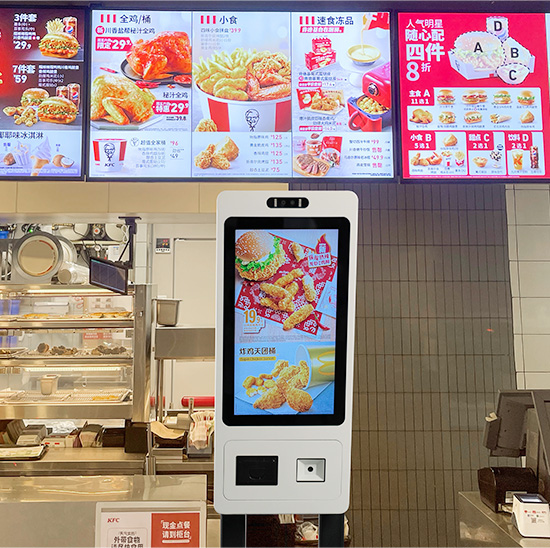
Fast food service continues to upgrade for speed and accuracy today. Manual counter ordering often creates long lines and minor order errors during peak hours. 为此原因, self-service devices become standard equipment in chain fast food stores.A at KFC is an in-store touchscreen terminal for customer self-ordering.

kiosk at KFC

It streamlines the entire ordering process without full staff assistance. 此外, it brings consistent service quality and higher store efficiency. This article explains its definition, core features, working steps, benefits and common FAQs.

Basic Overview of a Kiosk at KFC

A kiosk at KFC is a specialized self-service catering terminal. It focuses on simple, fast and standardized food ordering for dine-in and takeaway guests.

1. Customized fast-food hardware design

This kiosk adopts catering-grade touch screens and stable internal systems. It resists frequent daily tapping and public environment wear. It maintains smooth operation all day long.

2. Dedicated food ordering system

It runs exclusive fast-food ordering logic. It supports meal combos, ingredient adjustments and store promotions. It fits KFC’s unique service modes completely.

3. Independent customer service unit

Each kiosk works as a standalone service station. It reduces crowd gathering at traditional counters. It also balances service pressure during busy dining times.

Core Functions of a Kiosk at KFC

A standard kiosk at KFC delivers multiple practical functions to optimize store workflows.

1. Visual menu browsing and item selection

Customers view categorized menus, food pictures and real-time prices. They pick meals, drinks and side dishes with simple screen taps. Operation steps stay friendly for all age groups.

2. Personalized food customization

The kiosk allows flexible order adjustments. Users add extra toppings or remove unwanted ingredients. It meets diverse personal taste preferences easily.

3. Automatic billing and discount application

The system calculates order totals instantly. It applies valid coupons, combo deals and store promotions automatically. It ensures accurate and transparent pricing for every order.

4. Multi-channel secure payment

It supports all mainstream contactless payment methods. Customers complete transactions within seconds. The system confirms payment status in real time.

5. Real-time kitchen order synchronization

After successful payment, the kiosk sends order data to kitchen displays immediately. Cooks receive clear production reminders and speed up meal preparation.

Step-by-Step Working Process of a Kiosk at KFC

Every kiosk order follows a simple, clear and standardized workflow.

1. Activate the main interface

第一的, users touch the screen to wake the kiosk from standby mode. The device loads updated menus, new products and active promotions.

2. Build and customize orders

下一个, customers select favorite food items. They adjust portions and customize meal details based on personal needs.

3. Review orders and confirm payment

然后, users check their full order list and final bill. They confirm all details before moving to the payment page.

4. Complete transaction and submit orders

After payment, the kiosk validates the transaction. It generates an official order number and sends data to the store backend.

5. Print receipts and wait for pickup

最后, the kiosk prints a receipt with order information. Customers keep the slip and wait for in-store meal pickup.

Key Advantages of Using a Kiosk at KFC

Kiosk devices create win-win benefits for both customers and store operators.

1. Greatly cut waiting time

Multiple kiosks serve many customers at once. They disperse peak-hour passenger flow and shorten queuing time obviously.

2. Lower manual order errors

Customers select all items by themselves. They avoid miscommunication issues with staff. 因此, stores reduce wrong orders and food waste.

3. Optimize store labor arrangement

Kiosks handle repetitive ordering work. 工作人员专注于食品制作, store cleaning and customer guidance. This setup improves overall team productivity.

4. Standardize brand service quality

所有客户都遵循相同的订购流程. Pricing, promotions and order rules stay unified in every store. It builds a neat and professional brand image.

FAQs About a Kiosk at KFC

Q1: What exactly is a kiosk at KFC used for?

A1: It acts as a self-service ordering terminal. It lets customers browse menus, customize meals, pay orders and submit requests without staff help.

Q2: Is a kiosk at KFC different from a vending machine?

A2: 是的. A kiosk supports custom combos and ingredient changes. Vending machines only sell fixed single products with no personalized options.

第三季度: Can beginners use a KFC kiosk with no guidance?

A3: 是的. The kiosk provides clear on-screen prompts. It uses simple steps that all users can follow without training or assistance.

第四季度: Do KFC kiosks update menus and prices automatically?

A4: 是的. Store managers update content remotely. The kiosk syncs new menus, prices and promotions in real time.

Q5: Are kiosk orders less accurate than counter orders?

A5: 不. Kiosk orders show full details on screen. Customers confirm every item, so these orders have far fewer mistakes than manual orders.

结论

总结一下, a kiosk at KFC is a professional touchscreen self-service terminal built for fast-food scenarios. It covers full ordering functions including selection, customization, billing and payment. It speeds up store service, cuts human errors and standardizes daily operations. It remains one of the most practical smart devices for modern chain fast food stores.

If you want to purchase stable, high-efficiency customized fast-food self-service kiosks for your store upgrade, 请在我们的官方网站上填写咨询表. Share your store size, layout conditions and functional demands. Our professional team will provide you with tailored kiosk solutions and technical support.

提交下面的表格以获取更多信息

或获得个性化优惠.


    *我们尊重您的机密性,所有信息均受到保护