
レストラン業界は、サービスの効率と顧客満足度を向上させる方法を模索し続けています。. 長い行列や手動による注文ミスにより、日常業務の妨げになることがよくあります. 多くの店舗オーナーは、これらの問題を解決するための実用的なアップグレードを求めています。セルフオーダー キオスク ケータリングスペース全体で人気のスマートソリューションになっています.
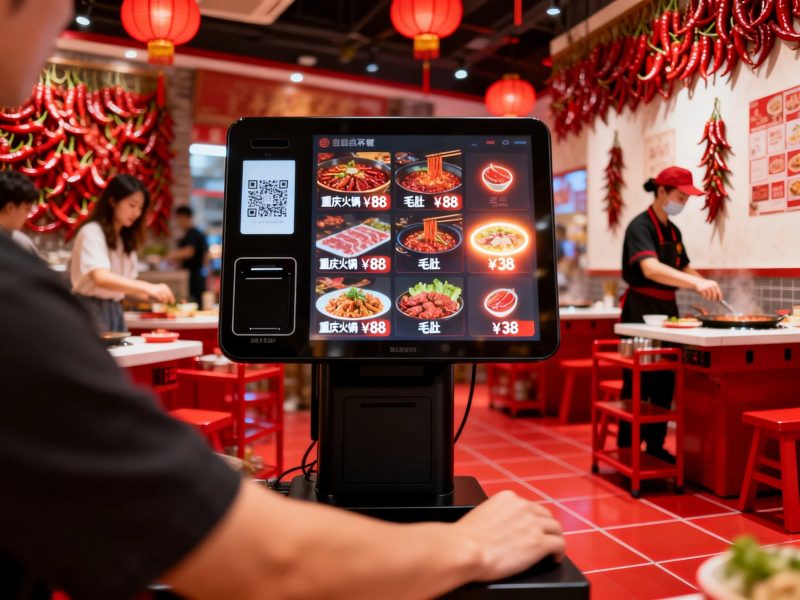
これらのタッチスクリーン端末により、ゲストは個別に注文を完了できます. また、現場スタッフの負担を軽減し、サービスプロセスを標準化します。. この記事ではコア機能について説明します, 主な利点, 導入のヒントとセルフオーダー キオスクに関するよくある質問.
セルフオーダーキオスクのコア機能
最新のセルフオーダー キオスクには、レストラン サービスのニーズに合わせたフルセットの機能が搭載されています.
1. メニューの参照と項目の選択
ユーザーは画面上に分類された食品リストと価格の詳細を表示します. アイコンをタップして食事を追加します, ドリンクとサイドメニューは注文に応じて. インターフェースはすべての年齢層向けにシンプルです.
2. 個別の注文調整
ゲストは食事の量を変更したり、特定の食材を削除したりできます. 自分の味の好みに合わせて簡単に注文を組み立てます. すべての変更はリアルタイムで画面に表示されます.
3. 自動課金・割引適用
選択直後にシステムが合計コストを計算します. コンボが発動します, クーポンや限定オファーが自動的に提供されます. すべての請求書は正確かつ透明性を保ちます.
4. 複数支払いのサポート
これらのキオスクは主流の支払い方法に対応しています. ゲストは数秒でトランザクションを完了します. システムは支払いデータを記録し、注文を即座に確認します.
5. リアルタイムの注文データ同期
送信された注文はキッチンターミナルに直接送信されます. 料理人は遅滞なく明確な生産リマインダーを受け取ることができます. このリンクで食事の待ち時間が大幅に短縮されます.
自動注文キオスクを使用する主な利点
レストランはセルフオーダー キオスクの導入後、複数の長期的な利点を獲得します.
1. 顧客の待ち時間を短縮
複数のキオスクが同時にゲストにサービスを提供する. ピーク時の混雑した交通量を分散します. したがって, 店舗は日々サービス回転率を向上させています.
2. 手動による注文ミスの減少
すべての項目をゲスト自身が選択してチェックします. 顧客とスタッフ間のコミュニケーションのミスを回避します. この変更により、誤注文と食品ロスが削減されます.
3. スタッフの作業負荷を最適化する
キオスクが繰り返しの注文作業を引き継ぐ. 従業員は調理や現場指導に専念. 企業は人材をより合理的に配置します.
4. 店内サービスの標準化
すべての場所で同じ注文手順と価格設定ルールに従います. 顧客は一貫したサービス体験を得ることができます. プロフェッショナルな店舗イメージの構築に役立ちます.
5. ビジネスに役立つデータを収集する
キオスク システムは毎日の注文量と人気商品を記録します. オーナーはデータを分析してメニューやマーケティング計画を調整します. スマートな店舗運営をサポートします.
セルフオーダーキオスクの実践的な導入のヒント
適切なレイアウトと設定により、セルフオーダー キオスクが最高のパフォーマンスで実行されます。.
1. 適切な設置位置を選択してください
オープンなロビーエリアにキオスクを設置する. ゲストが操作できるように各デバイスの周囲に十分なスペースを確保してください. ユーザーのアクセスを妨げる混雑したコーナーを避ける.
2. コンテンツを定期的に更新する
メニューを更新する, 定期的な価格とプロモーション. 古い情報は顧客を混乱させる. リモートアップデート機能により作業が簡単になります.
3. デバイスを清潔に保ち、よくメンテナンスしてください
タッチスクリーンとシェルを毎日拭いてください. 油汚れやホコリを取り除き、繊細なタッチ反応を維持します。. 基本的なケアによりデバイスの耐用年数が延びます.
4. 明確な画面上のガイダンスを設定する
インターフェースに簡単な操作プロンプトを追加. 新しいユーザーは追加のサポートなしで手順をすぐに学ぶことができます. 全体的な操作の流暢性が向上します.
レストラン業界における一般的なアプリケーション シナリオ
セルフオーダーキオスクは、ほとんどのタイプのケータリング サービス環境に適合します.
1. ファストフード店
迅速なサービスには高い効率が必要です. キオスクは大規模な顧客の流れを処理し、注文処理を高速化します. ファストフードチェーンの標準的な設定です.
2. カジュアルダイニング店
これらの場所には柔軟な注文オプションが必要です. キオスクは多様な食事の組み合わせと個人的なカスタマイズをサポートします. 全体的なダイニング体験を向上させます.
3. 軽食と飲み物の店
小さなケータリングスペースにはカウンターエリアが限られています. コンパクトなセルフオーダーキオスクは床面積を節約し、日常のサービスを簡素化します.
4. 大型ケータリングホール
大規模な会場は分散した顧客グループに直面している. 複数のキオスクにより混雑が分散され、繁忙期でも秩序あるサービスが維持されます.
セルフオーダーキオスクに関するよくある質問
Q1: 顧客はセルフオーダー キオスクを使用するためにスタッフのサポートが必要ですか??
A1: いいえ. インターフェイスには明確なガイドがあります. ほとんどのユーザーは注文プロセス全体を独立して完了できます.
Q2: セルフオーダーキオスクは既存のキッチンシステムで使用できますか?
A2: はい. スムーズなデータ接続をサポートするスタンダードモデル. 注文情報をキッチンの表示デバイスと安定して同期します.
Q3: セルフオーダーキオスクは保守が難しいですか?
A3: いいえ. 毎日のクリーニングと定期的なコンテンツの更新で十分です. 専門的なチェックは長い間隔でのみ行われます.
Q4: これらのキオスクは長時間安定して動作できますか?
A4: はい. 商用グレードのデバイスは 24 時間の連続使用をサポートします. 営業時間のピーク時にも安定したパフォーマンスを維持します.
Q5: キオスクにストア限定プロモーションを設定できますか?
A5: 絶対に. カスタムコンボや割引ルールを追加できます. システムはこれらのオファーを適格な注文に自動的に適用します。.
結論
総括する, セルフオーダーキオスクはレストラン業界で不可欠なスマート機器となっています. 注文を統合します, 請求する, 支払いとデータの同期を 1 つのワークフローに統合. 彼らは列をカットしました, エラーを減らす, スタッフのプレッシャーを軽減し、標準化されたサービスを実現します. 合理的な導入と日常のメンテナンスにより、ケータリング ビジネスの価値が最大化されます。.
レストランのアップグレードまたは新規オープンのために高性能セルフオーダー キオスクの設置を計画している場合, 公式サイトのお問い合わせフォームにご記入ください. 店舗の規模を共有する, スペースレイアウトと機能的ニーズ. 当社の専門チームがカスタマイズされたソリューションと信頼できる技術サポートを作成します。.
