
Bíonn brú seirbhíse comhsheasmhach ar shiopaí mearbhia agus bia ócáideacha gach lá. Tugann buaicuaireanta línte plódaithe, foireann rushed agus botúin ordaithe inseachanta. Ar an gcúis seo, glacann go leor úinéirí gnó uirlisí cliste féinseirbhíse chun oibríochtaí laethúla a shruthlíniú. Soláthraíonn both ordú bia seirbhís neamhspleách do chustaiméirí gan treoir láimhe.
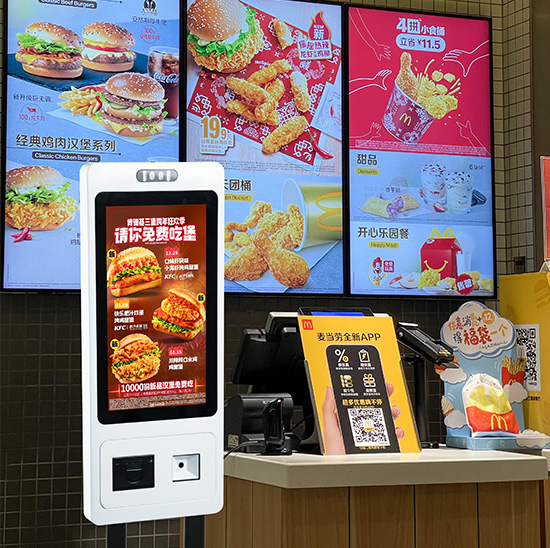
Braitheann sé ar mhodúil crua-earraí comhoiriúnaithe agus ar loighic bogearraí ionsuite chun sreabhadh oibre iomlána ordú a chríochnú. Ina theannta sin, déanann sé cáilíocht seirbhíse a chobhsú agus luasann sé láimhdeachas na siopaí. Míníonn an t-alt seo a croí-chomhpháirteanna, próiseas oibríochta céim ar chéim, gnéithe oibre agus ceisteanna coitianta úsáideora.
Croímhodúil Crua-earraí a thacaíonn le hOibriú Both a Ordú
Úsáideann gach both feidhmiúil ordaithe crua-earraí tiomnaithe chun tacú le hoibriú réidh laethúil.
1. Modúl scáileán tadhaill ard-chruinneas
Feidhmíonn an scáileán tadhaill mar phríomhthairseach idirghníomhach. Freagraíonn sé go tapa le gníomhartha cnagadh agus sleamhnáin. Taispeánann sé biachláir, praghsanna agus sonraí cur chun cinn soiléir do chustaiméirí.
2. Príomhchlár rialaithe Chliste
Ritheann an croí-chomhpháirt seo gach clár córais. Próiseálann sé roghanna úsáideoirí, ríomhann sé billí agus stórálann sé taifid ordaithe. Coinníonn sé oibriú cobhsaí le linn buaicuaireanta ard-tráchta.
3. Modúl braite íocaíochta
Tacaíonn an chuid seo le modhanna íocaíochta gan tadhall príomhshrutha. Scanann sé cóid íocaíochta custaiméirí agus dearbhaíonn sé torthaí na n-idirbheart láithreach. Nascann sé go dlúth le córas inneall an tsiopa.
4. Printéir admháil uathoibríoch
Tar éis íocaíocht rathúil, oibríonn an modúl seo láithreach. Priontálann sé admhálacha ordaithe le huimhreacha ordaithe uathúla. Cuidíonn sé leis an bhfoireann béilí custaiméirí a rangú agus a ullmhú go cruinn.
Oibríocht Céim ar Chéim Sreabhadh Oibre de Bhoth Ordaithe Bia
Leanann both ordaithe pointe fosaithe, sreabhadh oibre loighciúil chun gach ordú custaiméara a chomhlánú.
1. Seoladh an príomh-chomhéadan seirbhíse
Ar dtús, Dúisíonn an both ón mód fuireachais nuair a dhéanann úsáideoirí teagmháil leis an scáileán. Lódálann sé biachláir chatagóirithe bia, sonraí an táirge agus cur chun cinn gníomhach siopaí.
2. Roghnaigh míreanna agus orduithe a shaincheapadh
Ar aghaidh, déanann custaiméirí roghanna bia a bhrabhsáil agus cuireann siad míreanna lena gcairteacha. Coigeartaíonn siad méideanna coda, bain comhábhair nó cuir rudaí breise bunaithe ar roghanna pearsanta. Idir an dá linn, déanann an córas praghsanna fíor-ama a nuashonrú.
3. Orduithe a athbhreithniú agus arduithe céime a chur i bhfeidhm
Ansin, seiceálann úsáideoirí a liosta ordú iomlán ar an scáileán. Cuireann an córas cúpóin bhailí i bhfeidhm go huathoibríoch, combos agus lascaine a stóráil. Gineann sé bille deiridh soiléir lena dheimhniú.
4. Próiseáil íocaíochta slán a chríochnú
Tar éis deimhniú ordú, roghnaíonn custaiméirí an cainéal íocaíochta is fearr leo. Críochnaíonn siad idirbhearta tapa ar an meaisín. Taispeánann an both fógraí rathúlachta íocaíochta láithreach.
5. Orduithe a shioncronú agus admhálacha a eisiúint
Ar deireadh, seolann an gléas sonraí ordaithe bailí chuig córais taispeána cistine. Priontaíonn sé admhálacha do chustaiméirí agus nuashonraíonn sé sonraí chuig inneall bainistíochta an tsiopa. Críochnaíonn an chéim seo an timthriall oibríochta iomlán.
Príomhfheidhmeanna Bogearraí a Uasmhéadaíonn Oibríocht Both
Ní féidir le crua-earraí amháin tacú le seirbhís chobhsaí. Déanann bogearraí gairmiúla feidhmíocht iomlán both a uasghrádú.
1. Loighic aitheantais ord cliste
Déanann an córas idirdhealú uathoibríoch ar orduithe bia-isteach agus beir leat. Marcálann sé cineálacha éagsúla ordaithe le haghaidh aitheantais foirne cistine. Laghdaíonn sé obair sórtála láimhe go héifeachtach.
2. Sioncrónú sonraí fíor-ama
Ina theannta sin, Sioncrónaíonn na bogearraí na sonraí ordaithe go léir gan mhoill. Ceanglaíonn sé críochfoirt cistine, córais airgeadóra agus modúil staitisticí fardail. Coinníonn sé sonraí comhsheasmhach ar fud an stór ar fad.
3. Dearadh uathoibríoch um chosc earráide
Déanann an córas íocaíochtaí dúblacha agus aighneachtaí ordaithe neamhbhailí a scagadh. Pops sé suas teachtaireachtaí pras le haghaidh oibríochtaí mícheart. Seachnaíonn sé mearbhall sonraí neamhghnácha le linn tréimhsí gnóthacha.
4. Tacaíocht le nuashonrú inneachair cianda
Roghchláir nuashonraithe foirne stórais, praghsanna agus tionscnaimh nua go cianda. Níl aon dífhabhtú meaisín ar an láthair ag teastáil uathu. Sábhálann an fheidhm seo am bainistíochta stórais laethúil.
Buntáistí Oibriúcháin Bothanna Ordú Bia do Bhialanna
Cruthaíonn ordú bothanna feabhsuithe inláimhsithe ar oibríochtaí gnó lónadóireachta laethúil.
1. Giorraigh scuainí feithimh custaiméirí
Freastalaíonn bothanna iolracha ar roinnt custaiméirí ag an am céanna. Scaipeann siad sreabhadh paisinéirí buaicuaireanta. Dá bhrí sin, feabhsaíonn siopaí éifeachtacht seirbhíse laethúil go suntasach.
2. Deireadh a chur le hearráidí cumarsáide láimhe
Roghnaíonn custaiméirí gach mír go neamhspleách ar an scáileán. Scipeann siad an mhíchumarsáid ó bhéal leis an bhfoireann. Laghdaíonn sé orduithe mícheart agus dramhaíl bia go mór.
3. An leithdháileadh saothair stórais a bharrfheabhsú
Déanann bothanna obair ordaithe athchleachtach. Díríonn an fhoireann ar ullmhú bia, glanadh siopa agus treoir do chustaiméirí. Ina dhiaidh sin, úsáideann siopaí acmhainní daonna ar bhealach níos réasúnaí.
4. Seirbhís stórais laethúil a chaighdeánú
Leanann gach custaiméir an próiseas ordaithe céanna. Fanann gach riail lascaine agus praghsála comhsheasmhach. Tógann sé íomhá seirbhíse siopa aontaithe agus gairmiúla.
Ceisteanna Coitianta Faoi Oibriú Both Ordaithe Bia
C1: An féidir le both ordaithe bia orduithe casta teaglama agus lascaine a láimhseáil?
A1: Tá. Tacaíonn loighic an chórais réamhshocraithe le combos, cúpóin agus cur chun cinn séasúrach. Ríomhann sé gach méid ordú go cruinn gach uair.
C2: An gá don fhoireann ghairmiúil seirbhís laethúil a reáchtáil ó bhoth ordaithe?
A2: Níl. Ritheann an meaisín go hiomlán go huathoibríoch. Críochnaíonn custaiméirí an próiseas iomlán ordaithe gan cabhair ón bhfoireann.
C3: An féidir le bainisteoirí stórais ábhar roghchláir a nuashonrú ar an bhoth ordaithe?
A3: Cinnte. Tacaíonn an córas le nuashonruithe cianda agus ar an láthair. Athraíonn bainisteoirí míreanna bia, praghsanna agus cur chun cinn ag am ar bith.
C4: An mbeidh tionchar ag teipeanna líonra ar oibriú bothanna ordú?
A4: Tá feidhmeanna taisce sonraí as líne ag bothanna gairmiúla. Tacaíonn siad le buntascanna ordaithe agus sioncronaíonn siad sonraí tar éis aisghabháil líonra.
C5: An féidir le bothanna ordaithe iolracha oibriú go comhuaineach in aon siopa amháin?
A5: Tá. Nascann feistí iolracha le hinneall aontaithe amháin. Oibríonn siad go cobhsaí le chéile gan coinbhleacht sonraí nó mearbhall ordú.
Conclúid
Chun achoimre, feidhmíonn both ordú bia trí mhodúil chrua-earraí chomhordaithe agus córais bhogearraí éirimiúla. Críochnaíonn sé brabhsáil roghchláir, roghnú ordú, próiseáil íocaíochta agus sioncrónú sonraí i gcéimeanna caighdeánacha. Réitíonn sé pointí pian coitianta lónadóireachta cosúil le scuainí fada, earráidí láimhe agus acmhainní saothair daingean. Cruthaíonn sé níos tapúla, seirbhís chaighdeánaithe agus níos cliste do gach siopa bia.
Más mian leat cobhsaí a shuiteáil, bothanna ordaithe ardéifeachtúlachta chun do chóras seirbhíse stórais a uasghrádú, bíodh leisce ort teagmháil a dhéanamh linn. Comhlánaigh an fhoirm fiosrúcháin le do thoil ar ár suíomh Gréasáin oifigiúil agus roinn do mhéid siopa, éilimh fheidhmiúla agus cásanna úsáide. Soláthróidh ár bhfoireann ghairmiúil réitigh both saincheaptha agus tacaíocht theicniúil mhionsonraithe do do ghnó.
