
फ़ास्ट फ़ूड और कैज़ुअल डाइनिंग स्टोर्स को हर दिन लगातार सेवा दबाव का सामना करना पड़ता है. पीक आवर्स में भीड़ भरी लाइनें आती हैं, हड़बड़ाए हुए कर्मचारी और टाली जा सकने वाली ऑर्डर गलतियाँ. इस कारण से, कई व्यवसाय मालिक दैनिक कार्यों को सुव्यवस्थित करने के लिए स्मार्ट स्व-सेवा उपकरण अपनाते हैं। एक खाद्य ऑर्डरिंग कियोस्क मैन्युअल मार्गदर्शन के बिना स्वतंत्र ग्राहक सेवा प्रदान करता है.
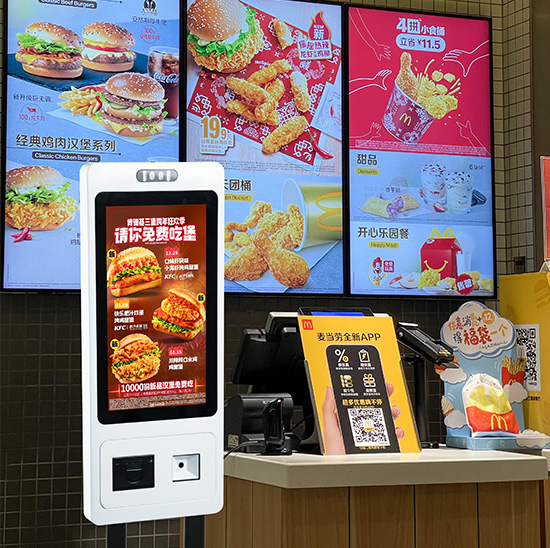
यह पूर्ण ऑर्डरिंग वर्कफ़्लो को पूरा करने के लिए मिलान किए गए हार्डवेयर मॉड्यूल और अंतर्निहित सॉफ़्टवेयर तर्क पर निर्भर करता है. आगे, यह सेवा की गुणवत्ता को स्थिर करता है और स्टोर टर्नओवर को गति देता है. यह आलेख इसके मुख्य घटकों की व्याख्या करता है, चरण-दर-चरण संचालन प्रक्रिया, कामकाजी विशेषताएं और सामान्य उपयोगकर्ता प्रश्न.
कोर हार्डवेयर मॉड्यूल जो ऑर्डरिंग कियोस्क ऑपरेशन का समर्थन करते हैं
प्रत्येक कार्यात्मक ऑर्डरिंग कियोस्क सुचारू दैनिक संचालन का समर्थन करने के लिए समर्पित हार्डवेयर का उपयोग करता है.
1. उच्च परिशुद्धता टच स्क्रीन मॉड्यूल
टच स्क्रीन मुख्य इंटरैक्टिव पोर्टल के रूप में कार्य करती है. यह टैपिंग और स्लाइडिंग क्रियाओं पर तुरंत प्रतिक्रिया करता है. यह मेनू प्रदर्शित करता है, ग्राहकों के लिए कीमतें और प्रचार विवरण स्पष्ट रूप से.
2. बुद्धिमान मुख्य नियंत्रण बोर्ड
यह मुख्य घटक सभी सिस्टम प्रोग्राम चलाता है. यह उपयोगकर्ता चयन को संसाधित करता है, बिलों की गणना करता है और ऑर्डर रिकॉर्ड संग्रहीत करता है. यह उच्च-यातायात पीक घंटों के दौरान स्थिर संचालन बनाए रखता है.
3. भुगतान संवेदन मॉड्यूल
यह हिस्सा मुख्यधारा की संपर्क रहित भुगतान विधियों का समर्थन करता है. यह ग्राहक भुगतान कोड को स्कैन करता है और लेनदेन परिणामों की तुरंत पुष्टि करता है. यह स्टोर के बैकएंड सिस्टम के साथ निकटता से जुड़ा हुआ है.
4. स्वचालित रसीद प्रिंटर
सफल भुगतान के बाद, यह मॉड्यूल तुरंत काम करता है. यह अद्वितीय ऑर्डर नंबरों के साथ ऑर्डर रसीदें प्रिंट करता है. यह कर्मचारियों को ग्राहक भोजन को सटीक रूप से वर्गीकृत करने और तैयार करने में मदद करता है.
फ़ूड ऑर्डरिंग कियोस्क का चरण-दर-चरण संचालन वर्कफ़्लो
एक ऑर्डरिंग कियोस्क एक निश्चित का अनुसरण करता है, प्रत्येक ग्राहक ऑर्डर को पूरा करने के लिए तार्किक वर्कफ़्लो.
1. मुख्य सेवा इंटरफ़ेस लॉन्च करें
पहला, जब उपयोगकर्ता स्क्रीन को छूते हैं तो कियोस्क स्टैंडबाय मोड से सक्रिय हो जाता है. यह वर्गीकृत भोजन मेनू लोड करता है, उत्पाद विवरण और सक्रिय स्टोर प्रचार.
2. आइटम चुनें और ऑर्डर कस्टमाइज़ करें
अगला, ग्राहक भोजन के विकल्प ब्राउज़ करते हैं और अपनी कार्ट में आइटम जोड़ते हैं. वे भाग के आकार को समायोजित करते हैं, व्यक्तिगत प्राथमिकताओं के आधार पर सामग्री हटाएँ या अतिरिक्त जोड़ें. इस दौरान, सिस्टम वास्तविक समय में कीमतों को अपडेट करता है.
3. आदेशों की समीक्षा करें और पदोन्नति लागू करें
तब, उपयोगकर्ता स्क्रीन पर अपनी पूरी ऑर्डर सूची देखते हैं. सिस्टम स्वचालित रूप से वैध कूपन लागू करता है, कॉम्बो और स्टोर छूट. यह पुष्टि के लिए एक स्पष्ट अंतिम बिल तैयार करता है.
4. पूर्ण सुरक्षित भुगतान प्रक्रिया
आदेश की पुष्टि के बाद, ग्राहक अपना पसंदीदा भुगतान चैनल चुनें. वे मशीन पर तेजी से लेनदेन पूरा करते हैं. कियोस्क तुरंत भुगतान सफलता सूचनाएं प्रदर्शित करता है.
5. ऑर्डर सिंक करें और रसीदें जारी करें
अंत में, डिवाइस किचन डिस्प्ले सिस्टम को वैध ऑर्डर डेटा भेजता है. यह ग्राहकों के लिए रसीदें प्रिंट करता है और स्टोर प्रबंधन बैकएंड पर डेटा अपडेट करता है. यह चरण पूर्ण संचालन चक्र को पूरा करता है.
मुख्य सॉफ़्टवेयर फ़ंक्शंस जो कियोस्क संचालन को अनुकूलित करते हैं
अकेले हार्डवेयर स्थिर सेवा का समर्थन नहीं कर सकता. व्यावसायिक सॉफ़्टवेयर समग्र कियोस्क प्रदर्शन को उन्नत करता है.
1. बुद्धिमान आदेश पहचान तर्क
सिस्टम डाइन-इन और टेकअवे ऑर्डर को स्वचालित रूप से अलग करता है. यह रसोई कर्मचारियों की पहचान के लिए विभिन्न ऑर्डर प्रकारों को चिह्नित करता है. यह मैन्युअल सॉर्टिंग कार्य को प्रभावी ढंग से कम करता है.
2. वास्तविक समय डेटा सिंक्रनाइज़ेशन
इसके अलावा, सॉफ़्टवेयर बिना किसी देरी के सभी ऑर्डर डेटा को सिंक करता है. यह रसोई टर्मिनलों को जोड़ता है, कैशियर सिस्टम और इन्वेंट्री सांख्यिकी मॉड्यूल. यह पूरे स्टोर में लगातार डेटा रखता है.
3. स्वचालित त्रुटि निवारण डिज़ाइन
सिस्टम डुप्लिकेट भुगतान और अमान्य ऑर्डर सबमिशन को फ़िल्टर करता है. यह गलत संचालन के लिए त्वरित संदेश पॉप अप करता है. यह व्यस्त अवधि के दौरान असामान्य डेटा भ्रम से बचाता है.
4. दूरस्थ सामग्री अद्यतन समर्थन
स्टोर टीमें मेनू अपडेट करती हैं, कीमतें और नए प्रमोशन दूर से. उन्हें ऑन-साइट मशीन डिबगिंग की आवश्यकता नहीं है. यह फ़ंक्शन दैनिक स्टोर प्रबंधन समय बचाता है.
रेस्तरां के लिए खाना ऑर्डर करने वाले कियोस्क के परिचालन लाभ
कियोस्क ऑर्डर करने से दैनिक खानपान व्यवसाय संचालन में ठोस सुधार आते हैं.
1. ग्राहकों की प्रतीक्षा कतारें छोटी करें
एकाधिक कियोस्क एक ही समय में कई ग्राहकों को सेवा प्रदान करते हैं. वे पीक-आवर यात्री प्रवाह को तितर-बितर कर देते हैं. इस प्रकार, स्टोर दैनिक सेवा दक्षता में उल्लेखनीय रूप से सुधार करते हैं.
2. मैन्युअल संचार त्रुटियों को दूर करें
ग्राहक स्क्रीन पर सभी आइटम स्वतंत्र रूप से चुनते हैं. वे कर्मचारियों के साथ मौखिक गलत संचार से बचते हैं. इससे गलत ऑर्डर और भोजन की बर्बादी बहुत कम हो जाती है.
3. स्टोर श्रम आवंटन का अनुकूलन करें
कियोस्क बार-बार ऑर्डर देने का काम करते हैं. कर्मचारी भोजन की तैयारी पर ध्यान दें, स्टोर की सफाई और ग्राहक मार्गदर्शन. के बदले में, स्टोर मानव संसाधनों का अधिक उचित उपयोग करते हैं.
4. दैनिक स्टोर सेवा का मानकीकरण करें
सभी ग्राहक समान ऑर्डर प्रक्रिया का पालन करते हैं. सभी छूट नियम और मूल्य निर्धारण एक समान रहते हैं. यह एक एकीकृत और पेशेवर स्टोर सेवा छवि बनाता है.
फ़ूड ऑर्डरिंग कियोस्क संचालन के बारे में अक्सर पूछे जाने वाले प्रश्न
Q1: क्या खाना ऑर्डर करने वाला कियोस्क जटिल कॉम्बो और डिस्काउंट ऑर्डर संभाल सकता है??
ए 1: हाँ. प्री-सेट सिस्टम लॉजिक कॉम्बो का समर्थन करता है, कूपन और मौसमी प्रचार. यह हर बार सभी ऑर्डर राशियों की सटीक गणना करता है.
Q2: क्या ऑर्डरिंग कियोस्क को दैनिक सेवा चलाने के लिए पेशेवर कर्मचारियों की आवश्यकता होती है?
ए2: नहीं. मशीन पूरी तरह से स्वचालित रूप से चलती है. ग्राहक ऑर्डर की पूरी प्रक्रिया बिना स्टाफ की मदद के पूरी करते हैं.
Q3: प्रबंधक ऑर्डरिंग कियोस्क पर मेनू सामग्री को अद्यतन कर सकते हैं?
ए3: बिल्कुल. सिस्टम रिमोट और ऑन-साइट अपडेट का समर्थन करता है. मैनेजर खाने का सामान बदलते हैं, किसी भी समय कीमतें और प्रचार.
Q4: क्या नेटवर्क विफलता ऑर्डरिंग कियोस्क संचालन को प्रभावित करेगी??
ए4: व्यावसायिक कियोस्क में ऑफ़लाइन डेटा कैश फ़ंक्शन होते हैं. वे बुनियादी ऑर्डरिंग कार्यों का समर्थन करते हैं और नेटवर्क पुनर्प्राप्ति के बाद डेटा सिंक करते हैं.
Q5: क्या एक ही स्टोर में एकाधिक ऑर्डरिंग कियोस्क एक साथ काम कर सकते हैं??
ए5: हाँ. एकाधिक डिवाइस एक एकीकृत बैकएंड से कनेक्ट होते हैं. वे डेटा टकराव या ऑर्डर भ्रम के बिना एक साथ स्थिर रूप से काम करते हैं.
निष्कर्ष
संक्षेप में, एक फूड ऑर्डरिंग कियोस्क समन्वित हार्डवेयर मॉड्यूल और बुद्धिमान सॉफ्टवेयर सिस्टम के माध्यम से संचालित होता है. यह मेनू ब्राउज़िंग पूर्ण करता है, आदेश चयन, मानक चरणों में भुगतान प्रसंस्करण और डेटा सिंक्रनाइज़ेशन. यह लंबी कतारों जैसी सामान्य खानपान समस्याओं का समाधान करता है, मैन्युअल त्रुटियाँ और तंग श्रम संसाधन. यह तेजी से बनता है, सभी डाइनिंग स्टोर्स के लिए मानकीकृत और स्मार्ट सेवा.
यदि आप स्टेबल इंस्टॉल करना चाहते हैं, आपके स्टोर सेवा सिस्टम को अपग्रेड करने के लिए उच्च दक्षता वाले ऑर्डरिंग कियोस्क, हमसे संपर्क करने के लिए स्वतंत्र महसूस करें. कृपया हमारी आधिकारिक वेबसाइट पर पूछताछ फॉर्म भरें और अपने स्टोर का आकार साझा करें, कार्यात्मक मांगें और उपयोग परिदृश्य. हमारी पेशेवर टीम आपके व्यवसाय के लिए अनुकूलित कियोस्क समाधान और विस्तृत तकनीकी सहायता प्रदान करेगी.
