
Les camions à tacos sont une question de vitesse, commodité, et une saveur délicieuse : ils prospèrent en servant rapidement des clients affamés, que ce soit lors de festivals, parcs de bureaux, ou au coin des rues. Un processus de paiement fluide est essentiel pour maintenir les lignes en mouvement et la satisfaction des clients., et c'est là qu'intervient l'écran tactile du kiosque de paiement Taco Truck.. Mais tous les écrans tactiles ne sont pas conçus pour relever les défis uniques d'une entreprise de tacos mobile..
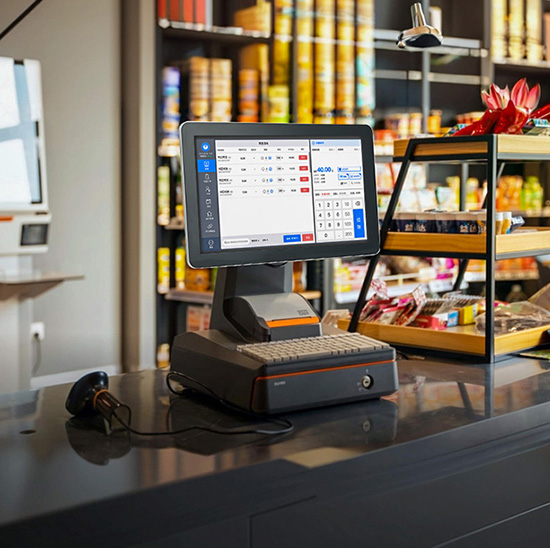
Les camions à tacos sont confrontés à des conditions difficiles: mouvement constant, météo extérieure (soleil, pluie, vent), espace limité, et utilisation fréquente. Le mauvais écran tactile sera en retard, mauvais fonctionnement, ou casser rapidement, ralentir le service et frustrer les clients. Le bon, cependant, alimentera votre kiosque de paiement de manière transparente et traitera les paiements rapidement, résister aux éléments, et montage dans des espaces restreints. Ce guide détaille les fonctionnalités clés à prioriser, meilleurs modèles d'écran tactile pour camions à tacos, conseils de sélection, et FAQ pour vous aider à trouver la solution idéale. Que vous dirigiez un petit camion à tacos ou une flotte, ces informations vous aideront à choisir un camion Taco Kiosque de paiement Écran tactile qui améliore l'efficacité, réduit les temps d'arrêt, et assure le bon fonctionnement de votre activité mobile.
Principales caractéristiques d'un écran tactile fiable de kiosque de paiement pour camion Taco
Les kiosques de paiement pour camions Taco ont besoin d'écrans tactiles robustes, portable, et optimisé pour des paiements rapides. Voici les caractéristiques non négociables à rechercher:
1. Résistance aux intempéries (Pour une utilisation en plein air avec un camion à tacos)
Les camions à tacos fonctionnent à l'extérieur, donc l'écran tactile doit résister au soleil, pluie, et les variations de température.
Indice de protection IP65+: Boucliers contre la pluie, poussière, et des éclaboussures (critique pour les averses inattendues ou les garnitures de tacos en désordre).
Écran anti-éblouissant: Assure la visibilité même en plein soleil, afin que les clients et le personnel puissent utiliser l'écran sans plisser les yeux.
Large plage de température: Fonctionne de manière fiable de -10°C à 60°C, gérer les chaudes journées d’été et les nuits fraîches.
Boîtier étanche: Les bordures scellées empêchent l'humidité de s'infiltrer dans l'écran, même en cas de forte pluie ou de nettoyage.
2. Réactivité tactile rapide & Traitement des paiements
La vitesse est primordiale pour les camions à tacos : les écrans tactiles lents ou les retards de paiement nuisent à la satisfaction des clients.
Faible latence (Temps de réponse ≤ 1 ms): Les robinets s'enregistrent instantanément, afin que les clients puissent sélectionner rapidement les options de paiement.
Prise en charge multi-touch: Permet aux utilisateurs de passer d'un mode de paiement à l'autre (carte de crédit, paiement mobile) sans décalage.
Intégration transparente des paiements: Fonctionne avec les processeurs de paiement populaires (Carré, Griller, Paypal) pour traiter les transactions en 2 à 3 secondes.
Capacité de paiement hors ligne: Stocke les données de paiement hors ligne, afin que les clients puissent payer même si le camion perd Internet (se synchronise automatiquement lorsque la connexion revient).
3. Compact & Conception portative (S'adapte aux espaces restreints des camions à tacos.)
Les camions Taco ont un espace de comptoir et de stockage limité : les écrans tactiles doivent être minces et faciles à monter.
7-Écran 12 pouces: Suffisamment petit pour tenir sur un kiosque de paiement compact sans encombrer l'intérieur du camion.
Profil mince (≤1,5 pouces): Permet d'économiser de l'espace et s'adapte facilement aux supports de montage ou aux supports de comptoir.
Léger (≤5 livres): Facile à installer, retirer, ou déménagez si vous réorganisez la disposition de votre camion.
Options de montage flexibles: Montage mural, comptoir, ou des conceptions à montage sur poteau pour s'adapter à l'espace de votre camion.
4. Durabilité pour une utilisation mobile
Les camions à tacos se déplacent fréquemment, l'écran tactile doit donc gérer les vibrations et les impacts mineurs.
9Verre anti-rayures H: Résiste aux rayures des clés, ustensiles, ou des chocs accidentels pendant le transport.
Cadre résistant aux chocs: Bords renforcés pour résister aux bousculades lorsque le camion est en mouvement.
Composants internes résistants aux chocs: Protège des vibrations dues à la conduite, garantissant l’absence de dommages internes.
Surface facile à nettoyer: Un revêtement résistant aux taches qui se nettoie avec des lingettes désinfectantes (critique pour les dégâts causés par les camions de tacos).
5. Interface conviviale (Pour des paiements clients rapides)
Les clients veulent payer rapidement et facilement : pas de menus compliqués ni d'étapes déroutantes.
Simple, interface basée sur des icônes: Grand, icônes claires pour les méthodes de paiement (carte de crédit, Apple Payer, Google Payer) et confirmation de commande.
Options de paiement en un clic: Réduit les étapes pour les clients, réduire le temps par transaction.
Prise en charge multilingue: S'adresse à une clientèle diversifiée avec des options comme l'anglais et l'espagnol (clé pour le public des camions à tacos).
Commentaires sans erreur: Des messages clairs pour des paiements réussis, cartes refusées, ou informations manquantes.
Meilleurs modèles d'écran tactile de kiosque de paiement pour camions Taco (Par cas d'utilisation)
Le meilleur écran tactile dépend de la taille de votre camion à tacos, trafic, et des besoins uniques. Voici les meilleurs modèles à considérer:
1. Écran tactile de paiement compact Elo 10" (Idéal pour les petits camions à tacos)
Un gain de place, option abordable pour les petits camions à tacos ou ceux avec un espace de comptoir limité.
Avantages clés: 10-affichage en pouces, Résistance aux intempéries IP65, 1temps de réponse en ms, et conception légère (3.5 livres).
Fonctionnalités critiques: Prise en charge du paiement hors ligne, écran anti-éblouissant, et compatibilité avec Square/Toast.
Idéal pour: Petits camions à tacos, unités mobiles pop-up, ou camions à trafic quotidien faible à moyen.
Avantages supplémentaires: Support de montage facile à installer, 2-an de garantie, et 24/7 assistance technique.
2. Écran tactile de paiement industriel ViewSonic 12" (Parfait pour les camions à tacos occupés)
Un modèle performant pour les camions à tacos avec un trafic quotidien élevé ou plusieurs bornes de paiement.
Avantages clés: 12-écran antireflet en pouces, Indice d'étanchéité IP67, et traitement rapide des paiements (2-deuxième transaction).
Fonctionnalités critiques: Prise en charge multi-touch, résistance aux chocs, et une intégration transparente aux points de vente.
Idéal pour: Camions à tacos occupés, vendeurs de festivals, ou des camions desservant 100+ clients par jour.
Avantages supplémentaires: Compatibilité de l'imprimante de reçus intégrée, 3-an de garantie, et résistance à la température jusqu'à 60°C.
3. Écran tactile portable planaire de 8 pouces (Idéal pour les mobiles & Camions à tacos éphémères)
Un ultra-compact, modèle portable pour les camions à tacos qui se déplacent fréquemment ou nécessitent une configuration flexible.
Avantages clés: 8-affichage en pouces, léger (2.8 livres), et option alimentée par batterie (pour les emplacements hors réseau).
Fonctionnalités critiques: Protection IP65, revêtement anti-éblouissant, et couplage Bluetooth facile avec les processeurs de paiement.
Idéal pour: Camions à tacos pop-up, vendeurs de festivals, ou des camions qui opèrent dans des zones à puissance limitée.
Avantages supplémentaires: Batterie rechargeable (dure 8+ heures), connectivité sans fil, et interface simple.
4. Écran tactile de paiement Premium NEC 11" (Pour les camions à tacos haut de gamme)
Un modèle haut de gamme pour les camions à tacos axé sur l'expérience client et la durabilité.
Avantages clés: 11-écran FHD en pouces, Résistance aux intempéries IP67, et fonctionnalités avancées de sécurité des paiements.
Fonctionnalités critiques: Prise en charge multilingue, conception résistante aux chocs, et mises à jour du menu à distance.
Idéal pour: Camions à tacos haut de gamme, flottes de food trucks, ou des camions desservant des événements d'entreprise.
Avantages supplémentaires: Interface personnalisable (ajoutez le logo de votre camion), 4-an de garantie, et assistance à l'installation professionnelle.
Comment choisir le bon écran tactile de kiosque de paiement pour camion Taco
Suivez ces étapes pour adapter l'écran tactile aux besoins uniques de votre camion à tacos:
1. Évaluez l’espace de votre camion & Mise en page
Commencez par mesurer votre espace disponible et déterminer où ira le kiosque de paiement:
Petits camions: Optez pour un écran tactile compact de 8 à 10 pouces pour économiser de l'espace sur le comptoir.
Des camions plus gros: Choisissez un écran de 11 à 12 pouces pour une meilleure visibilité, surtout si les clients sont en libre-service.
Emplacement de montage: Décidez si vous avez besoin d'un support mural, comptoir, ou modèle à montage sur poteau pour s'adapter à la disposition de votre camion.
2. Tenez compte de votre trafic quotidien & Volume de paiement
Adaptez les performances de l'écran tactile au niveau d'occupation de votre camion:
Faible trafic (50–100 clients/jour): Un modèle de base de 8 à 10 pouces avec des fonctionnalités standard suffira.
Trafic élevé (100+ clients/jour): Donnez la priorité à un écran de 12 pouces avec un temps de réponse rapide et une prise en charge des paiements hors ligne.
Modes de paiement: Assurez-vous que l'écran prend en charge vos types de paiement les plus courants (carte de crédit, paiement mobile, options sans numéraire).
3. Donner la priorité à la météo & Besoins de durabilité
Puisque les camions à tacos fonctionnent à l'extérieur, la résistance aux intempéries n'est pas négociable:
Camions réservés à l'extérieur: Choisissez la protection IP67 pour les fortes pluies, poussière, et la lumière directe du soleil.
Camions partiellement couverts: La protection IP65 est suffisante en cas d'éclaboussures occasionnelles ou de pluie légère.
Camions mobiles: Recherchez une résistance aux chocs et une protection contre les vibrations pour gérer le transport.
4. Vérifiez la compatibilité avec votre système de paiement
Assurez-vous que l'écran tactile fonctionne de manière transparente avec vos outils de paiement existants:
Vérifier la compatibilité du processeur de paiement: La plupart des modèles fonctionnent avec Square, Griller, et PayPal : vérifiez avant d'acheter.
Intégration PDV: Si vous utilisez un système POS, assurer la synchronisation de l'écran tactile pour suivre les ventes et les stocks.
Capacité hors ligne: Confirmez que l'écran peut traiter les paiements sans Internet pour éviter les temps d'arrêt.
FAQ sur les écrans tactiles du kiosque de paiement Taco Truck
Q1: L'écran tactile fonctionnera-t-il en plein soleil ??
A1: Oui : recherchez des modèles dotés d'un écran antireflet et d'une luminosité élevée (1000+ lentes). Ceux-ci garantissent que l'écran est visible même en plein soleil, pour que les clients puissent payer rapidement.
Q2: L'écran tactile peut-il supporter la pluie ou les éclaboussures ??
A2: Absolument. Tous les modèles recommandés ont une protection IP65+, qui protège de la pluie, éclaboussures, et la poussière. Les modèles IP67 résistent même aux fortes pluies et à l'immersion temporaire.
Q3: Combien de temps dure l'écran tactile dans un camion à tacos?
A3: Avec des soins appropriés, un écran tactile de kiosque de paiement pour camions Taco de qualité durera 3 à 5 ans. Des caractéristiques de durabilité telles que le verre résistant aux rayures et aux chocs prolongent sa durée de vie.
Q4: L'écran tactile fonctionne-t-il avec les applications de paiement mobile (Apple Payer, Google Payer)?
A4: Oui. Tous les modèles haut de gamme s'intègrent aux applications de paiement mobile, permettre aux clients de payer d'un simple toucher de leur téléphone. Cela accélère les transactions et améliore le confort du client.
Q5: Puis-je utiliser l'écran tactile lorsque le camion n'a pas Internet?
A5: Oui, la plupart des modèles ont une fonctionnalité hors ligne. Ils stockent les données de paiement localement et se synchronisent automatiquement avec votre processeur de paiement une fois Internet rétabli.. Aucun paiement perdu, pas de temps d'arrêt.
Q6: Est-il facile d'installer l'écran tactile dans mon camion à tacos?
A6: Très facile. La plupart des modèles sont livrés avec du matériel de montage universel et des instructions étape par étape. L'installation prend 30 à 45 minutes, et vous n'avez besoin que d'outils de base (tournevis, percer).
Q7: Puis-je mettre à jour les options de paiement ou l'interface à distance?
A7: Oui. Les modèles Premium vous permettent de mettre à jour les méthodes de paiement, ajouter des promotions, ou changez d'interface à distance via une application mobile ou un portail web. Pas besoin d'être au camion pour apporter des modifications.
Conclusion
Le bon écran tactile du kiosque de paiement Taco Truck est l'épine dorsale d'un système fluide., entreprise de tacos mobile efficace. En privilégiant la résistance aux intempéries, traitement rapide des paiements, conception compacte, et durabilité, vous pouvez choisir un écran qui maintient les lignes en mouvement, réduit les temps d'arrêt, et garde les clients satisfaits, même dans les endroits les plus occupés, environnements extérieurs les plus difficiles.
Plus de lenteur, écrans qui ne répondent pas ou dysfonctionnements liés à la météo. Un écran tactile spécialement conçu pour le kiosque de paiement Taco Truck garantit que votre processus de paiement est aussi rapide et fiable que vos tacos., vous aidant à servir plus de clients et à augmenter vos bénéfices.
Prêt à trouver l'écran tactile de kiosque de paiement Taco Truck parfait pour votre entreprise mobile? Remplissez le formulaire sur notre site Web pour partager la taille de votre camion, trafic quotidien, et processeur de paiement. Nos experts en technologie de food truck vous recommanderont le meilleur modèle compatible, fournir des conseils d'installation, et répondez à toutes vos questions pour vous aider à rationaliser votre processus de paiement. Faisons de votre camion à tacos le lieu de prédilection pour une livraison rapide, pratique, et une cuisine délicieuse – commencez dès aujourd'hui!
