ニュース

最新のタッチモニターニュースで最新情報を入手してください

技術トレンド, 新製品の発売, 業界の洞察

お客様のニーズのための実用的なアプリケーションのヒント.

KFC 支払いセルフサービス キオスク

Fast-food service focuses on speed, accuracy and convenience in modern times. Traditional manual payment often causes congestion during peak dining hours. It also leads to slow checkout and trivial billing errors. A KFC Payment Self-Service キオスク solves these common pain points perfectly.

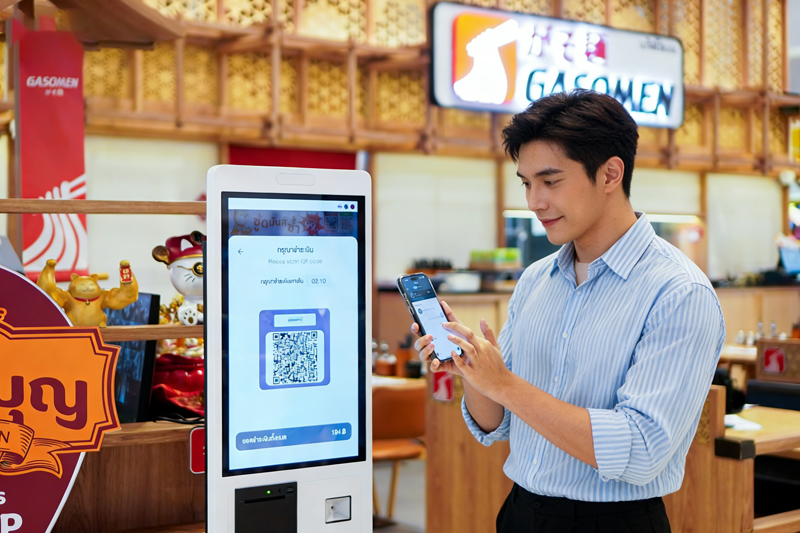
Payment Self-Service Kiosk

It integrates food selection, order confirmation and independent payment into one single device. さらに, it simplifies store workflows and optimizes customer dining experiences. This article fully introduces the core features, 作業手順を完了する, unique advantages and common FAQs of the Payment Self-Service Kiosk.

Basic Overview of KFC Payment Self-Service Kiosk

A Payment Self-Service Kiosk is a professional all-in-one catering terminal. It focuses on autonomous ordering and unmanned payment for fast-food scenarios.

1. Integrated ordering and payment design

This kiosk combines menu browsing, meal customization and fund settlement. It no longer needs separate counter payment steps. It realizes one-stop self-service operation.

2. Catering-oriented system optimization

The internal system adapts fast-food business rules. It supports combo matching, discount deduction and order classification. It fully fits daily fast-food store operation needs.

3. Independent and stable operation performance

Each Payment Self-Service Kiosk works independently. It connects with store backend and kitchen systems in real time. It maintains stable operation during high-traffic periods.

Complete Working Process of Payment Self-Service Kiosk

The device follows a simple, standardized workflow to finish ordering and payment services.

1. Activate the official ordering interface

初め, users tap the touch screen to wake up the kiosk. The system loads updated menus, new products and ongoing store promotions instantly.

2. Select meals and customize orders

次, customers pick favorite meals, 副菜と飲み物. They adjust ingredients and portions to meet personal taste needs. The screen updates prices in real time.

3. Apply discounts and verify order details

それから, users check their order list. The system automatically matches valid coupons and combo offers. Customers confirm the final bill before payment.

4. Select payment method and settle bills

確認後, users choose their preferred payment channel. They complete fast and safe transactions on the kiosk. The system immediately records valid order data.

5. Sync orders and print pickup receipts

ついに, the kiosk sends order information to the kitchen system. It prints a receipt with a unique order number for customer pickup.

Core Functional Features of Payment Self-Service Kiosk

This smart kiosk has multiple practical functions to improve store service quality.

1. Diversified secure payment channels

主流の非接触型支払い方法をすべてサポートしています. It guarantees fast transaction speed and high fund safety for every user.

2. Intelligent discount automatic matching

The system identifies all valid store promotions. It applies discounts intelligently without manual calculation. It ensures fair and accurate billing.

3. Real-time order data synchronization

All paid orders sync to kitchen terminals and store backends. It helps cooks arrange production and managers monitor business data.

4. Humanized multi-language interface

The kiosk provides multiple language options. It serves different customer groups and lowers operation barriers for new users.

Key Advantages of Deploying Payment Self-Service Kiosk

Stores and customers both gain obvious benefits from this smart device.

1. Effectively reduce peak-hour queuing

Multiple kiosks process orders and payments at the same time. They disperse customer flow and greatly shorten waiting time.

2. Completely avoid manual billing errors

Customers confirm all order and price details by themselves. It eliminates wrong billing problems caused by manual recording.

3. Greatly reduce store labor pressure

The kiosk undertakes repetitive ordering and payment work. Staff focus on food production and on-site customer guidance.

4. Standardize overall store service

Unified kiosk operation rules stabilize service quality. It avoids service differences caused by different staff proficiency.

FAQs About KFC Payment Self-Service Kiosk

Q1: What is a KFC Payment Self-Service Kiosk used for?

A1: It is an all-in-one terminal for self ordering and autonomous bill payment. It simplifies fast-food service and improves store operation efficiency.

Q2: Is payment on the self-service kiosk safe?

A2: はい. The kiosk adopts encrypted transaction systems. It protects user payment information and ensures every transaction is safe and reliable.

Q3: Can I modify my order after kiosk payment?

A3: You can adjust orders before kitchen production starts. You can ask on-site staff for help to modify or cancel qualified orders.

Q4: Does the kiosk support all store discount activities?

A4: はい. The device syncs the latest store promotions in real time. It automatically matches and deducts eligible discounts for each order.

Q5: Is it difficult for the elderly to use the payment kiosk?

A5: いいえ. The interface has large icons and clear text prompts. The operation steps are simple and friendly for all age groups.

結論

結論としては, the KFC Payment Self-Service Kiosk is a highly practical smart catering device. It integrates ordering, カスタマイズ, discount calculation and secure payment functions. It optimizes customer dining experience, cuts queuing time and reduces store labor costs. It has become an indispensable smart facility for modern fast-food store upgrades.

If you want to equip your catering store with stable, high-efficiency Payment Self-Service Kiosks to upgrade store service, 公式サイトのお問い合わせフォームにご記入ください. Leave your store size, layout and functional needs, and our team will provide you with professional customized solutions.

以下のフォームを送信して、詳細を受け取ります

または、パーソナライズされたオファーを取得します.


    *私たちはあなたの機密性を尊重し、すべての情報は保護されています