
Bryllup catering buffeter handler om elegance, effektivitet, og skabe en problemfri oplevelse for par og deres gæster. Men opstillingsdagen er ofte kaotisk: koordinerende menuvisninger, håndtering af gæsters kostbehov, og sikre, at personalet kan følge med servicekravene. Hvert minut, der spildes på kedelige opsætningsopgaver, skærer i tid brugt på at perfektionere buffetens præsentation og kvalitet. Spørgsmålet er: Kan en bryllup catering buffet Berøringsskærm forenkle denne proces?
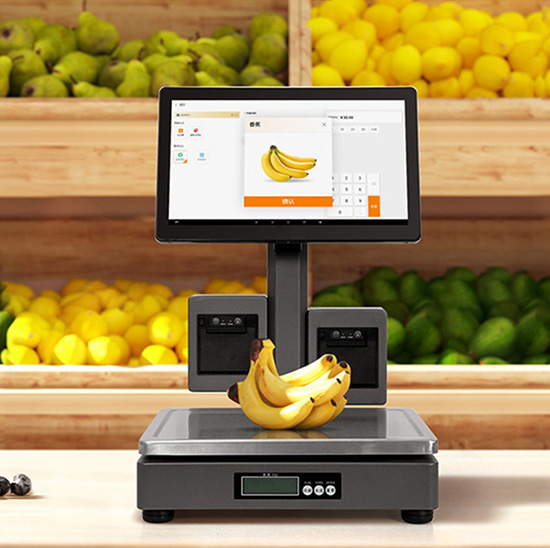
Svaret er et rungende ja. Bryllupsbuffeter står over for unikke udfordringer - menuændringer i sidste øjeblik, forskellige kostrestriktioner, og behovet for at opretholde en poleret, professionelt udseende. En specialbygget touchskærm skærer gennem kaosset, strømlining af opsætningsopgaver, reducere fejl, og frigøre personale til at fokusere på det, der betyder mest. Denne vejledning forklarer, hvordan disse berøringsskærme forenkler opsætningen, nøglefunktioner at prioritere, implementeringstips, og ofte stillede spørgsmål for at hjælpe dig med at løfte din bryllupscatering. Uanset om du driver et lille cateringfirma eller et stort event-team, disse indsigter hjælper dig med at bruge en berøringsskærm til bryllupscateringbuffet til at gøre opsætningen hurtigere, glattere, og mindre stressende.
Gør Bryllup Catering Buffet Touch-skærme faktisk forenkle opsætningen? (Det fulde svar)
Ja—Bryllup Catering Buffet Touch-skærme forenkler opsætningen ved at reducere opsætningstiden med 30-40 % sammenlignet med traditionelle manuelle metoder. De eliminerer tidskrævende opgaver som udskrivning og opdatering af papirmenuer, manuelt sporing af diætønsker, og koordinering af personaleopgaver.
Traditionel bryllupsbuffetopsætning involverer at skabe fysiske menuskilte, mærkning af hver ret med ingredienser, og orienterer personalet om gæsternes præferencer - som alle er tilbøjelige til at fejle og det tager timer at fuldføre. En berøringsskærm centraliserer alle disse opgaver: du kan indlæse menuer på få minutter, opdater retter med et enkelt tryk, og vise kostoplysninger tydeligt. Personalet kan få adgang til opsætningstjeklister, gæstetæller, og servicetidslinjer direkte på skærmen, reducere fejlkommunikation og forsinkelser. Under, vi nedbryder præcis, hvordan disse berøringsskærme gør opsætningen nemmere for dit cateringteam.
Hvordan Bryllupscatering Buffet Touch-skærme forenkler buffetopsætning
1. Øjeblikkelig menuvisning & Opdateringer (Ikke flere papirskilte)
Papirmenuer er tidskrævende at udskrive, opdatering, og sæt op – og de ser upolerede ud, hvis der er behov for ændringer.
Indlæs din bryllupsbuffetmenu på berøringsskærmen på få minutter, med fotos af høj kvalitet af hver ret.
Opdater menupunkter, priser, eller beskrivelser med et enkelt tryk – perfekt til ændringer i sidste øjeblik (f.eks., en skålsubstitution på grund af ingrediensmangel).
Vis skålens ingredienser, kostmærker (glutenfri, vegansk, nøddefri), og allergenadvarsler automatisk - ingen grund til at skrive etiketter i hånden til hver tallerken.
Touchskærmens slanke design tilføjer elegance til buffeten, passer bedre til brylluppets æstetik end papirskilte.
Dette skærer ned på opsætningstiden og sikrer, at din menu ser professionel og præcis ud.
2. Strømlinet håndtering af diætanmodninger
Bryllupper har ofte snesevis af diætrestriktioner, og sporing af dem manuelt er et opsætningsmareridt.
Forindlæs gæstediætanmodninger på berøringsskærmen (synkroniseret med brylluppets RSVP-liste) for at vise, hvilke retter der er sikre for hver gæst.
Gæster kan trykke på skærmen for at filtrere retter efter deres kostbehov (f.eks., “vis kun veganske muligheder”), reducere personalespørgsmål under opsætning og service.
Personalet kan hurtigt henvise til kostoplysninger på skærmen, eliminerer behovet for at huske eller bære papirlister.
Skærmen markerer højprioriterede allergier (f.eks., nødder, skaldyr) for at forhindre krydskontaminering under opsætning.
Dette forenkler opsætningen ved at fjerne gætværket fra diætoverholdelse.
3. Indbyggede opsætningstjeklister & Personalekoordinering
Koordinering af personale under opsætning af bryllupsbuffet er kaotisk - berøringsskærme holder alle på sporet.
Indlæs en brugerdefineret opsætningstjekliste på skærmen (f.eks., “oprette forretter station,” “arranger desserttallerkener," "test madvarmere").
Personalet kan markere opgaver som afsluttede i realtid, så du kan spore fremskridt og undgå mistede trin.
Tildel specifikke opgaver til medarbejdere via skærmen, mindsker forvirringen om, hvem der gør hvad.
Indstil tidslinjer for hver opsætningsopgave (f.eks., “appetitvækker station klar ved 4:00 PM") for at sikre, at alt er forberedt til tiden.
Dette holder dit team organiseret og sikrer, at opsætningen holder tidsplanen.
4. Hurtigt udstyr & Lagersporing
Sporing af buffetudstyr (varmere, fade, redskaber) og lagerbeholdning under opsætning sparer tid og forhindrer mangel.
Brug berøringsskærmen til at logge det nødvendige udstyr til hver buffetstation (f.eks., 3 madvarmere, 5 serveringsfade).
Marker udstyr som "checket ud" eller "returneret" for at undgå tabte eller forlagte genstande under opsætningen.
Spor lagerniveauer for ingredienser, servietter, og redskaber, så du kan genopfylde før gæster ankommer.
Skærmen sender advarsler, hvis noget element er ved at løbe tør, forhindrer sidste øjebliks scrambles under opsætningen.
5. Nem transport & Opsætning (Perfekt til bryllupssteder)
Bryllupssteder varierer meget, og cateringudstyr skal være bærbart – berøringsskærme er designet til denne fleksibilitet.
De fleste Wedding Catering Buffet Touch-skærme er lette (≤5 lbs) og kompakt, gør dem nemme at transportere til forskellige steder.
De kommer med bærbare stativer eller vægmonteringsmuligheder, så du kan sætte dem op hvor som helst i spillestedet (buffet bord, indgang, eller personaleområde).
Ingen kompliceret ledningsføring – mange modeller er batteridrevne eller bruger USB-opladning, så du behøver ikke at lede efter stikkontakter under opsætningen.
Skærmen starter op på få sekunder, så du kan begynde at bruge den, så snart du har pakket den ud.
Nøglefunktioner at se efter i en berøringsskærm med cateringbuffet til bryllup
For at maksimere opsætningens enkelhed, vælg en berøringsskærm med disse bryllupsspecifikke funktioner:
1. Bryllupsklar design (Elegant & Alsidig)
Touchskærmen skal komplementere brylluppets æstetik, ikke kollidere med det.
Slank, slankt design: En moderne, minimalt look, der passer til formelle eller afslappede bryllupstemaer.
Brugerdefinerbar grænseflade: Tilføj parrets navne, bryllupsdato, eller logo, der matcher spillestedets indretning.
Justerbar lysstyrke: Sikrer, at skærmen er synlig i dunkle receptionshaller eller lyse udendørs spillesteder.
Trådløs tilslutning: Giver dig mulighed for at opdatere menuer eller tjeklister fra din telefon, uden at være bundet til skærmen.
2. Brugervenlig grænseflade (Til hurtig opsætning)
Dit cateringteam burde ikke have brug for tekniske færdigheder for at bruge skærmen under opsætningen.
Enkel, ikonbaseret navigation: Stor, klare ikoner til menuer, tjeklister, og diætfiltre.
Opdateringer med et enkelt tryk: Nemt at ændre menupunkter, tilføje kostmærker, eller marker opgaver som afsluttede.
Gæstevenligt design: Intuitivt for gæster at bruge (f.eks., filtrering af retter) uden personalehjælp.
Offline funktionalitet: Virker uden internet, så du kan konfigurere selv på steder med plettet tilslutning.
3. Holdbarhed & Bærbarhed (Til brug ved bryllupssted)
Bryllupscatering involverer ofte flytning af udstyr - berøringsskærme skal være robuste og nemme at transportere.
IP65 stænkbestandighed: Beskytter mod utilsigtet spild (f.eks., champagne, sovs) under opsætning og service.
9H ridsefast glas: Modstår ridser fra serveringsredskaber eller transport.
Letvægts & kompakt: Nem at have med i cateringtasker eller køretøjer.
Batteridrevet mulighed: Holder 8+ timer på en enkelt opladning, ideel til steder uden strømudtag.
4. Integration med bryllupsværktøjer
Berøringsskærmen skal fungere med de værktøjer, du allerede bruger til bryllupscatering.
RSVP integration: Synkroniserer med RSVP-systemer til bryllup for at trække gæstediætanmodninger automatisk.
Lagerstyring: Opretter forbindelse til dit catering-inventarsystem for at spore ingredienser og forsyninger.
Personaleplanlægning: Integreres med dit teams tidsplan for at tildele opsætningsopgaver.
Kvittering/etiketudskrivning: Udskriver opvaskeetiketter eller gæstediætkort hurtigt under opsætning.
5. Multi-station support (Til store buffeter)
Hvis du serverer et stort bryllup med flere buffetstationer, berøringsskærmen skal klare det.
Synkronisering på flere skærme: Tilslut flere berøringsskærme for at vise forskellige menusektioner (appetitvækkere, hovedretter, desserter).
Centraliseret kontrol: Opdater alle skærme på én gang, så ændringer i menuen eller kostinformationen afspejler sig overalt.
Stationsspecifikke tjeklister: Opret separate opsætningstjeklister for hver buffetstation (f.eks., forret, dessert, drik).
Sådan implementeres en berøringsskærm til bryllupscateringbuffet for nem opsætning
Følg disse trin for at bruge din berøringsskærm til at forenkle opsætningen til hvert bryllup:
1. Forbered skærmen før bryllupsdagen
Spar tid på opsætningsdagen ved at forudindlæse alle nødvendige oplysninger:
Indlæs bryllupsmenuen, parabol billeder, og kostmærker 1-2 dage før arrangementet.
Synkroniser gæstediætanmodninger fra RSVP-listen for at undgå manuel indtastning.
Opret en brugerdefineret opsætningstjekliste, der er skræddersyet til lokalet og buffetstørrelsen.
Test skærmens batteri, forbindelse, og lysstyrke for at sikre, at den fungerer perfekt.
2. Vælg den rigtige placering til skærmen
Placering betyder noget – placer skærmen for at strømline opsætning og gæsteoplevelse:
Placer én skærm nær buffetindgangen, så gæsterne kan filtrere retter efter diætbehov.
Placer en anden skærm i personaleområdet for opsætning af tjeklister og lagersporing.
Brug bærbare stativer til nemt at flytte skærmen, hvis spillestedets layout ændres.
Sørg for, at skærmen er synlig for personalet, men ikke forstyrrer buffetens æstetik.
3. Træn dit team til at bruge skærmen
En hurtig træningssession sikrer, at dit hold bruger skærmen effektivt under opsætningen:
Lær personalet, hvordan man opdaterer menuer, markere opgaver som afsluttede, og få adgang til kostinformation.
Øv dig i at bruge skærmen med en mock setup før det første bryllup.
Tildel en "skærmmanager" til at håndtere eventuelle spørgsmål eller opdateringer under opsætningen.
Del lynvejledninger (f.eks., hvordan man fejlfinder offline-tilstand) for ro i sindet.
4. Feedback efter bryllup & Justeringer
Brug feedback til at gøre opsætningen endnu mere smidig til fremtidige bryllupper:
Spørg dit team, hvad der virkede, og hvad der ikke gjorde under opsætningen (f.eks., "Var tjeklisten nem at følge?”).
Få feedback fra parret eller stedets personale om skærmens anvendelighed.
Opdater dine opsætningstjeklister eller menuskabeloner baseret på feedback for at spare tid næste gang.
Ofte stillede spørgsmål om berøringsskærme til bryllupscateringbuffet
Q1: Vil touchskærmen være nem at sætte op på forskellige bryllupssteder?
A1: Ja! De fleste modeller er lette, batteridrevet, og kommer med bærbare stativer. Opsætningen tager 10-15 minutter - bare pak ud, tænde, og indlæs din forhåndsforberedte menu og tjekliste.
Q2: Kan jeg tilpasse berøringsskærmen, så den matcher brylluppets tema?
A2: Absolut. Du kan tilføje parrets navne, bryllupsdato, logo, eller endda matche skærmens baggrund til bryllupsfarverne. Dette tilføjer en personlig, elegant præg på buffeten.
Q3: Hvordan synkroniserer jeg gæstediætanmodninger til berøringsskærmen?
A3: De fleste berøringsskærme integreres med populære bryllups-RSVP-platforme (f.eks., Knuden, Zola). Du kan også manuelt uploade en CSV-fil med diætanmodninger – uanset hvad, det er hurtigt og fejlfrit.
Q4: Hvad hvis spillestedet ikke har noget internet? Vil berøringsskærmen stadig fungere?
A4: Ja. Alle anbefalede modeller har offline funktionalitet. Du forudindlæser al menu- og kostinformation før brylluppet, så skærmen fungerer perfekt selv uden internet.
Q5: Kan flere medarbejdere bruge berøringsskærmen på samme tid?
A5: Ja – de fleste modeller understøtter multi-touch, så flere medarbejdere kan få adgang til tjeklister, opdatere opgaver, eller referer til kostoplysninger samtidigt. Dette fremskynder opsætningen betydeligt.
Q6: Er berøringsskærmen holdbar nok til hyppig transport?
A6: Ja. De har ridsefast glas, IP65 stænkbestandighed, og stødfaste rammer. De er designet til at modstå slid og ælde ved cateringtransport og opsætning.
Q7: Hvor længe holder batteriet på en bærbar berøringsskærm?
A7: De fleste batteridrevne modeller holder 8-10 timer på en enkelt opladning - mere end nok til en komplet bryllupsopsætning og -service. Du kan også tilslutte den, hvis strøm er tilgængelig.
Konklusion
Bryllup Catering Buffet Touch-skærme er en game-changer for opsætning - de skærer tid, reducere stress, og sørg for, at din buffet kører problemfrit fra start til slut. Ved at strømline menuvisningen, koststyring, personalekoordinering, og lagersporing, disse berøringsskærme lader dit cateringteam fokusere på at skabe en mindeværdig oplevelse for parret og deres gæster.
Ikke flere sene nætter med udskrivning af papirmenuer, ikke mere forvirring om diætønsker, og ikke flere mistede opsætningsopgaver. En Wedding Catering Buffet Touch Screen forenkler alle aspekter af opsætningen, vende kaos til ro og sikre, at din bryllupscatering er poleret, effektiv, og stressfri.
Klar til at forenkle din bryllup catering buffet opsætning med den perfekte berøringsskærm? Udfyld formularen på vores hjemmeside for at dele dit cateringfirmas størrelse, typisk bryllupsvolumen, og spillestedstyper. Vores event tech-eksperter vil anbefale den bedst kompatible model, give opsætningstip, og besvare eventuelle spørgsmål for at hjælpe dig med at løfte din bryllupscatering. Lad os gøre enhver opsætning af bryllupsbuffet til en leg – start i dag!
