
Selvbetjeningskiosker bliver populære i detailhandlen, catering og offentlige serviceerhverv. De fremskynder bestilling, strømline kassen og reducere rutinemæssig arbejdsbyrde for personalet. Alligevel, en kiosk er ikke en perfekt løsning til ethvert forretningsmiljø.
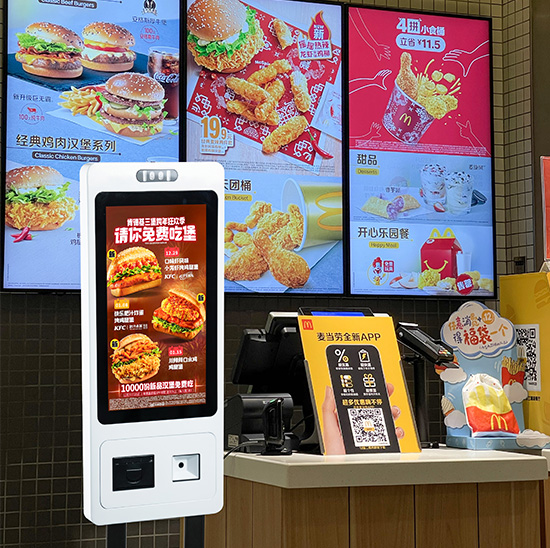
Faktisk, mange butiksejere overser kritiske svagheder før installation. Disse skjulte ulemper kan påvirke kundeoplevelsen og den daglige drift. Af denne grund, At lære ulemperne ved at bruge en kiosk hjælper dig med at undgå unødvendige tab. Denne artikel dækker driftsfejl, omkostningsmæssige ulemper, scenariegrænser og praktiske løsninger.
Daglige driftsmæssige ulemper ved en kiosk
En kiosk forbedrer den generelle effektivitet, men skaber synlige servicebegrænsninger i virkelige forretningsscenarier.
1. Tekniske fejl forårsager serviceafbrydelser
Kiosker afhænger af netværksforbindelse og systemstabilitet. Dårligt internet fører til langsom indlæsning eller fejl ved ordreafsendelse. Systemnedbrud eller skærme, der ikke reagerer, stopper også selvbetjeningsprocedurer øjeblikkeligt. Disse små fejl forstyrrer kundeflowet i myldretiden.
2. Faste systemer kan ikke håndtere tilpassede anmodninger
Hver kiosk kører på forudindstillet programlogik. Det understøtter kun standardordrer og faste operationer. Det kan ikke løse personlige krav, særlige ændringer eller uventede kundeproblemer. Personalet skal træde til for at håndtere fleksible servicescenarier.
3. Nogle brugergrupper står over for driftsbarrierer
Ældre brugere og mindre teknologikyndige kunder kæmper med touchscreen-trin. De føler sig forvirrede over varevalg, rabatansøgning og betalingsprocesser. Disse brugere foretrækker traditionel manuel service frem for en kiosk.
4. Selvbetjening mangler humaniseret servicevarme
En kiosk leverer stiv, skabelonbaserede interaktioner. Det kan ikke tilbyde venlig kommunikation eller følelsesmæssig vejledning. Langsigtet afhængighed af kiosker kan reducere kundernes klæbrighed for mærker, der fokuserer på varm service.
Koste & Vedligeholdelse Ulemper ved en kiosk
Udover driftsmæssige problemer, en kiosk medfører også langsigtet økonomisk og vedligeholdelsesmæssigt pres.
1. Høj initial investering for fuld implementering
Kommercielle kvalitetskiosker kræver professionel hardware og stabile softwaresystemer. Små virksomheder betaler høje forudgående omkostninger for køb af udstyr og fejlretning på stedet. Dette hæver tærsklen for smarte butiksopgraderinger
2. Regelmæssig vedligeholdelse tager tid og arbejde
Kioskskærme, betalingsmoduler og interne dele har brug for rutinetjek. Personale rene overflader, opdatere systemer og teste funktioner hver uge. Disse gentagne opgaver bruger ekstra arbejdskraft dagligt.
3. Slidte komponenter skaber tilbagevendende gebyrer
Lange timers kommerciel brug forårsager naturlig hardwareældning. Berøringspaneler, printere og kortlæsere skal udskiftes efter lang tids drift. Disse løbende reparationsomkostninger øger langsigtede forretningsudgifter.
Scenariebegrænsning Ulemper ved en kiosk
En kiosk passer til de fleste indendørs scenarier, men kan ikke tilpasse sig komplekse eller snævre miljøer.
1. Dårlig stabilitet under barske udendørsforhold
Standard kiosker mangler vandtætte, støvtætte og anti-høj temperatur strukturer. Stærkt sollys, regn eller støv forårsager let skærmfejl og systemfejl. Kun tilpassede industrimodeller fungerer godt udendørs.
2. Uhensigtsmæssig brug til små og kompakte butikker
Minibutikker har begrænset gulvplads. Uafhængigt kioskudstyr optager værdifulde aktivitetsområder. Det kan blokere kundebevægelser og påvirke den samlede effektivitet i butikstrafikken.
Effektive måder at reducere kiosk-ulemper på
Du kan udligne de fleste ulemper med rimelige implementerings- og daglige ledelsesstrategier.
1. Brug hybrid selvbetjening og manuel tilstand
Hold kiosker som den primære servicekanal. I mellemtiden, reservere manuelle tællere til specielle brugere og unormale ordrer. Denne metode balancerer høj effektivitet og fleksibel kundeservice.
2. Vælg højkvalitets og scenariematchede kiosker
Vælg holdbare kommercielle kiosker til langtidsdrift. Match vandtæt, antirefleks og stabile konfigurationer i henhold til dit lokale miljø. Kvalitetshardware reducerer fejlfrekvensen i høj grad.
3. Opbyg standardiserede daglige vedligeholdelsesrutiner
Arranger regelmæssig inspektion og systemopdateringer. Udskift aldrende dele på forhånd for at undgå pludselig nedetid. Stabil vedligeholdelse holder din kiosk kørende hele året rundt.
Ofte stillede spørgsmål om ulemper ved at bruge en kiosk
Q1: Hvad er den største ulempe ved at bruge en kiosk?
A1: Den største ulempe er dårlig fleksibilitet. En kiosk kan ikke håndtere personlige anmodninger, og tekniske fejl kan afbryde forretningsdriften i myldretiden.
Q2: Vil kiosker helt erstatte butikspersonalet?
A2: Ingen. Kiosker erstatter kun gentagne grundlæggende arbejde. Virksomheder har stadig brug for personale til vedligeholdelse, kundevejledning og kompleks problemløsning.
Q3: Er kiosker svære at vedligeholde for små virksomheder?
A3: Grundlæggende kommercielle kiosker har enkle vedligeholdelsesbehov. Regelmæssig rengøring og rutineopdateringer holder enheder stabile uden store arbejdsbyrder.
Q4: Kan udendørs steder påvirke kioskens ydeevne?
A4: Ja. Standard indendørs kiosker kan ikke modstå ekstremt vejr. Du har brug for tilpassede industrielle kiosker til udendørs og semi-udendørs scenarier.
Q5: Er det stadig værd at investere i erhvervskiosker?
A5: Ja. Du kan undgå de fleste ulemper med korrekt konfiguration og styring. Kiosker reducerer stadig lønomkostningerne og forbedrer den samlede serviceeffektivitet.
Konklusion
For at konkludere, at bruge en kiosk har klare ulemper, herunder teknisk ustabilitet, ufleksibel servicelogik, brugerbarrierer og løbende vedligeholdelsesomkostninger. Det har også brugsgrænser for små spillesteder og udendørs miljøer. Alligevel, disse svagheder kan kontrolleres med videnskabelig implementering og daglig ledelse.
En korrekt afstemt kiosk leverer stadig enorm værdi til moderne kommercielle opgraderinger. Hvis du vil have lav-fejl, vedligeholdelsesvenlige kiosker for at minimere driftsmæssige ulemper, udfyld venligst forespørgselsformularen på vores officielle hjemmeside. Del din spillestedstype og funktionelle behov, og vores team vil skabe den bedst egnede kioskløsning til din virksomhed.
