
许多用户在更换或购买之前怀疑触摸屏显示器的实用价值. 他们担心触摸反应不稳定, 使用寿命短,与现有设备兼容性差. 同时, 传统显示器依赖额外的输入工具并减慢日常操作速度.
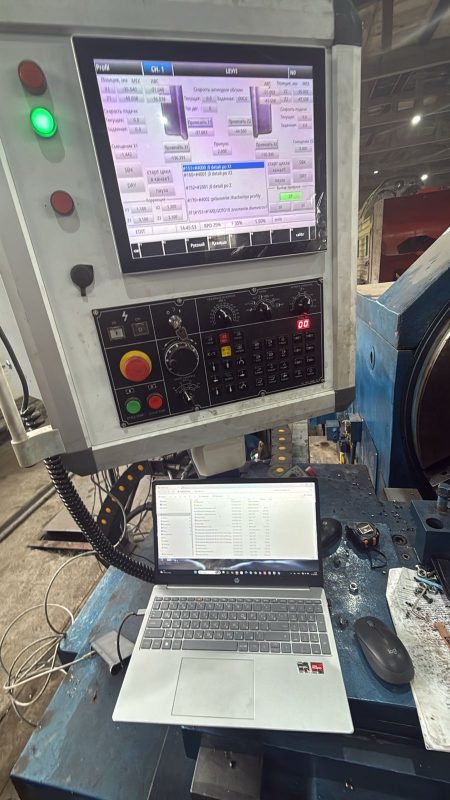
实际上, 优质触摸屏显示器在办公中带来明显优势, 车间和商业服务领域. 他们改变旧的运营模式,创造更高效的工作体验. 这篇文章讲的是核心优势, 适用场合, 小缺点和选择技巧. 您将清楚地判断触摸屏显示器是否适合您自己的使用需求.
触摸屏显示器的主要优点
与传统显示设备相比,高品质触摸屏显示器具有突出的优点.
1. 操作更直观、快捷
用户直接点击屏幕图标来完成命令. 省去移动鼠标或按下键盘的步骤. 简单的动作大大提高繁忙工作时间的日常工作效率.
2. 灵活适应多样化场景
这些显示器在办公室内运行良好, 生产车间及零售服务柜台. 工业模型防尘, 潮湿和轻微冲击,保持稳定运行. 常见款式轻松满足基本日常办公需求.
3. 让所有员工轻松学习
新员工短时间内掌握触控逻辑. 他们不会花太多时间去记忆复杂的操作规则. 整个团队能够快速熟悉新设备.
4. 布局整齐,节省工作空间
一台集成监视器取代了分散的控制配件. 为办公桌和操作平台留出更多空间. 整洁的空间有助于人们专注于正在进行的工作任务.
触摸屏显示器的小限制
触摸屏显示器也有一些小缺点,用户需要提前注意.
1. 成本比普通显示器高
完整的触摸感应结构增加了整体制造成本. 售价仍高于普通非触摸显示屏. 采购阶段需要较多的一次性投资.
2. 表面容易沾染指纹和污渍
频繁的手指触摸会在屏幕表面留下明显的痕迹. 灰尘、油斑也容易影响观看清晰度. 用户需要定期清洁才能保持良好的显示效果.
3. 不适合长时间繁重的打字工作
盲打无法与物理键盘的舒适度相媲美. 工作人员每天仍需要外接键盘来完成海量文字输入工作.
适合使用触摸屏显示器的地方
触摸屏显示器在这些典型工作场景中发挥最大价值.
1. 工业现场设备控制
工作人员方便调整机器参数、查看运行数据. 快速触摸响应完美满足实时生产控制需求.
2. 商业自助服务站
顾客只需轻轻一按即可选择商品并完成付款. 有效减轻人工服务压力,缩短等待队列.
3. 日常办公数据查看与整理
管理员浏览文件, 快速查看报告并调整简单文档. 稳步加快日常办公处理进度.
4. 仓库库存管理工作
运营商现场更新库存信息、查询商品详情. 触摸操作,盘点更方便、准确.
选择优质触摸屏显示器的实用技巧
合理选型帮助用户避免劣质产品,获得稳定的使用体验.
1. 根据实际环境匹配类型
选择车间使用的防尘防水型号. 室内办公、零售场景常见电容屏选择.
2. 确认与现有系统的兼容性
确保显示器与本地操作系统和设备程序顺利连接. 兼容性好,避免异常断线和触摸故障.
3. 根据空间选择合适的屏幕尺寸
小尺寸适合狭窄的操作柜台. 大显示屏适合中央监控和数据观察工作.
4. 注重日常耐用性能
检查防刮表面和稳定的传感部件. 耐用的结构减少了后期维护和更换频率.
有关触摸屏显示器的常见问题解答
Q1: 触摸屏显示器可以与普通桌面主机连接吗?
A1: 是的, 大多数采用通用接口. 可以与普通主机进行连接,简单连接后即可正常使用.
Q2: 合格的触摸屏显示器能服务日常工作多久?
A2: 标准产品保持稳定的性能 3 到 5 正常日常使用条件下的年数.
第三季度: 触摸屏显示器日常清洁难吗?
A3: 不, 用柔软的干布轻轻擦拭表面污渍. 避免腐蚀性液体,保护屏幕涂层.
第四季度: 工业触摸屏显示器可以支持戴手套操作吗?
A4: 专业工业模型支持手套触摸. 普通办公屏幕主要适应裸指使用.
Q5: 触摸屏显示器更耗电吗?
A5: 功耗接近普通显示器. 长期使用不会带来额外的高电费.
结论
全面的, 触摸屏显示器具有明显的优点和一些小缺陷. 他们擅长快速操作, 场景适应广,员工轻松学习. 它们成为工业控制的伟大升级, 自助服务站及日常办公. 只要您根据实际环境和工作需求选择匹配的型号即可, 触摸屏显示器可以创造稳定高效的使用体验.
如果您打算购买可靠的触摸屏显示器用于设备升级或新项目部署, 请在我们的官方网站上填写咨询表. 留下您的使用环境, 所需尺寸和功能需求. 我们的专业团队将及时提供针对性的产品推荐和详细规格.