消息

随时了解最新的触摸显示器新闻

科技趋势, 新产品发布, 行业洞察

以及满足您需求的实际应用技巧.

信息亭是触摸屏设备吗?

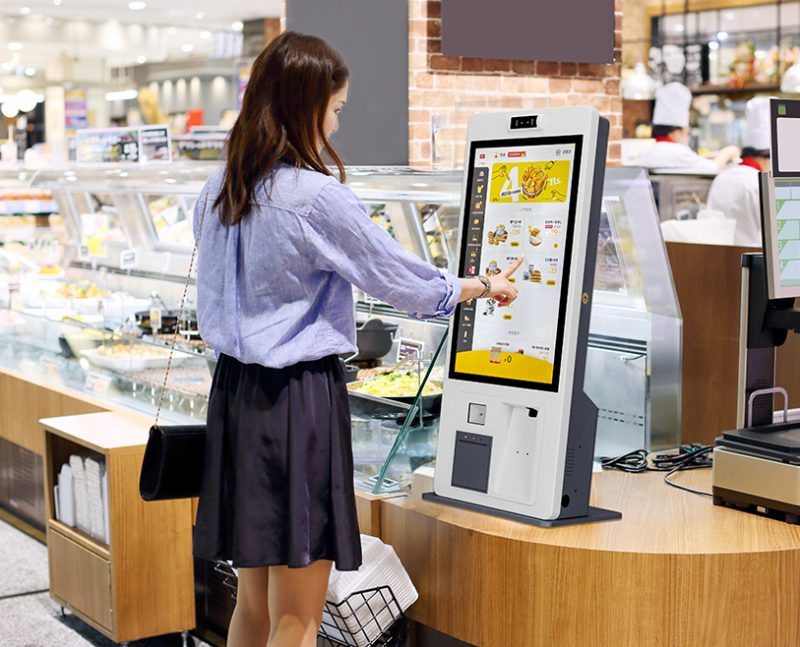
Self-service kiosks grow popular in restaurants, retail shops and public facilities. Most users interact with these machines by tapping and swiping the front panel. Yet many people cannot tell the exact relationship between kiosks and touchscreens.

触摸屏设备

Some people assume all kiosks use touch control, while others treat kiosks and screens as separate hardware. 实际上, most modern service kiosks integrate interactive displays. 即便如此, not every kiosk belongs to a standard touchscreen device. This article clarifies their definitions, differences, matching types and practical application rules.

Core Definition of Kiosks and Touchscreen Devices

To clear up confusion, you need to distinguish the two professional definitions first.

1. What a standard kiosk is

一个 is a complete self-service terminal. It includes hardware shell, 控制板, operating system and interactive modules. It serves independent ordering, payment and inquiry functions.

2. What a touchscreen device is

A touchscreen device refers to any screen with sensing layers. It captures user touch gestures and converts actions into system commands. It acts as an interactive input tool.

3. Basic logical relationship between them

A kiosk is a full set of service equipment. 同时, a touchscreen device is one core interactive component. Modern commercial kiosks rely heavily on touchscreen modules for user operation.

Are Most Commercial Kiosks Touchscreen Devices?

简而言之, mainstream service kiosks count as integrated touchscreen devices for daily business scenarios.

1. Touchscreens become standard configuration

Nearly all new catering and retail kiosks adopt touchscreen panels. They replace old button and keyboard modes. 因此, they deliver more intuitive and fast interactions.

2. All-in-one structure simplifies operation

Modern kiosks combine display and touch sensing into one screen. Users browse content and input commands on the same panel. This design cuts extra auxiliary equipment.

3. Touchscreen design fits public service needs

Touch operation suits users of all ages. It lowers learning costs for new customers. It also improves service efficiency during peak crowds.

Are There Kiosks Without Touchscreen Functions?

Not all kiosk models use touchscreen device technology. Some special versions adopt other interactive modes.

1. Button-type dedicated inquiry kiosks

Simple public inquiry kiosks use physical buttons. They do not install touchscreen panels. They only complete fixed information query tasks.

2. Keyboard-operated service kiosks

Individual professional service kiosks match external keyboards. They rely on manual typing instead of screen tapping. They target precise data input scenarios.

3. Sensor-based non-touch kiosks

Some unmanned access kiosks use infrared sensors. They trigger operations through body induction. They completely skip touchscreen interaction.

Key Features of Touchscreen Kiosk Devices

Touchscreen-equipped kiosks have unique advantages over traditional non-touch models.

1. Intuitive visual interaction

Users follow on-screen menus to complete operations. They avoid complicated button memory. 此外, the visual interface supports personalized customization.

2. High sensitivity and fast response

Qualified touchscreen devices respond within milliseconds. They support continuous tapping and sliding. They maintain smooth performance during high-frequency use.

3. 环境适应性强

Commercial touchscreen panels resist dust and minor scratches. They work stably in crowded indoor and semi-outdoor environments. They adapt to long-hour continuous operation.

4. Flexible function expansion

Touchscreen kiosks update menus and programs remotely. They add new service functions without hardware replacement. They support long-term business iteration.

FAQs About Kiosks and Touchscreen Devices

Q1: Is a regular self-service kiosk a touchscreen device?

A1: 是的. Most commercial self-service kiosks integrate standard touchscreen device modules. They use touch control as the only interactive method.

Q2: Can kiosks work normally without touchscreen devices?

A2: 是的. Specialized kiosks use buttons, sensors or keyboards. These non-touch modes meet simple and fixed service demands.

第三季度: Which is better, touchscreen or button kiosks?

A3: Touchscreen kiosks fit most commercial scenarios. They support richer functions and simpler operation. Button kiosks only suit single fixed services.

第四季度: Do touchscreen kiosks have higher failure rates?

A4: 不. Modern industrial touchscreen devices have durable surfaces. They resist daily wear and keep stable for long-term use.

Q5: Can we customize touchscreen sizes for kiosks?

A5: 确实. You can match different touchscreen device sizes. Custom options fit store layouts and business scale demands perfectly.

结论

总结一下, most modern commercial kiosks are complete touchscreen device integrated terminals. Touchscreens serve as the core interactive part of mainstream self-service equipment. 同时, a small number of professional kiosks adopt non-touch interactive structures for special scenarios. Touchscreen kiosks deliver better flexibility, higher efficiency and wider applicability for catering, retail and public services.

如果您需要高品质, durable touchscreen device kiosks for your commercial or public service projects, feel free to fill out the inquiry form on our official website. Tell us your usage scenarios and size requirements, and our team will provide professional customized kiosk solutions for you.

提交下面的表格以获取更多信息

或获得个性化优惠.


    *我们尊重您的机密性,所有信息均受到保护