
Kaunter pengambilan sushi berkembang pesat dengan ketepatan—pelanggan mengidamkan segar, gulung disediakan dengan betul, nigiri, dan sashimi, dengan keperluan diet khusus dan permintaan tersuai. Namun pengambilan pesanan secara manual sering membawa kepada kesilapan yang mahal: silap dengar kombinasi gulungan, nota alahan terlepas, atau pengiraan bahagian yang salah. Kesilapan ini mengecewakan pelanggan, bahan buangan, dan merosakkan reputasi kaunter. Penyelesaiannya? Kaunter Ambil Sushi Skrin Sentuh direka untuk menghapuskan tekaan dan menyelaraskan ketepatan pesanan.
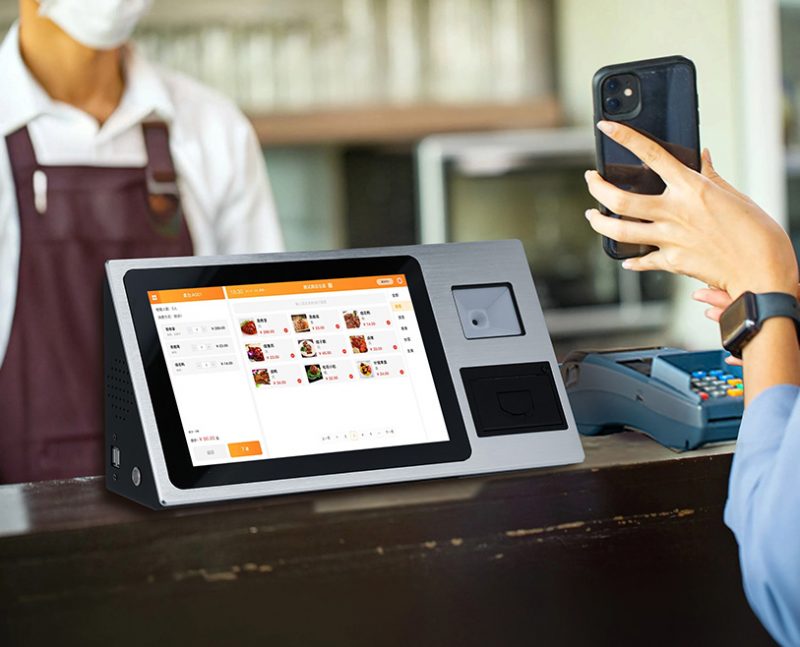
Soalan untuk setiap pemilik kaunter sushi adalah mudah: Bolehkah skrin sentuh sebenarnya mengurangkan ralat pesanan? Jawapannya ialah ya—tetapi hanya dengan model yang dibina untuk permintaan unik sushi. Panduan ini menerangkan cara skrin sentuh mengurangkan kesilapan, ciri utama untuk diutamakan, petua pelaksanaan, dan Soalan Lazim untuk membantu anda menaik taraf kaunter bawa pulang anda. Sama ada anda menjalankan tempat sushi kejiranan kecil atau kaunter bandar yang sibuk, cerapan ini akan membantu anda menyediakan pesanan yang sempurna, meningkatkan kesetiaan pelanggan, dan memotong sisa.
Bolehkah Sushi Bawa Keluar Membalas Skrin Sentuh Benar-benar Mengurangkan Ralat? (Jawapan Penuh)
Ya, Sushi Takeout Counter Touch Screens mengurangkan ralat pesanan sebanyak 40–60% berbanding pengambilan pesanan manual. Mereka menangani punca kesilapan: salah komunikasi, kealpaan manusia, dan kakitangan bergegas.
Pesanan manual bergantung pada kakitangan mendengar pelanggan, menulis permintaan, dan menyampaikan butiran kepada tukang masak sushi—setiap langkah mewujudkan ruang untuk kesilapan. Skrin sentuh meletakkan pelanggan mengawal pesanan mereka. Mereka memilih item yang tepat, menyesuaikan gulungan, alahan bendera, dan mengesahkan butiran dalam masa nyata. Chef menerima yang jelas, tiket digital tanpa tulisan tangan yang tidak kemas atau nota tertinggal. Di bawah, kami memecahkan dengan tepat cara skrin sentuh menghapuskan ralat pesanan sushi biasa.
Bagaimana Skrin Sentuh Kaunter Bawa Keluar Sushi Mengurangkan Ralat Pesanan
1. Menghapuskan Miskomunikasi (Tiada Lagi Permintaan Salah Dengar)
Sumber terbesar ralat pesanan sushi ialah salah komunikasi—skrin sentuh membetulkannya sepenuhnya:
Pelanggan memilih gulungan, nigiri, atau sashimi terus daripada menu visual dengan foto dan nama yang jelas.
Pilihan penyesuaian (mis., “tambahkan avokado,” “wasabi tambahan,” “tiada biji bijan”) adalah pilihan satu ketik, bukan permintaan lisan.
Skrin memaparkan ringkasan pesanan penuh sebelum pembayaran, supaya pelanggan boleh menyemak semula dan membetulkan kesilapan.
Chef menerima tiket digital dengan butiran yang tepat, jadi tiada lagi “mereka mahu tempura atau timun gulung?” kekeliruan.
Kejelasan ini mengurangkan kesilapan salah komunikasi kepada hampir sifar.
2. Menyerlahkan Sekatan Pemakanan & Alahan (Kritikal untuk Keselamatan Sushi)
Kaunter sushi mengendalikan permintaan alahan yang kerap (mis., bebas kacang, bebas gluten, tanpa kerang)—skrin sentuh menjadikannya mustahil untuk terlepas:
Penapis alahan wajib: Pelanggan mesti menandakan alergen (soya, kerang, kacang) sebelum memuktamadkan pesanan.
Makluman merah pada tiket digital: Tukang masak melihat amaran berani untuk pesanan khusus alahan, mencegah pencemaran silang.
Pilihan pemakanan yang dilabelkan sebelumnya: Kicap bebas gluten atau gulung vegan ditandakan dengan jelas, jadi pelanggan tidak perlu mengulangi permintaan.
Tiada bahan tersembunyi: Setiap item menyenaraikan ramuan penuh, jadi pelanggan mengelakkan pencetus tidak sengaja.
Ciri ini bukan sekadar untuk mengurangkan ralat—ia tentang memastikan pelanggan selamat.
3. Menyeragamkan Kiraan Bahagian (Tiada Persediaan Berlebihan/Bawah)
Pesanan manual selalunya membawa kepada pengiraan bahagian yang salah (mis., 3 bukannya 5 kepingan nigiri)—skrin sentuh menghapuskan ini:
Pilihan bahagian pratetap (mis., 2, 5, 10 kepingan) untuk setiap item, jadi pelanggan memilih dengan tepat apa yang mereka mahu.
Skrin mengira jumlah kepingan secara automatik, supaya kakitangan tidak salah mengira pesanan.
Tukang masak menerima butiran bahagian yang tepat, mengurangkan sisa makanan daripada penyediaan berlebihan atau membuat semula pesanan.
Himpunan makan kombo telah diprogramkan terlebih dahulu, jadi tiada barang yang terlepas (mis., sup miso atau gyoza) dalam pesanan bawa pulang.
4. Memperkemas Permintaan Khas (Tiada Tambahan Terlupa)
Pelanggan suka permintaan sushi tersuai (mis., “potong gulung menjadi kepingan kecil,” “halia tambahan”)—skrin sentuh memastikan ini tidak hilang:
Kotak teks "permintaan khas" khusus membolehkan pelanggan menaip keperluan khusus, tidak bergantung pada ingatan kakitangan.
Permintaan disertakan pada tiket chef digital, dalam teks tebal, jadi mereka menonjol daripada pesanan standard.
Tiada lagi aduan "Saya meminta wasabi tambahan tetapi tidak mendapatnya"—permintaan didokumentasikan dan sukar untuk dilepaskan.
Tahap perincian ini menjadikan pelanggan kasual menjadi pelanggan tetap yang mempercayai kaunter anda untuk mendapatkan pesanan mereka dengan betul.
5. Mengurangkan Ralat Keletihan Kakitangan (Sesuai untuk Waktu Puncak)
Kaunter sushi menjadi huru-hara semasa makan tengah hari dan makan malam tergesa-gesa—kakitangan yang letih membuat lebih banyak kesilapan:
Skrin sentuh mengendalikan pengambilan pesanan, supaya kakitangan boleh fokus pada pembungkusan pesanan atau membantu pelanggan dengan soalan menu.
Tiada lagi menconteng pesanan di atas tiket kertas sambil menyulap berbilang pelanggan.
Skrin menyimpan sejarah pesanan secara automatik, jadi pelanggan berulang boleh menyusun semula gulungan kegemaran mereka dengan satu ketikan.
Kurang tekanan bermakna lebih sedikit kesilapan, walaupun semasa syif paling sibuk.
Ciri Utama yang Perlu Diperhatikan dalam Skrin Sentuh Kaunter Ambil Sushi
1. Alat Penyesuaian Menu Khusus Sushi
Skrin sentuh terbaik termasuk ciri yang disesuaikan dengan pesanan sushi:
Menu visual dengan foto: Imej berkualiti tinggi bagi setiap gulungan, nigiri, dan sashimi untuk mengelakkan pesanan bercampur-campur.
Alat pembina gulungan: Biarkan pelanggan membuat gulungan tersuai dengan memilih nasi, ikan, sayur-sayuran, dan topping.
Sistem bendera alahan: Medan wajib untuk alergen sushi biasa (soya, kerang, kacang, pulut).
Pratetap bahagian: Kiraan pratetap untuk nigiri (2, 5, 10) dan gulung (1, 2, 3 kepingan) untuk menyeragamkan pesanan.
2. Ketahanan untuk Persekitaran Kaunter Sushi
Kaunter sushi lembab, ruang yang tidak kemas—skrin sentuh mesti tahan terhadap pemakaian harian:
Rintangan percikan IP65: Melindungi daripada tumpahan kicap, air, dan penyelesaian pembersihan.
9H kaca tahan calar: Tahan calar daripada penyepit, bekas makanan, atau benjolan tidak sengaja.
Paparan anti-kabus: Menghalang pemeluwapan daripada persekitaran kaunter lembap yang mengabus skrin.
Permukaan yang mudah dibersihkan: Salutan kalis noda yang mengelap bersih dengan kain lap sanitasi antara pelanggan.
3. Integrasi Tiket Chef yang lancar
Skrin mesti bersambung terus ke bar sushi untuk memastikan tukang masak mendapat butiran yang tepat:
Percetakan tiket chef digital: Menghantar pesanan ke pencetak dapur dengan jelas, teks tebal dan amaran alahan.
Sistem paparan dapur (KDS) penyegerakan: Memaparkan pesanan pada skrin di bar sushi, jadi tukang masak tidak perlu mengendalikan tiket kertas.
Pengetagan keutamaan pesanan: Membolehkan kakitangan menandakan pesanan sebagai "tergesa-gesa" atau "kumpulan besar" untuk menyelaraskan persediaan.
4. Saiz Padat & Pemasangan Fleksibel
Kaunter sushi mempunyai ruang yang terhad—skrin sentuh perlu muat tanpa sesak:
15– Paparan 17 inci: Sesuai untuk penempatan countertop berhampiran daftar, dengan profil tipis untuk menjimatkan ruang.
Pilihan yang dipasang di dinding: Membebaskan ruang kaunter untuk paparan sushi atau pembungkusan bawa pulang.
Pengurusan kabel: Menyembunyikan wayar untuk memastikan kaunter sentiasa kemas dan mengelakkan bahaya tersandung.
5. Fungsi luar talian (Tiada Internet, Tiada Masalah)
Gangguan Internet boleh mematikan sistem pesanan manual—tetapi bukan skrin sentuh dengan mod luar talian:
Menyimpan menu dan data pesanan di luar talian, jadi pelanggan masih boleh membuat pesanan semasa gangguan.
Autosegerakkan data setelah Internet dipulihkan, jadi tiada pesanan yang hilang.
Ciri ini memastikan kaunter anda kekal beroperasi, walaupun semasa gangguan teknikal.
Cara Melaksanakan Skrin Sentuh Kaunter Ambil Sushi
1. Pilih Skrin yang Tepat untuk Saiz Kaunter Anda
Padankan skrin dengan ruang anda dan volum pesanan:
Kaunter kecil: Pilih model atas meja 15 inci untuk menjimatkan ruang.
Kaunter sibuk: Pilih skrin 17 inci dengan penyegerakan KDS untuk mengendalikan pesanan waktu sibuk.
Uji antara muka: Pastikan menu mudah untuk dinavigasi untuk pemula sushi dan pelanggan tetap.
2. Sesuaikan Menu untuk Tawaran Sushi Anda
Sesuaikan skrin dengan menu unik kaunter anda:
Tambahkan foto gulungan paling popular anda untuk mengurangkan masa membuat keputusan.
Program amaran alahan untuk item yang mengandungi soya, kerang, atau kacang.
Sertakan makanan kombo dan pek keluarga untuk meningkatkan purata nilai pesanan.
Tambahkan bahagian "kegemaran pelanggan" untuk menyerlahkan item paling laris.
3. Kakitangan Keretapi & Promosikan Layan Diri kepada Pelanggan
Pelaksanaan yang lancar memerlukan pembelian kakitangan dan pendidikan pelanggan:
Latih kakitangan untuk membantu pelanggan menggunakan skrin, terutamanya mereka yang kurang celik teknologi.
Tanda tempat: “Pesan Di Sini untuk Tepat, Sushi Cepat—Tiada Silap Lagi!"
Tawarkan sedikit diskaun (mis., edamame percuma) untuk pelanggan yang menggunakan skrin sentuh untuk pesanan pertama mereka.
Minta maklum balas untuk mengubah suai menu atau antara muka mengikut keperluan.
4. Pantau Kadar Ralat & Laraskan mengikut Keperluan
Jejaki cara skrin sentuh meningkatkan ketepatan kaunter anda:
Kira kesilapan manual (salah gulung, permintaan terlepas) sebelum dan selepas pelaksanaan.
Minta maklum balas pelanggan tentang ketepatan pesanan—kebanyakan akan menghargai peningkatan itu.
Kemas kini menu dengan kerap untuk menggambarkan item bermusim atau gulung baharu.
Soalan Lazim Mengenai Skrin Sentuh Kaunter Bawa Keluar Sushi
Q1: Adakah pelanggan bersusah payah menggunakan skrin sentuh jika mereka tidak mahir teknologi?
A1: Tidak! Skrin mempunyai yang mudah, antara muka intuitif dengan foto besar dan pilihan satu ketik. Malah pelanggan yang jarang menggunakan skrin sentuh boleh memesan dalam masa kurang daripada 60 saat. Kakitangan juga boleh membantu jika perlu.
S2: Bolehkah skrin sentuh mengendalikan permintaan roll tersuai?
A2: Sudah tentu. Alat pembina gulungan membolehkan pelanggan memilih setiap komponen (jenis nasi, ikan, sayur-sayuran, topping) untuk mencipta gulungan tersuai mereka yang sempurna. Chef menerima butiran tepat pada tiket digital.
Q3: Adakah skrin sentuh berfungsi dengan sistem POS sedia ada saya?
A3: Kebanyakan model teratas berintegrasi dengan sistem POS yang popular (Segi empat, Roti bakar, Semanggi) digunakan oleh kaunter sushi. Kami boleh mengesahkan keserasian dengan sistem khusus anda sebelum anda membeli.
Q4: Bagaimanakah tukang masak mendapatkan butiran pesanan daripada skrin sentuh?
A4: Skrin sama ada mencetak tiket digital yang jelas untuk bar sushi atau menyegerak dengan KDS. Tiket termasuk semua penyesuaian, amaran alahan, dan pengiraan bahagian dalam teks tebal—tiada tulisan tangan yang tidak kemas.
S5: Adakah skrin sentuh mudah dibersihkan dalam persekitaran kaunter sushi?
A5: Ya! Ia mempunyai rintangan percikan IP65 dan salutan kalis noda. Anda boleh mengelapnya dengan kain sanitasi untuk menghilangkan percikan atau cap jari kicap—tiada kerosakan pada skrin.
S6: Bagaimana jika internet padam? Adakah saya akan kehilangan pesanan?
A6: Tidak. Model teratas mempunyai fungsi luar talian—mereka menyimpan pesanan secara setempat sehingga Internet dipulihkan. Anda tidak akan kehilangan satu pesanan, walaupun semasa gangguan berterusan.
S7: Berapa lama masa yang diperlukan untuk memasang skrin sentuh?
A7: Kebanyakan pemasangan mengambil masa 30–45 minit. Skrin dilengkapi dengan perkakasan pemasangan dan arahan langkah demi langkah, jadi anda boleh memasangnya sendiri dengan alatan asas.
Kesimpulan
Sushi Takeout Counter Touch Screens ialah pengubah permainan untuk ketepatan—ia menghapuskan miskomunikasi, menyerlahkan alahan, menyeragamkan bahagian, dan mengurangkan kesilapan keletihan kakitangan. Dengan memilih skrin dengan alat penyesuaian khusus sushi, ketahanan, dan integrasi chef, anda boleh melayani pesanan yang sempurna setiap masa, memotong sisa makanan, dan menjadikan pelanggan sekali sahaja menjadi pelanggan tetap yang setia.
Tiada lagi membuat semula gulungan kerana permintaan yang salah dengar. Tiada lagi pelanggan yang mengecewakan dengan nota alahan yang terlepas. Skrin sentuh mengubah kaunter bawa pulang anda kepada yang diperkemas, operasi bebas ralat yang dipercayai pelanggan.
Bersedia untuk mengurangkan ralat di kaunter pengambilan sushi anda dengan skrin sentuh yang sempurna? Isi borang di laman web kami untuk berkongsi saiz kaunter anda, menu, dan jumlah pesanan. Pakar teknologi perkhidmatan makanan kami akan mengesyorkan model serasi terbaik, menyediakan petua pemasangan, dan jawab sebarang soalan untuk membantu anda menyampaikan dengan tepat, sushi lazat yang membuatkan pelanggan datang kembali. Mari jadikan kaunter bawa pulang sushi anda tempat paling boleh dipercayai di bandar—mulai hari ini!
