
Les bornes libre-service deviennent populaires dans les restaurants, magasins de détail et équipements publics. La plupart des utilisateurs interagissent avec ces machines en appuyant et en faisant glisser le panneau avant.. Pourtant, de nombreuses personnes ne peuvent pas établir la relation exacte entre les kiosques et les écrans tactiles..
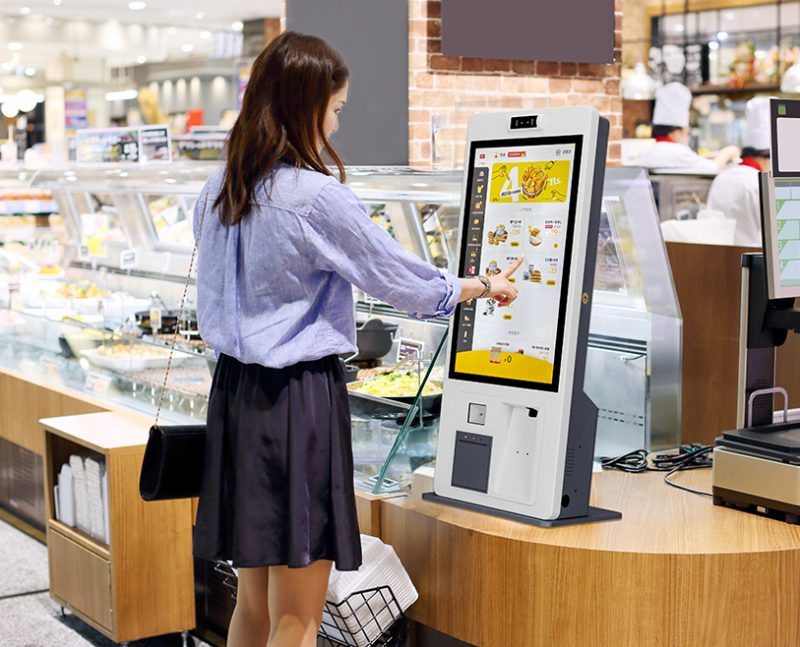
Certaines personnes supposent que tous les kiosques utilisent le contrôle tactile, tandis que d'autres traitent les kiosques et les écrans comme du matériel distinct. En fait, les kiosques de service les plus modernes intègrent des écrans interactifs. Quand même, tous les kiosques n'appartiennent pas à un appareil à écran tactile standard. Cet article clarifie leurs définitions, différences, types de correspondance et règles d'application pratiques.
Définition de base des kiosques et des appareils à écran tactile
Pour dissiper la confusion, il faut d'abord distinguer les deux définitions professionnelles.
1. Qu'est-ce qu'un kiosque standard
UN kiosque est une borne libre-service complète. Il comprend une coque matérielle, tableau de commande, système d'exploitation et modules interactifs. Il sert de commande indépendante, fonctions de paiement et de demande de renseignements.
2. Qu'est-ce qu'un appareil à écran tactile
Un appareil à écran tactile fait référence à tout écran doté de couches de détection. Il capture les gestes tactiles de l'utilisateur et convertit les actions en commandes système. Il agit comme un outil de saisie interactif.
3. Relation logique de base entre eux
Un kiosque est un ensemble complet d'équipements de service. Entre-temps, un appareil à écran tactile est un composant interactif essentiel. Les kiosques commerciaux modernes s'appuient fortement sur des modules à écran tactile pour le fonctionnement des utilisateurs.
La plupart des kiosques commerciaux sont-ils des appareils à écran tactile?
En bref, les kiosques de service grand public comptent comme des appareils à écran tactile intégrés pour les scénarios professionnels quotidiens.
1. Les écrans tactiles deviennent une configuration standard
Presque tous les nouveaux kiosques de restauration et de vente au détail adoptent des panneaux à écran tactile. Ils remplacent les anciens modes boutons et clavier. Ainsi, ils offrent des interactions plus intuitives et plus rapides.
2. La structure tout-en-un simplifie le fonctionnement
Les kiosques modernes combinent l'affichage et la détection tactile sur un seul écran. Les utilisateurs parcourent le contenu et saisissent des commandes sur le même panneau. Cette conception supprime les équipements auxiliaires supplémentaires.
3. La conception de l'écran tactile répond aux besoins des services publics
Le fonctionnement tactile convient aux utilisateurs de tous âges. Cela réduit les coûts d’apprentissage pour les nouveaux clients. Cela améliore également l'efficacité du service lors des pics de fréquentation..
Existe-t-il des kiosques sans fonctions d'écran tactile?
Tous les modèles de kiosques n'utilisent pas la technologie des appareils à écran tactile. Certaines versions spéciales adoptent d'autres modes interactifs.
1. Bornes de renseignements dédiées de type bouton
Les kiosques d’enquête publique simples utilisent des boutons physiques. Ils n'installent pas de panneaux à écran tactile. Ils effectuent uniquement des tâches de requête d'informations fixes.
2. Bornes de service à clavier
Les kiosques de service professionnel individuels correspondent aux claviers externes. Ils s'appuient sur la saisie manuelle au lieu de taper sur l'écran. Ils ciblent des scénarios précis de saisie de données.
3. Bornes non tactiles basées sur des capteurs
Certains kiosques d'accès sans pilote utilisent des capteurs infrarouges. Ils déclenchent des opérations par induction corporelle. Ils ignorent complètement l’interaction sur écran tactile.
Principales caractéristiques des appareils kiosques à écran tactile
Les kiosques équipés d'un écran tactile présentent des avantages uniques par rapport aux modèles traditionnels non tactiles.
1. Interaction visuelle intuitive
Les utilisateurs suivent les menus à l'écran pour effectuer les opérations. Ils évitent la mémoire compliquée des boutons. En outre, l'interface visuelle prend en charge la personnalisation personnalisée.
2. Haute sensibilité et réponse rapide
Les appareils à écran tactile qualifiés répondent en quelques millisecondes. Ils prennent en charge le taraudage et le glissement continus. Ils maintiennent des performances fluides lors d’une utilisation à haute fréquence.
3. Forte adaptabilité environnementale
Les panneaux tactiles commerciaux résistent à la poussière et aux rayures mineures. Ils fonctionnent de manière stable dans des environnements intérieurs et semi-extérieurs très fréquentés. Ils s'adaptent à un fonctionnement continu de longues heures.
4. Extension de fonctions flexible
Les bornes tactiles mettent à jour les menus et les programmes à distance. Ils ajoutent de nouvelles fonctions de service sans remplacement de matériel. Ils prennent en charge les itérations commerciales à long terme.
FAQ sur les kiosques et les appareils à écran tactile
Q1: Une borne libre-service classique est-elle un appareil à écran tactile?
A1: Oui. La plupart des bornes libre-service commerciales intègrent des modules d'appareils à écran tactile standard. Ils utilisent le contrôle tactile comme seule méthode interactive.
Q2: Les kiosques peuvent-ils fonctionner normalement sans appareils à écran tactile?
A2: Oui. Les kiosques spécialisés utilisent des boutons, capteurs ou claviers. Ces modes non tactiles répondent à des demandes de service simples et fixes.
Q3: Quel est le meilleur, kiosques à écran tactile ou à boutons?
A3: Les kiosques à écran tactile conviennent à la plupart des scénarios commerciaux. Ils prennent en charge des fonctions plus riches et un fonctionnement plus simple. Les kiosques à boutons ne conviennent qu'à des services fixes uniques.
Q4: Les kiosques à écran tactile ont-ils des taux de défaillance plus élevés?
A4: Non. Les appareils à écran tactile industriels modernes ont des surfaces durables. Ils résistent à l'usure quotidienne et restent stables pour une utilisation à long terme.
Q5: Pouvons-nous personnaliser les tailles d'écran tactile pour les kiosques?
A5: Certainement. Vous pouvez faire correspondre différentes tailles d'appareils à écran tactile. Les options personnalisées s'adaptent parfaitement à l'agencement des magasins et aux exigences de l'entreprise..
Conclusion
Pour résumer, la plupart des kiosques commerciaux modernes sont des terminaux complets intégrés à un appareil à écran tactile. Les écrans tactiles constituent la partie interactive centrale des équipements libre-service grand public. Entre-temps, un petit nombre de kiosques professionnels adoptent des structures interactives non tactiles pour des scénarios spéciaux. Les bornes à écran tactile offrent une meilleure flexibilité, une efficacité plus élevée et une applicabilité plus large pour la restauration, commerce de détail et services publics.
Si vous avez besoin de haute qualité, kiosques à écran tactile durables pour vos projets commerciaux ou de service public, n'hésitez pas à remplir le formulaire de demande sur notre site officiel. Dites-nous vos scénarios d'utilisation et vos exigences de taille, et notre équipe vous fournira des solutions de kiosque professionnelles personnalisées.
