
El autoservicio de pago continúa remodelando las operaciones comerciales modernas. El pago manual en mostrador suele provocar largas colas y un servicio lento durante las horas punta. También crea una carga de trabajo innecesaria para el personal en el sitio..
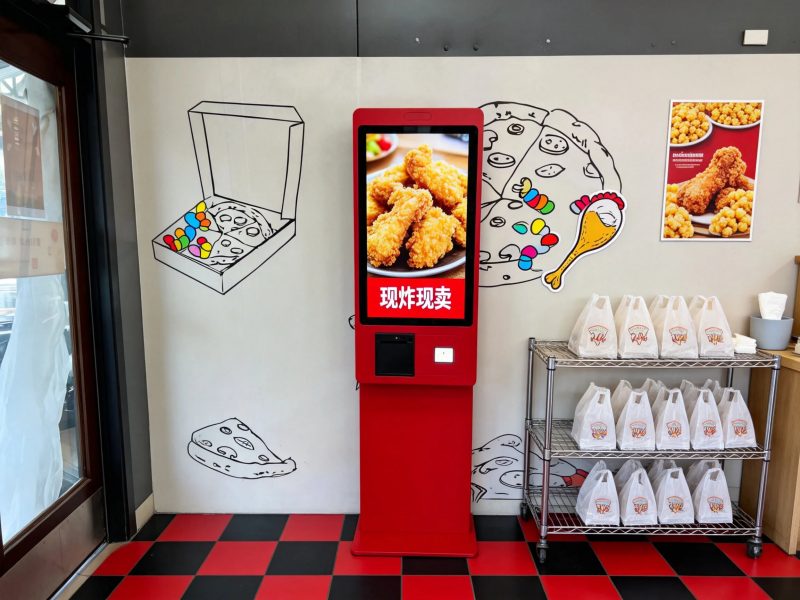
Por lo tanto, Los quioscos de pago se han convertido en equipos de autoservicio convencionales.. Estos terminales inteligentes gestionan el pago y la liquidación de pedidos de forma independiente para los clientes.. Mientras tanto, Simplifican los flujos de trabajo de las tiendas y estabilizan la precisión de las transacciones.. Muchos usuarios interactúan con estos dispositivos a diario pero carecen de conocimientos prácticos claros.. Esta guía explica completamente cómo funcionan los quioscos de pago., sus partes clave, Procesos completos y beneficios prácticos..
Componentes de hardware esenciales de los quioscos de pago
Cada quiosco de pago depende de hardware central compatible para completar transacciones estables. Cada parte juega un papel independiente e irremplazable..
Pantalla interactiva táctil
La pantalla táctil actúa como la entrada principal de operación del usuario.. Muestra listas de pedidos., precios y detalles de la promoción. Capta gestos de tocar y deslizar para recopilar instrucciones del usuario al instante..
Módulo de procesamiento inteligente
Este chip central calcula datos y analiza las operaciones del usuario.. Juzga la validez del pedido y coincide con las reglas de descuento correspondientes.. Garantiza que cada operación siga la lógica empresarial estándar..
Módulo de pago multicanal
Esta unidad incorporada admite todos los métodos de pago principales. Procesa escaneos móviles, Deslizamiento de tarjetas e inserción de efectivo.. Verifica el estado de las transacciones y garantiza la seguridad de los fondos..
Unidad de impresión de recibos
Después del pago exitoso, este componente genera recibos en papel rápidamente. Registra los números de pedido., Detalles de consumo y tiempo de transacción para prueba de usuario..
Interfaz de transmisión de datos
Esta parte conecta los quioscos con el backend de la tienda y los sistemas de pedidos.. Carga datos de transacciones y sincroniza el estado del pedido en tiempo real.. Admite la gestión unificada de tiendas..
Proceso de trabajo paso a paso de los quioscos de pago
Los quioscos de pago siguen un patrón fijo, flujo de trabajo simple para cada transacción de autoservicio. Todo el proceso lleva sólo unos segundos..
Cargar y mostrar información del pedido
Primero, el quiosco se conecta al sistema de la tienda. Carga datos de pedidos en tiempo real., Precios de productos y actividades promocionales válidas en la pantalla..
Recibir instrucciones de operación del usuario
Próximo, Los usuarios exploran el contenido del pedido y confirman los artículos de consumo.. Ajustan los detalles del pedido o aplican cupones según las necesidades personales.. La pantalla actualiza los importes al instante..
Calcular el monto del pago final exacto
Entonces, el sistema interno calcula la factura total. Deduce automáticamente los descuentos elegibles y genera el monto final a pagar. Evita errores de cálculo manual.
Activar y completar transacción
Los usuarios seleccionan su método de pago preferido. Finalizan el pago a través del módulo de pago incorporado.. El sistema verifica los resultados de la transacción inmediatamente..
Sincronizar datos y generar registros
Finalmente, el quiosco actualiza el estado del pedido a pagado. Carga datos de transacciones al backend e imprime recibos.. Completa el ciclo completo de trabajo..
Características operativas clave de los quioscos de pago modernos
Los quioscos de pago avanzados agregan funciones optimizadas para adaptarse a diversos escenarios comerciales. Estas actualizaciones mejoran la estabilidad general del servicio.
Sincronización de datos en tiempo real
Estos dispositivos sincronizan los datos de pedidos y pagos sin demora. Los gerentes de tienda verifican los datos comerciales de forma remota en cualquier momento. Comprenden claramente las condiciones de venta diarias..
Igualación automática de descuentos
El sistema identifica cupones válidos y ofertas combinadas de forma inteligente. Aplica los mejores planes de descuento para usuarios automáticamente.. Mejora la experiencia de consumo..
Compatibilidad con múltiples pagos
Los quioscos modernos admiten canales de transacciones diversificados. Adaptan diferentes hábitos de pago de los usuarios. Reducen efectivamente las tasas de fracaso en los pagos.
Corrección de errores inteligente
El sistema identifica operaciones anormales en tiempo real. Aparece indicaciones claras para guiar a los usuarios.. Garantiza procesos de transacción fluidos.
Principales beneficios de trabajar con quioscos de pago
Tanto los comerciantes como los clientes obtienen ventajas obvias del funcionamiento del quiosco de pago.. Estos valores respaldan las actualizaciones comerciales a largo plazo..
Mejore enormemente la eficiencia del pago
Los quioscos de pago atienden a varios usuarios al mismo tiempo. Dispersan el flujo de clientes en horas punta. Acortan eficazmente las colas de espera.
Reducir los errores de operación manual
El cálculo del sistema inteligente reemplaza el trabajo de facturación manual. Elimina problemas de errores de cálculo.. Mantiene cada transacción precisa y transparente..
Ahorre costos de mano de obra en la tienda
Los quioscos realizan trabajos de pago repetitivos. El personal se centra en el servicio principal y el trabajo de producción.. Las tiendas asignan los recursos humanos de forma más razonable.
Ampliar el tiempo de servicio
El funcionamiento estable del quiosco admite el autoservicio durante largas horas. Incluso funciona para escenarios empresariales no tripulados.. Amplía capacidad de atención en tienda.
Preguntas frecuentes sobre cómo funcionan los quioscos de pago
Q1: ¿Los quioscos de pago son difíciles de operar para los nuevos usuarios??
A1: No. Los quioscos de pago cuentan con interfaces intuitivas y mensajes claros. Todos los usuarios pueden finalizar el pago independiente sin la guía del personal..
Q2: ¿Los quioscos de pago necesitan soporte de red para funcionar??
A2: Las transacciones regulares necesitan una conexión de red estable para la sincronización de datos. Algunos modelos admiten pagos básicos fuera de línea para uso de emergencia.
Q3: ¿Pueden los quioscos de pago identificar pagos falsos??
A3: Sí. Los módulos de pago profesionales tienen sistemas de verificación integrados. Verifican la autenticidad de las transacciones y evitan pedidos anormales.
Q3: ¿Pueden los quioscos de pago identificar pagos falsos??
A4: No. Las actualizaciones se ejecutan durante las horas de menor actividad. No interrumpirán los procesos de pago diarios ni afectarán la experiencia del usuario..
Q5: ¿Pueden los quioscos de pago adaptarse a las reglas personalizadas de la tienda??
A5: Sí. Puedes establecer descuentos exclusivos., reglas de precios y métodos de pago. El quiosco ajusta la lógica de trabajo para adaptarse a su modo de negocio..
Conclusión
Para concluir, Los quioscos de pago funcionan mediante sistemas coordinados de hardware y software inteligentes.. Completan exhibición de pedidos, cálculo de cantidad, verificación de pagos y registro de datos en pasos estandarizados. Estos dispositivos inteligentes mejoran la eficiencia del pago, reducir los costos laborales y estandarizar el servicio de la tienda. Se convierten en equipos inteligentes imprescindibles para la restauración moderna, industrias minoristas y de servicios públicos.
Si desea implementar estable, Quioscos de pago de alta eficiencia para mejorar el sistema de autoservicio de su tienda, Por favor complete el formulario de consulta en nuestro sitio web oficial.. Comparta sus escenarios comerciales y demandas funcionales., y nuestro equipo le proporcionará soluciones de quiosco profesionales personalizadas.
