
تعتبر أكشاك الخدمة الذاتية لبار السلطة عنصرًا أساسيًا مناسبًا في الوجبات الجاهزة, الكافيتريات, ومحلات البقالة - مما يسمح للعملاء ببناء سلطات مخصصة, حدد الطبقة, وتحقق بسرعة. ولكن مع لمس العشرات من الأيدي للشاشة يومياً, بار سلطة شاشة تعمل باللمس كشك يمكن أن تصبح مرتعا للبكتيريا, جراثيم, وبقايا الطعام. التعقيم المناسب ليس مجرد متطلبات النظافة; إنه أمر بالغ الأهمية للحفاظ على سلامة العملاء, بناء الثقة, والامتثال للوائح سلامة الأغذية.
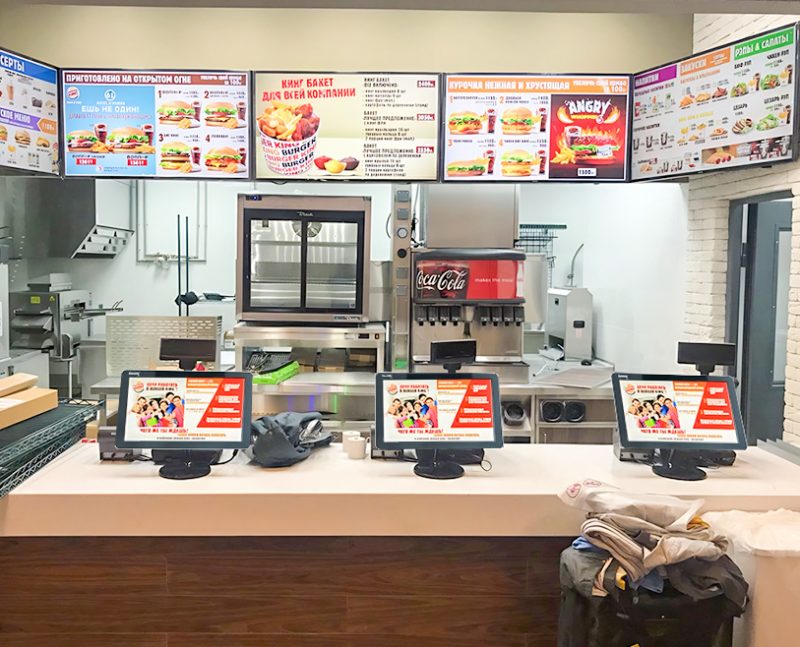
يعاني العديد من أصحاب الأعمال من صعوبة تعقيم شاشات اللمس بشكل صحيح، وذلك باستخدام مواد كيميائية قاسية تلحق الضرر بالشاشة, أو التسرع خلال العملية والجراثيم المفقودة. والخبر السار هو أن تعقيم شاشة اللمس في Salad Bar Kiosk أمر بسيط, طالما اتبعت الخطوات الصحيحة, استخدام المنتجات الآمنة للغذاء, وإنشاء روتين ثابت. هذا الدليل يكسر كل ما تحتاج إلى معرفته: طرق التعقيم خطوة بخطوة, منتجات آمنة, المبادئ التوجيهية التردد, والأسئلة الشائعة لضمان بقاء كشكك نظيفًا وعمليًا. سواء كنت تدير بار سلطة صغيرًا أو كافتيريا كبيرة, ستساعدك هذه النصائح في الحفاظ على تجربة خدمة ذاتية صحية تحافظ على عودة العملاء.
خطوات الإعداد الأساسية قبل تعقيم شاشة اللمس في كشك السلطة
قبل البدء بالتعقيم, اتخذ هذه الخطوات التحضيرية السريعة لحماية الشاشة وضمان التنظيف الفعال:
1. قم بإيقاف تشغيل الكشك وفصله (حاسمة للسلامة)
قم دائمًا بإيقاف تشغيل الكشك وفصله قبل التعقيم. وهذا يمنع الصدمات الكهربائية ويحمي المكونات الداخلية لشاشة اللمس من الرطوبة. بالإضافة إلى ذلك, تسهل الشاشة المظلمة اكتشاف اللطخات, بقايا الطعام, والجراثيم التي قد تفوتك عند تشغيل الشاشة. انتظر لمدة 10-15 ثانية بعد إيقاف تشغيل الكشك لتترك الشاشة تبرد قليلاً - وهذا يساعد المطهر على العمل بشكل أفضل ويمنع ظهور الخطوط.
2. قم بإزالة الحطام السائب وبقايا الطعام
ابدأ بمسح أي حطام أو جزيئات طعام من الشاشة. استخدم جافًا, قطعة قماش من الألياف الدقيقة خالية من الوبر لمسح الشاشة بلطف بحركات دائرية. انتبه بشكل خاص إلى حواف وزوايا الشاشة, حيث الفتات, قطع الخس, أو غالبًا ما يتم احتجاز بقع الملابس. تضمن إزالة الحطام السائب أولاً وصول المطهر إلى سطح الشاشة مباشرةً, بدلا من أن تكون مسدودة بالأوساخ.
3. اجمع مستلزمات التعقيم الآمنة للطعام
استخدم فقط المنتجات الآمنة على الأغذية لتعقيم شاشة اللمس الخاصة بـ Salad Bar Kiosk - حيث يمكن للمواد الكيميائية القاسية أن تلحق الضرر بطبقة الشاشة وتشكل خطراً على العملاء. إليك ما ستحتاج إليه:
قطعة قماش من الألياف الدقيقة خالية من الوبر (تجنب المناشف الورقية, التي تخدش الشاشة)
مناديل معقمة آمنة للطعام (معتمد للأسطح الملامسة للأغذية)
الماء المقطر و 70% كحول الأيزوبروبيل (للحصول على محلول تعقيم DIY)
زجاجة رذاذ صغيرة (في حالة استخدام الحل DIY)
قفازات (لحماية يديك ومنع التلوث المتبادل)
دليل خطوة بخطوة لتعقيم شاشة اللمس في كشك السلطة الخاصة بك
اتبع هذه الخطوات البسيطة لتطهير شاشة اللمس الخاصة بك بشكل فعال, دون الإضرار بها:
1. امسح الشاشة بقطعة قماش جافة من الألياف الدقيقة (مرة أخرى!)
بعد إزالة الحطام السائب, امنح الشاشة مسحًا جافًا نهائيًا لضمان عدم بقاء أي غبار أو جزيئات. هذه الخطوة ضرورية لأنه حتى الفتات الصغيرة يمكن أن تحبس الرطوبة والجراثيم, تقليل فعالية المطهر. استخدم جزءًا نظيفًا من قطعة القماش لهذا المسح، ولا تعيد استخدام نفس المنطقة التي التقطت الحطام.
2. تطبيق محلول التعقيم (آمن للطعام!)
اختر إما منديلًا معقمًا آمنًا للطعام أو محلولًا يمكنك صنعه بنفسك (1 جزء 70% كحول الأيزوبروبيل 1 جزء من الماء المقطر). في حالة استخدام مناديل, اضغط بلطف على المسح على الشاشة لتحرير المطهر - لا تفرك أو تضغط بقوة. إذا كنت تستخدم الحل DIY, رش كمية صغيرة على قطعة القماش المصنوعة من الألياف الدقيقة (أبدا مباشرة على الشاشة, حيث يمكن أن يتسرب هذا إلى الحواف ويؤدي إلى إتلاف المكونات الداخلية).
3. امسح الشاشة بلطف, حركات دائرية
امسح سطح الشاشة بالكامل ببطء, حركات دائرية لطيفة. ابدأ من الزاوية اليسرى العليا ثم انتقل إلى أسفل اليمين, مما يضمن لك تغطية كل بوصة من الشاشة، بما في ذلك الحواف والزوايا. لا تتعجل في هذه الخطوة; يستغرق الأمر من 10 إلى 15 ثانية لمسح الشاشة جيدًا. وهذا يضمن أن المطهر لديه الوقت لقتل الجراثيم (تحتاج معظم المطهرات 30 ثواني من وقت الاتصال لتكون فعالة).
4. دع الشاشة تجف بالهواء تمامًا
بعد المسح, دع الشاشة تجف في الهواء لمدة 30-60 ثانية. لا تستخدم قطعة قماش لتجفيفها، فقد يؤدي ذلك إلى ترك خطوط أو إعادة إدخال الجراثيم. يمنح التجفيف بالهواء أيضًا وقتًا كافيًا للمطهر للقضاء على أي بكتيريا أو فيروسات متبقية. تجنب إعادة تشغيل الكشك مرة أخرى حتى تجف الشاشة تمامًا لمنع تلف الرطوبة.
5. امسح إطار الكشك والأزرار (كثيرا ما ينسى!)
لا تتوقف عند الشاشة، بل قم بتطهير إطار الكشك, أزرار, وأي أسطح أخرى يلمسها العملاء. استخدم نفس المسحة أو المحلول المطهر لمسح هذه المناطق, لأنها يمكن أن تؤوي عددًا من الجراثيم مثل الشاشة. انتبه جيدًا لزر الطاقة وأي أزرار فعلية للوحة المفاتيح, حيث يتم لمسها بشكل متكرر.
كم مرة يجب عليك تعقيم شاشة لمس كشك السلطة الخاصة بك؟?
يعتمد تكرار التعقيم على مدى انشغال شريط السلطة الخاص بك, ولكن اتباع هذه الإرشادات يضمن لك البقاء متوافقًا وصحيًا:
1. ساعات الذروة: تعقيم كل 30-60 دقيقة
خلال أوقات الانشغال (على سبيل المثال, الاندفاع الغداء, خدمة العشاء), قم بتعقيم شاشة اللمس كل 30-60 دقيقة. ارتفاع حركة العملاء يعني المزيد من الأيدي على الشاشة, لذا فإن التعقيم المتكرر يمنع الجراثيم من الانتشار. قم بتعيين أحد الموظفين للتعامل مع هذه المهمة، حتى أن عملية التعقيم السريعة لمدة دقيقة واحدة يمكن أن تحدث فرقًا كبيرًا.
2. ساعات غير الذروة: تعقيم كل 2-3 ساعات
خلال فترات أبطأ (على سبيل المثال, منتصف الصباح, في وقت متأخر بعد الظهر), قم بتعقيم الشاشة كل 2-3 ساعات. وهذا يحافظ على النظافة دون إضاعة الوقت أو الإمدادات. يمكنك أيضًا التعقيم عندما تلاحظ وجود بقايا طعام أو لطخات مرئية على الشاشة.
3. نهاية اليوم: التعقيم العميق
في نهاية كل يوم عمل, إجراء التعقيم العميق. اتبع الدليل خطوة بخطوة أعلاه, ولكن استخدم أيضًا قطعة قطن مغموسة في المطهر لتنظيف الفجوات الصغيرة بين الشاشة وإطار الكشك. يؤدي ذلك إلى إزالة أي حطام أو جراثيم عالقة تراكمت على مدار اليوم. بعد التعقيم, قم بتغطية الكشك بقطعة قماش نظيفة لمنع تراكم الغبار طوال الليل.
أخطاء يجب تجنبها عند تعقيم شاشات اللمس في أكشاك بار السلطة
تجنب هذه الأخطاء الشائعة لحماية شاشة اللمس الخاصة بك وضمان التعقيم الفعال:
1. استخدام المواد الكيميائية القاسية (لا تفعل هذا أبدًا!)
لا تستخدم مواد التبييض أبدًا, الأمونيا, منظف النوافذ, أو غيرها من المواد الكيميائية القاسية. فقد يؤدي ذلك إلى إتلاف الطبقة المضادة للتوهج الخاصة بالشاشة, تسبب تغير اللون, وترك بقايا سامة غير آمنة لملامسة الطعام. التزم بمناديل التعقيم الآمنة للطعام أو 70% كحول الأيزوبروبيل ومحلول الماء المقطر.
2. رش المطهر مباشرة على الشاشة
قد يؤدي رش المطهر مباشرة على الشاشة إلى تسرب الرطوبة إلى الحواف, إتلاف المكونات الداخلية لشاشة اللمس. قم دائمًا برش المطهر على قطعة قماش من الألياف الدقيقة أولاً, ثم امسح الشاشة.
3. استخدام المناشف الورقية أو الملابس الخشنة
مناشف ورقية, المناديل الورقية, أو قد تؤدي قطعة القماش الخشنة إلى خدش سطح شاشة اللمس, مما يجعل تنظيفها أكثر صعوبة وأكثر عرضة للتلطخ. استخدمي دائمًا الناعمة, قطعة قماش من الألياف الدقيقة خالية من الوبر.
4. التسرع في هذه العملية
إن تخطي الخطوات أو الإسراع في عملية التعقيم يؤدي إلى إحباط الهدف. خذ الوقت الكافي لمسح الشاشة جيدًا, دعها تجف بالهواء, وتعقيم جميع الأسطح التي تم لمسها. سريع, المسح المهمل لن يقتل الجراثيم أو يزيل البقايا.
الأسئلة الشائعة حول تعقيم شاشات اللمس في أكشاك بار السلطة
س 1: هل يمكنني استخدام مناديل التعقيم العادية على شاشة اللمس الخاصة بـ Salad Bar Kiosk?
A1: فقط إذا كانت المناديل آمنة للطعام ومعتمدة للأسطح الملامسة للطعام. قد تحتوي مناديل التعقيم المنزلية العادية على مواد كيميائية قاسية تلحق الضرر بالشاشة أو تترك بقايا غير آمنة. ابحث عن المناديل المبللة التي تحمل علامة "آمنة للطعام" أو "مطهر ملامس للطعام".
Q2: سيؤدي تعقيم الشاشة إلى إتلاف وظيفة اللمس الخاصة بها?
A2: لا، إذا كنت تستخدم المنتجات والطريقة المناسبة. المطهرات الآمنة للطعام (يحب 70% كحول الأيزوبروبيل) لطيفة على طبقات شاشة اللمس ولن تؤثر على الاستجابة. تجنب المواد الكيميائية القاسية, الضغط المفرط, أو نقع الشاشة, وستظل وظيفة اللمس سليمة.
س 3: ما هي المدة التي يحتاجها المطهر للبقاء على الشاشة لقتل الجراثيم?
A3: تتطلب معظم المطهرات الآمنة للطعام 30 ثواني من وقت الاتصال لقتل البكتيريا والفيروسات. بعد مسح الشاشة, اتركه يجف في الهواء لمدة 30-60 ثانية للتأكد من أن المطهر لديه الوقت الكافي للعمل.
س 4: هل يمكنني تعقيم الشاشة أثناء تشغيل الكشك؟?
A4: لا - قم دائمًا بإيقاف تشغيل الكشك وفصله قبل التعقيم. وهذا يمنع الصدمات الكهربائية ويحمي المكونات الداخلية للشاشة من الرطوبة. كما أنه يسهل اكتشاف اللطخات والبقايا.
س5: ماذا لو كانت شاشة اللمس تحتوي على بقايا طعام عنيدة؟ (على سبيل المثال, صلصة السلطة)?
A5: للبقايا العنيدة, بلل قطعة قماش من الألياف الدقيقة بكمية صغيرة من الماء المقطر وامسح المنطقة بلطف لتفكيك البقايا. ثم اتبع خطوات التعقيم كالمعتاد. لا تقم بالفرك، فقد يؤدي ذلك إلى خدش الشاشة.
س6: كم مرة يجب أن أستبدل الأقمشة المصنوعة من الألياف الدقيقة؟?
أ6: استبدل الأقمشة المصنوعة من الألياف الدقيقة كل أسبوع إلى أسبوعين, أو عاجلاً إذا أصبحت قذرة, ملطخة, أو المتوترة. يمكن للملابس المتسخة أن تعيد إدخال الجراثيم إلى الشاشة, لذلك من المهم استخدام قطع قماش نظيفة لكل عملية تعقيم.
س7: هل هناك شاشات تعمل باللمس مصممة لتسهيل عملية التعقيم?
أ7: نعم! تم تصميم شاشات اللمس في Salad Bar Kiosk الخاصة بنا باستخدام مواد آمنة للطعام, أسطح سهلة التنظيف, مقاومة رذاذ IP65, والطلاءات المضادة للضباب. لقد تم تصميمها لتحمل التعقيم المتكرر دون حدوث ضرر, جعل إجراءات النظافة أسهل.
خاتمة
يعد تعقيم شاشة اللمس الخاصة بـ Salad Bar Kiosk أمرًا بسيطًا, مهمة حاسمة تحافظ على سلامة عملائك, يبني الثقة, ويضمن الامتثال للوائح سلامة الأغذية. باتباع الدليل خطوة بخطوة, باستخدام منتجات آمنة للغذاء, وإنشاء روتين تعقيم ثابت, يمكنك الحفاظ على نظافة, تجربة خدمة ذاتية صحية - دون الإضرار بشاشة اللمس الخاصة بك.
سواء كنت تعاني من البقايا العنيدة, عدم التأكد من المنتجات المناسبة للاستخدام, أو تحتاج إلى شاشة تعمل باللمس مصممة لسهولة التعقيم, نحن هنا للمساعدة. يمكن لشاشة اللمس الصحيحة في Salad Bar Kiosk أن تجعل عملية التعقيم أسرع وأسهل, مما يوفر لك الوقت ويضمن بقاء كشكك في أفضل حالة.
جاهز للترقية إلى شاشة تعمل باللمس Salad Bar Kiosk صديقة للتعقيم أو تحتاج إلى مساعدة في تحسين روتين التعقيم الخاص بك? املأ النموذج الموجود على موقعنا الإلكتروني لمشاركة حجم لوح السلطة الخاص بك, حجم حركة المرور, والاحتياجات. سيوصي خبراء تكنولوجيا الخدمات الغذائية لدينا بأفضل طراز بشاشة تعمل باللمس, تقديم نصائح التعقيم الشخصية, والإجابة على أي أسئلة لمساعدتك في الحفاظ على كشكك نظيفًا وآمنًا. لنجعل تجربة الخدمة الذاتية لمطعم السلطة الخاص بك صحية بقدر ما هي مريحة - ابدأ اليوم!
