
Gesinsrestaurante floreer met bestendige tafelomset—gelukkig, tevrede gesinne wat hul maaltye doeltreffend klaarmaak maak tafels vry vir nuwe gaste, inkomste direk verhoog. Maar stadige diens, lang wagtye vir bestellings of tjeks, en ongeorganiseerde tafelvoorbereiding trek dikwels omsetkoerse af. Dit frustreer nie net besige gesinne nie, maar beperk ook hoeveel kliënte jy elke skof kan bedien.
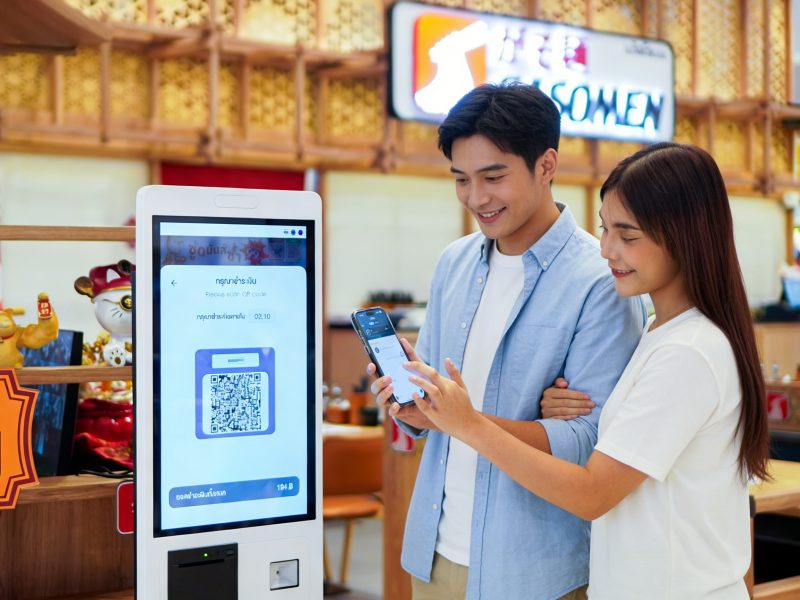
'n Aanraakskerm vir familie-restauranttafel-omset is die oplossing vir hierdie algemene pynpunte. Spesifiek ontwerp vir die chaos en tempo van gesinsvriendelike eetplekke, hierdie raakskerms stroomlyn elke stap van die eetervaring—van bestelling tot betaling—wat dienstyd verkort en tafels aan die beweeg hou. Anders as generies raakskerms, hulle is vir gesinne gebou (intuïtief vir kinders en ouers) en aangepas by die unieke behoeftes van gesinsrestaurante. Hierdie gids gee uiteen hoe hierdie raakskerms tafelomset 'n hupstoot gee, sleutelkenmerke om te prioritiseer, praktiese gebruik gevalle, wenke vir probleemoplossing, en Gereelde Vrae om jou te help om jou restaurant se doeltreffendheid te verander. Of jy nou 'n knus buurtplek of 'n besige ketting het, hierdie insigte sal jou help om meer gesinne te dien, wagtye verminder, en groei jou winspunt.
Hoe gesinsrestauranttafel-omset raakskerms doeltreffendheid verhoog
Tafelomset gaan nie net daaroor om gesinne uit te jaag nie - dit gaan daaroor om vinnig af te lewer, vriendelike diens wat gesinne hul maaltyd laat geniet sonder onnodige vertragings. Hierdie raakskerms optimaliseer elke stadium van die eetproses om tyd per tafel te verminder.
1. Bespoedig bestelling (Nie meer wag vir bedieners nie)
Gesinsmaaltye behels dikwels veelvuldige bestellings (kindermaaltye, dieetversoeke, drink hervullings)- stadige ordening belemmer omset.
Gaste kan bestellings direk vanaf die tafelraakskerm plaas, elimineer die behoefte om te wag vir 'n bediener om hul bestelling te neem.
Vooraf gelaaide kindermaaltydopsies, dieet filters (glutenvry, vegan), en drankbyvoegings maak bestelling vinnig en foutloos.
Bestellings word onmiddellik na die kombuis gestuur, vermindering van wankommunikasie en verkort kombuisvoorbereidingstyd met 15–20%.
Bedieners is vry om te fokus op hervulling en tafeldiens in plaas daarvan om bestellings te neem, hou die eetervaring glad.
2. Stroomlyn betaling (Geen meer jaag tjeks nie)
Wag vir die tjek en verwerking van betaling is een van die grootste knelpunte in tafelomset.
Gaste kan hul rekening direk vanaf die raakskerm versoek en betaal - dit is nie nodig om 'n bediener te merk nie.
Veelvuldige betaalopsies (kredietkaart, mobiele betaal, verdeel tjeks) maak voorsiening vir gesinsgroepe wat dikwels die rekening verdeel.
Kwitansies druk onmiddellik of word per e-pos gestuur, afsny betaaltyd vanaf 10+ minute tot 2-3 minute.
Bedieners word onmiddellik in kennis gestel wanneer 'n tafel betaal, sodat hulle dadelik kan begin skoonmaak en die tafel voorberei.
3. Vereenvoudig Tabelvoorbereiding (Kry tafels vinniger gereed)
Leë tafels moet vinnig skoongemaak en voorberei word om nuwe gesinne te verwelkom—raakskerms hou hierdie proses op koers.
Bedieners merk tafels as "vuil" of "skoon" via die raakskerm, sodat die busspan weet watter tafels om te prioritiseer.
Vooraf gelaaide tabelvoorbereidingskontrolelyste (bv., stel silwerware, hervul speserye, vee hoë stoele af) verseker dat geen stappe gemis word nie.
Bestuurders kan tabelstatus intyds opspoor, knelpunte te identifiseer (bv., stadige busry) en personeel daarvolgens aan te pas.
Dit verkort die voorbereidingstyd van die tafel met 25%, om nuwe gesinne vinniger te laat sit en wagtye te verminder.
4. Verminder foute (Minder Remakes, Vinniger diens)
Bestelfoute lei tot vertragings, gefrustreerde gesinne, en vermorste kos—raakskerms verminder hierdie foute.
Gaste kies hul eie bestellings, vermindering van mishoor versoeke (bv., "geen piekels" of "ekstra kaas").
Dieetetikette en allergeenwaarskuwings verskyn wanneer gaste sekere items kies, duur hervervaardigings te voorkom.
Kombuispersoneel ontvang duidelik, digitale bestellings met geen morsige handskrif nie, verseker dat maaltye die eerste keer korrek voorberei word.
Minder hervervaardigings beteken vinniger diens en gelukkiger gesinne, wat meer geneig is om hul maaltyd klaar te maak en dadelik te vertrek.
Sleutelkenmerke om te prioritiseer in 'n gesinsrestauranttafel-omset-aanraakskerm
Nie alle raakskerms is vir gesinsrestaurante gebou nie – soek hierdie gesinsvriendelike, funksies wat doeltreffendheid bevorder om tafelomset te maksimeer.
1. Intuïtief, Gesinsvriendelike koppelvlak
Gesinne sluit kinders en gaste van alle ouderdomme in – die koppelvlak moet eenvoudig en maklik wees om te gebruik.
Groot, kleurvolle ikone en duidelike teks maak dit maklik vir kinders om hul eie maaltye te bestel (bv., "hoendernuggets" of "mac and cheese").
Eenvoudige navigasie (geen ingewikkelde spyskaarte nie) laat gaste met 'n paar krane bestellings plaas of betaal.
Kindervriendelike ontwerp (duursaamheid, nie-giftige materiale) staan teen morsige hande en toevallige mors.
Meertalige ondersteuning (Engels, Spaans, ens.) maak voorsiening vir uiteenlopende gesinsgroepe.
2. Duursaam, Maklik om skoon te maak ontwerp
Gesinsrestaurante is morsig—raakskerms moet mors weerstaan, taai vingers, en gereelde skoonmaak.
IP65 spatweerstand beskerm teen koeldrankstortings, ketchup drup, en skoonmaakmiddels.
Glad, nie-poreuse oppervlakdoeke maak binne sekondes skoon met voedselveilige ontsmettingsdoeke.
9H krasbestande glas weerstaan skrape van eetgerei, speelgoed, of toevallige stampe.
Stewige montering (tafelblad of muur gemonteer) verhoed dat kantel of skade deur rumoerige kinders.
3. Naatlose integrasie met POS- en kombuisstelsels
Doeltreffendheid hang af van naatlose kommunikasie tussen die raakskerm, POS, en kombuis.
Sinkroniseer met jou bestaande POS-stelsel om bestellings op te spoor, betalings, en tabelstatus in reële tyd.
Stuur bestellings direk na die kombuisvertoonstelsel (KDS), papierkaartjies en vertragings uit te skakel.
Integreer met voorraadbestuurnutsmiddels om personeel te waarsku wanneer items uit voorraad is (bestellingsfoute te voorkom).
Dateer spyskaartitems en pryse outomaties op, sodat gaste altyd akkurate opsies sien.
4. Tabelstatusopsporing en personeelwaarskuwings
Bestuurders en personeel het intydse sigbaarheid nodig om tafels aan die beweeg te hou.
Kleurgekodeerde tabelstatus (beset, vuil, skoon, voorbehou) laat personeel in 'n oogopslag sien watter tafels beskikbaar is.
Waarskuwings stel bedieners in kennis wanneer 'n tafel gereed is om te bestel, benodig hervulling, of die rekening betaal het.
Bestuurders kan vinnige boodskappe aan personeel stuur (bv., “Tafel 5 benodig 'n hoë stoel") via die raakskerm.
Verslae volg tabelomsetkoerse, om bestuurders te help om spitstye te identifiseer en personeelvlakke aan te pas.
Hoe om aanraakskerms te gebruik om tafelomset te maksimeer (Praktiese wenke)
Selfs die beste raakskerm sal nie omset verhoog as jy dit nie doeltreffend gebruik nie. Volg hierdie wenke om die meeste uit jou gesinsrestauranttafel-omset-raakskerm te kry.
1. Lei personeel op om aanraakskermgebruik aan te moedig
Personeel speel 'n sleutelrol om gesinne te kry om die raakskerm te gebruik—lei hulle op om dit te bevorder.
Bedieners moet die kenmerke van die raakskerm verduidelik (bestel, betaling) wanneer gesinne sit.
Bied 'n klein aansporing (bv., 'n gratis kinderdrankie) vir gesinne wat hul bestelling via die raakskerm plaas.
Wys 'n personeellid toe om gesinne te help wat hulp nodig het (bv., ouer gaste of jong kinders).
2. Optimaliseer die kieslys vir aanraakskermbestelling
Pas jou spyskaart aan om aanraakskermbestelling vinnig en maklik te maak.
Groepeer items volgens kategorie (kindermaaltye, voorgeregte, voorgeregte) vir vinnige navigasie.
Voeg foto's van gewilde items by om gesinne te help om besluite vinniger te neem.
Merk "vinnige diens" opsies (bv., “15 minute voorgeregte”) om vinniger bestelling aan te moedig.
Verwyder verouderde items of items wat stadig is om voor te berei wat dienstyd verkort.
3. Stel outomatiese onthounotas en waarskuwings op
Outomatiseer roetinetake om diens aan die gang te hou sonder personeelingryping.
Stel waarskuwings op vir tafels waarvoor gesit is 5+ minute (personeel te herinner om na hulle te kyk).
Stuur 'n "betalingsherinnering" aan tafels wat klaar geëet het (sonder om opdringerig te wees).
Waarsku die busspan onmiddellik wanneer 'n tafel betaal, sodat hulle kan begin skoonmaak.
4. Ontleed omsetdata om verbeterings aan te bring
Gebruik die raakskerm se ontledings om areas vir verbetering te identifiseer.
Volg gemiddelde tyd per tafel (bevel tot betaling) en soek na knelpunte (bv., stadige kombuisvoorbereiding).
Kyk watter spyskaartitems die langste neem om voor te berei en pas dienooreenkomstig aan.
Monitor spitstye (bv., Saterdagoggende) en skeduleer ekstra personeel om tafels aan die beweeg te hou.
Opsporing van algemene raakskermkwessies
Geringe foute kan diens vertraag - hier is hoe om dit vinnig reg te stel.
1. Raakskerm reageer nie (Klewerige vingers of mors)
Vee die skerm af met 'n sagte mikrovesellap en 'n 50/50 mengsel van gedistilleerde water en isopropylalkohol.
Vermy die gebruik van harde skoonmaakmiddels (ammoniak, bleikmiddel) wat die skerm se beskermende laag beskadig.
As die skerm steeds nie reageer nie, skakel die toestel aan (trek uit en prop weer in) om dit terug te stel.
2. Bestellings word nie kombuis toe gestuur nie
Kyk of die raakskerm aan die Wi-Fi gekoppel is—koppel weer as dit vanlyn is.
Verifieer dat die kombuis vertoon stelsel (KDS) is aangeskakel en gesinkroniseer.
Herbegin die raakskerm se POS-integrasie om kommunikasiefoute reg te stel.
3. Betalingsverwerking misluk
Kyk of die aanraakskerm se betalingsleser behoorlik gekoppel is (USB of Bluetooth).
Verseker die betaling verwerker (Vierkantig, Roosterbrood) is aanlyn en funksioneer.
Bied 'n alternatiewe betaalmetode (kontant, mobiele betaal) tydens die oplos van probleme.
Gereelde Vrae Oor Familie Restaurant Tafel Omset Raakskerms
V1: Sal kinders die raakskerm maklik kan gebruik?
A1: Ja! Die koppelvlak is ontwerp met kinders in gedagte—groot ikone, eenvoudige navigasie, en kindervriendelike taal maak dit maklik vir selfs jong kinders om hul eie maaltye te bestel.
V2: Kan die raakskerm gesplete tjeks vir gesinsgroepe hanteer?
A2: Absoluut. Die raakskerm laat gaste die rekening eweredig verdeel, per item, of in pasgemaakte bedrae—perfek vir gesinne wat betalings verdeel.
V3: Moet ek my bestaande POS-stelsel vervang om hierdie raakskerm te gebruik?
A3: Nee, die meeste aanraakskerms vir familierestauranttafel-omset integreer naatloos met gewilde POS-stelsels (Vierkantig, Roosterbrood, Klawer) sonder dat 'n volledige vervanging nodig is.
V4: Hoe lank neem dit om die raakskerms te installeer?
A4: Installasie neem 30–45 minute per skerm. Die raakskerms kom met universele monteerhardeware en stap-vir-stap-instruksies, sodat jy dit met basiese gereedskap kan installeer.
V5: Sal die raakskerm in 'n raserige gesinsrestaurant werk?
A5: Ja. Die raakskerm gebruik raaksensitiewe tegnologie wat selfs in lawaaierige omgewings werk—geen stemopdragte nodig nie. Dit het ook 'n helder skerm vir sigbaarheid in besige toestande, goed beligte restaurante.
V6: Kan ek tafelomsetkoerse met die raakskerm dophou?
A6: Ja! Premium-modelle bevat ontledingsinstrumente wat die gemiddelde tyd per tafel naspoor, omsetkoerse, en spitstye. Hierdie data help jou om ingeligte besluite te neem om doeltreffendheid te verhoog.
V7: Is die raakskerms duursaam genoeg vir besige gesinsrestaurante?
A7: Ja. Hulle is gebou met spatbestand, krasvaste glas en stewige rame om deurmekaar hande te weerstaan, mors, en gereelde gebruik - perfek vir die chaos van gesinsetes.
Gevolgtrekking
'n Familie-restauranttafel-omset-raakskerm is 'n speletjie-wisselaar vir besige gesinsvriendelike plekke. Dit stroomlyn bestelling, versnel betalings, vereenvoudig tafelvoorbereiding, en verminder foute—dit alles terwyl die eetervaring vir gesinne aangenaam gehou word. Deur gesinsvriendelike kenmerke te prioritiseer, naatlose integrasie, en duursaamheid, jy kan tyd per tafel afkort, meer gaste bedien, en verhoog jou restaurant se inkomste.
Geen lang wagtye meer nie, gefrustreerde gesinne, of verspeelde geleenthede. Met 'n doelgeboude raakskerm, jy kan vinniger tafels draai sonder om die warm prys te gee, verwelkomende atmosfeer wat gesinsrestaurante spesiaal maak.
Gereed om jou gesinsrestaurant se tafelomset ’n hupstoot te gee en meer gelukkige klante te bedien? Vul die vorm op ons webwerf in om jou restaurant se grootte te deel, daaglikse verkeer, en huidige POS-stelsel. Ons voedseldiens-tegnologie-kundiges sal die beste versoenbare Family Restaurant Table Turnover Touch Screen aanbeveel, verskaf installasiewenke, en beantwoord enige vrae om jou te help om jou restaurant se doeltreffendheid te verander. Kom ons maak jou gesinsrestaurant die ideale plek vir vinnig, vriendelike diens—begin vandag!
