
現在、ほとんどのファーストフード店ではセルフサービス デバイスがサービスを提供しています. 注文機は注文プロセス全体を合理化し、長い行列を削減します。. 初めて使うユーザーの多くは、最初は基本的な操作に不安を感じます。.
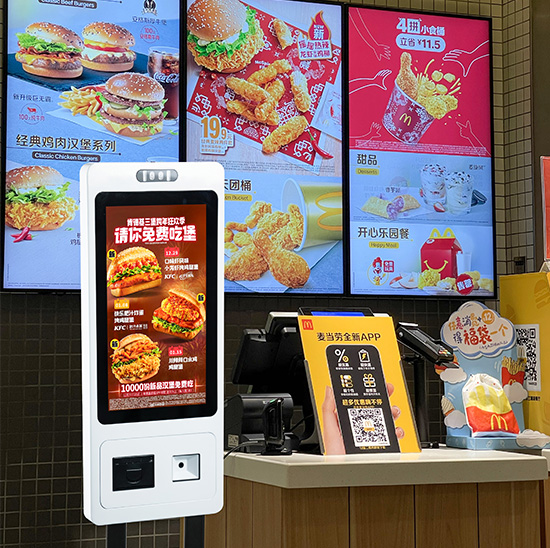
実際には, これを操作する タッチスクリーン デバイスにはいくつかの簡単な手順だけが必要です. 明確な画面上のガイドとユーザーフレンドリーなレイアウトが特徴です. 簡単なコントロールに加えて、, 食事のカスタマイズやさまざまな支払い方法にも対応しています. このガイドでは、完全な使用手順を説明します。, 注文機に関する便利なヒントとよくある質問.
注文機を利用する前の準備
いくつかの簡単なチェックを行うことで、注文機をスムーズに使い始めることができます.
1. デバイスを見つけて起動します
初め, 店のロビーにある注文機を見つける. 画面を軽くタップしてスタンバイモードを終了します. メインメニューがすぐにロードされます.
2. 支払いの準備をする
事前にご希望の支払い方法をご用意ください. ほとんどのマシンは、素早い取引のためのモバイル決済とカード決済をサポートしています。.
3. 基本的な画面プロンプトを確認する
インターフェイスのメモをざっと見てみましょう. これらの短いリマインダーは、注文とカスタマイズに関する基本的なルールを示しています。.
注文機を操作するためのステップバイステップガイド
注文機で完全な注文を完了するには、次の明確な手順に従ってください。.
1. メニューを閲覧して食品を選択する
次, 分類された食べ物と飲み物のリストを画面上に表示する. アイコンをタップして、お気に入りの食事やおかずを注文リストに追加します.
2. 食事をカスタマイズする
それから, 好みに応じて細部を調整する. 部分を変更したり、特定の材料を削除したりできます. システムはリアルタイムで価格を更新します.
3. コンボと利用可能な割引を適用する
現在開催中のプロモーションをページで確認してください. コンボ セットまたは有効なクーポンを選択してさらに節約しましょう. 最終的な請求書は自動的に更新されます.
4. 完全な注文リストを確認する
選択したすべてのアイテムと合計コストを慎重に確認してください. すべての詳細がニーズを満たしている場合は、確認ボタンをタップします.
5. 支払いタイプを選択して取引を完了する
希望の支払いチャネルを選択してください. 画面上の指示に従って支払いプロセスを完了します. システムが成功通知を表示するまで待ちます.
6. レシートを受け取り、食事を待ちます
ついに, 注文番号が記載された印刷された領収書を受け取ります. 安全に保管し、指定されたカウンターで食事の受け取りを待ちます.
注文機の使い方のヒント
これらの小さなヒントにより、操作がより速く、より便利になります。.
1. アイテムを一括で選択する
グループのすべての食事を一度に選択. この方法により、注文機での繰り返しの操作が省けます。.
2. 支払い前に注文を変更する
注文がまだ編集可能な状態ですべての変更を行ってください. 支払い完了後は簡単に商品を調整することはできません.
3. エラーについては画面のヒントに従ってください
画面にリマインダーが表示された場合, 最初に読んでください. 小さな問題を解決して注文プロセスを続行してください.
4. 画面の表面をきれいに保つ
デバイスの上に飲み物や食べ物を置かないでください. きれいな タッチスクリーン 繊細でスムーズな操作を保証します.
オーダーマシンのよくあるトラブルシューティング
使用中に小さな問題を自分で修正できます.
1. タッチスクリーンが反応しない
もう一度画面を軽くタップします. それでもうまくいかない場合は, しばらく待つか、近くのスタッフに助けを求めてください.
2. 失敗した支払い試行
ネットワークと支払い残高を確認する. 支払いプロセスを再開するか、別の支払い方法に切り替えます.
3. メニュー内容がありません
まずページを更新してください. ネットワークが通常に戻ると、古いコンテンツが更新されます.
KFC オーダーマシンに関するよくある質問
Q1: 新規ユーザーにとって注文機の使い方は難しいですか??
A1: いいえ. インターフェイスには明確なアイコンとガイドがあります. ほとんどの人は 1 分以内に注文を完了できます.
Q2: 支払い後に注文を変更できますか?
A2: 一般的にはありません. 注文機で確認して支払う前に、すべての詳細を注意深く確認してください。.
Q3: 注文機はすべての店舗プロモーションをサポートしていますか?
A3: はい. 最新のコンボやクーポンを同期します. 画面上で直接選択して使用できます.
Q4: 機械が突然動かなくなったらどうすればよいですか?
A4: 作業を中止して店員に電話してください. 専門の作業員が迅速に点検・修理いたします.
Q5: この注文機でテイクアウトの注文をできますか?
A5: はい. 最初にイートインまたはテイクアウトのオプションを選択できます. システムは注文タイプを明確にマークします.
結論
結論としては, KFC注文機の使い方はシンプルで簡単です. デバイスのウェイクアップから, 食事の選択と選択肢のカスタマイズから支払いの完了まで, すべてのステップにわかりやすいガイドが付いています. このセルフサービス デバイスは注文を迅速化し、顧客により良い食事体験をもたらします. また、店舗が全体的なサービス効率を向上させるのにも役立ちます.
ケータリング ビジネスに安定した設備を整えたい場合, 操作が簡単な注文機, 公式サイトのお問い合わせフォームにご記入ください. 店舗の規模を教えてください, レイアウトと機能の要求. 当社の専門チームがお客様に合わせたソリューションと信頼できる技術サポートを提供します.
