
Samoposlužni uređaji sada služe većini lokala brze hrane. Stroj za narudžbe pojednostavljuje cijeli proces naručivanja i smanjuje duge redove. Mnogi novi korisnici isprva nisu sigurni u njegove osnovne operacije.
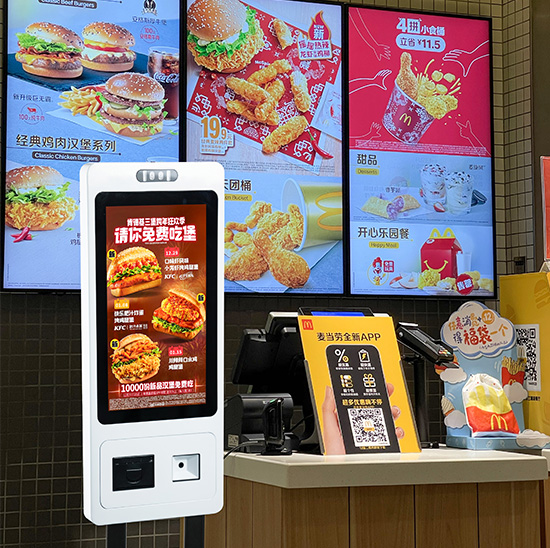
Zapravo, upravljajući ovim zaslon osjetljiv na dodir uređaj traje samo nekoliko jednostavnih koraka. Sadrži jasne vodiče na zaslonu i izglede jednostavne za korištenje. Osim jednostavnog upravljanja, također podržava prilagodbu obroka i različite načine plaćanja. Ovaj vodič vas vodi kroz sve korake korištenja, korisni savjeti i uobičajena pitanja o stroju za narudžbe.
Pripreme prije korištenja stroja za naručivanje
Nekoliko jednostavnih provjera pomaže vam da neometano počnete koristiti uređaj za narudžbe.
1. Locirajte i probudite uređaj
Prvi, pronađite stroj za narudžbe u predvorju trgovine. Lagano dodirnite zaslon za izlazak iz stanja pripravnosti. Glavni izbornik će se odmah učitati.
2. Pripremite se za plaćanje
Unaprijed pripremite željeni način plaćanja. Većina uređaja podržava mobilno plaćanje i kartično plaćanje za brze transakcije.
3. Provjerite osnovne upute na zaslonu
Brzo pogledajte bilješke o sučelju. Ovi kratki podsjetnici govore vam o osnovnim pravilima za naručivanje i prilagodbu.
Vodič korak po korak za upravljanje strojem za naručivanje
Slijedite ove jasne korake kako biste dovršili punu narudžbu na stroju za narudžbu.
1. Pregledajte jelovnike i odaberite hranu
Sljedeći, pregled kategoriziranih popisa hrane i pića na ekranu. Dodirnite ikone za dodavanje omiljenih jela i priloga na popis narudžbi.
2. Prilagodite svoje obroke
Zatim, prilagodite detalje prema svom ukusu. Možete promijeniti dijelove ili ukloniti određene sastojke. Sustav ažurira cijene u stvarnom vremenu.
3. Primijenite kombinacije i dostupne popuste
Promocije u tijeku provjerite na stranici. Odaberite kombinirane setove ili važeće kupone kako biste ostvarili dodatne uštede. Konačni račun će se automatski osvježiti.
4. Potvrdite cijeli popis narudžbi
Pažljivo pregledajte sve odabrane stavke i ukupnu cijenu. Pritisnite gumb za potvrdu ako sve pojedinosti odgovaraju vašim potrebama.
5. Odaberite vrstu plaćanja i dovršite transakcije
Odaberite željeni kanal plaćanja. Slijedite upute na zaslonu kako biste dovršili postupak plaćanja. Pričekajte da sustav prikaže obavijest o uspjehu.
6. Prikupite račun i pričekajte obroke
Konačno, uzmite ispisani račun s brojem vaše narudžbe. Čuvajte ga na sigurnom i čekajte preuzimanje obroka na za to predviđenom šalteru.
Korisni savjeti za korištenje stroja za narudžbe
Ovi mali savjeti mogu vaš rad učiniti bržim i praktičnijim.
1. Odaberite stavke u serijama
Odaberite sve obroke za svoju grupu odjednom. Ova metoda sprema ponovljene operacije na stroju za narudžbu.
2. Izmijenite narudžbe prije plaćanja
Napravite sve izmjene dok se narudžba još može uređivati. Stavke ne možete lako prilagoditi nakon što završite plaćanje.
3. Slijedite savjete na zaslonu za pogreške
Ako se na zaslonu pojavi podsjetnik, prvo ga pročitaj. Riješite mali problem i nastavite s postupkom naručivanja.
4. Održavajte površinu zaslona čistom
Ne stavljajte piće ili hranu na uređaj. Čisto zaslon osjetljiv na dodir osigurava osjetljiv i gladak rad.
Uobičajeno rješavanje problema za Stroj za narudžbe
Manje probleme tijekom korištenja možete sami riješiti.
1. Zaslon osjetljiv na dodir ne reagira
Ponovno nježno dodirnite zaslon. Ako i dalje ne radi, pričekajte trenutak ili zamolite osoblje u blizini za pomoć.
2. Neuspjeli pokušaji plaćanja
Provjerite svoju mrežu i stanje plaćanja. Ponovno pokrenite proces plaćanja ili se prebacite na drugi način plaćanja.
3. Nedostaje sadržaj izbornika
Najprije osvježite stranicu. Zastarjeli sadržaj ažurirat će se kada se mreža vrati u normalu.
Često postavljana pitanja o Kfc stroju za narudžbe
P1: Je li novim korisnicima teško koristiti stroj za narudžbe?
A1: Ne. Sučelje ima jasne ikone i vodiče. Većina ljudi može naručiti u roku od jedne minute.
Q2: Mogu li promijeniti narudžbu nakon plaćanja?
A2: Općenito ne. Pažljivo provjerite sve detalje prije nego potvrdite i platite na stroju za narudžbu.
Q3: Podržava li stroj za narudžbe sve promocije trgovine?
A3: Da. Sinkronizira najnovije kombinacije i kupone. Možete ih odabrati i koristiti izravno na zaslonu.
Q4: Što trebam učiniti ako stroj iznenada prestane raditi?
A4: Zaustavite rad i nazovite osoblje trgovine. Stručni radnici će brzo provjeriti i popraviti uređaj.
P5: Mogu li naručiti hranu za van na ovom stroju za narudžbe?
A5: Da. Na početku možete odabrati opciju obroka u restoranu ili hranu za van. Sustav će jasno označiti vrstu vaše narudžbe.
Zaključak
Da zaključim, korištenje Kfc stroja za narudžbe je jednostavno i jednostavno. Od buđenja uređaja, odabir obroka i prilagođavanje izbora do završetka plaćanja, svaki korak ima upute koje je lako pratiti. Ovaj samoposlužni uređaj ubrzava naručivanje i kupcima donosi bolje iskustvo objedovanja. Također pomaže trgovinama poboljšati ukupnu učinkovitost usluge.
Ukoliko želite svoj ugostiteljski obrt opremiti štalom, strojevi za naručivanje jednostavni za rukovanje, ispunite obrazac za upit na našoj službenoj web stranici. Recite nam veličinu vaše trgovine, raspored i funkcionalni zahtjevi. Naš stručni tim ponudit će vam prilagođena rješenja i pouzdanu tehničku podršku.
